




How Data Streams Work in Data 360 and Marketing Cloud Next

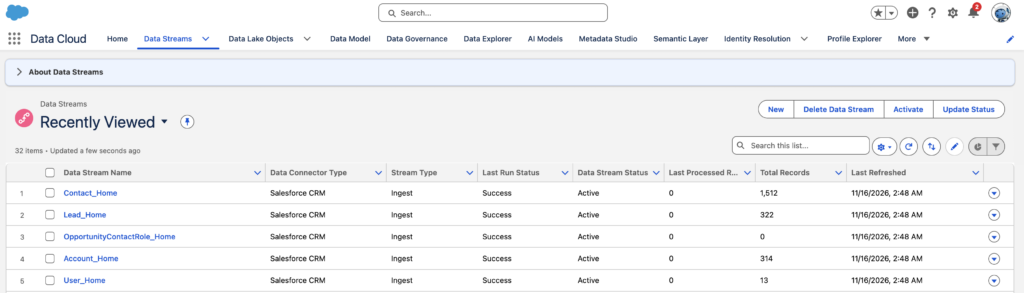
Data Streams connect supported data sources to Salesforce Data 360 and bring customer information into the platform for further processing. They provide the ingestion layer that makes data from Salesforce CRM, Marketing Cloud Engagement, external applications, and other supported sources available for data modelling, identity resolution, segmentation, and marketing activation.
A Data Stream uses a configured source connection to retrieve or receive data and stores ingested records in a Data Lake Object (DLO). The data must then be mapped to the appropriate Data Model Objects (DMOs) before the mapped fields and relationships can be used in downstream processes.
What Is a Data Stream?
A Data Stream is a configured connection between a source system and Data 360. It defines which source data is brought into the platform, how the data is structured, and how frequently it is refreshed.
For example, an organisation might store customer information in Salesforce CRM, purchase history in an external commerce platform, and email engagement data in Marketing Cloud Engagement. Data Streams connect these sources to Data 360 so that information from different systems can be used together.
Data 360 provides dedicated connectors for supported Salesforce and external sources. It also supports other ingestion methods, including APIs and SDKs. The available connection method depends on the source system and its supported integration options.
When creating a Data Stream, Data 360 retrieves a sample of the source data and recommends a schema for review. The selected source object or dataset determines the fields and structure available for ingestion.
How Data Streams Work in Data 360
The Data Stream process involves connecting a source, ingesting records, storing the source data, and mapping it to the appropriate data model.
Source Connection and Data Ingestion
The first step is to establish a connection between Data 360 and the system containing the source data.
For example:
- Salesforce CRM uses the Salesforce connector to access CRM records.
- Marketing Cloud Engagement uses its connector to access selected Data Extensions and supported engagement data.
- External applications can send data through the Ingestion API.
- Supported file-based sources can provide datasets through their respective connectors.
The connection requires the appropriate authentication and source permissions before a Data Stream can be created.
Once the connection is established, select the source object or dataset and configure the Data Stream. The source data is brought into Data 360 in its original structure, including its fields and data types.
Data Lake Objects (DLOs)
When a Data Stream ingests data, Data 360 stores the source records in a Data Lake Object (DLO). A DLO represents the ingested source dataset and retains its source fields and record structure.
Consider a loyalty dataset containing the following information:
| Member ID | First Name | Email Address | Loyalty Tier |
|---|---|---|---|
| 10001 | James | james@example.com | Gold |
| 10002 | Seetha | seetha@example.com | Silver |
| 10003 | David | david@example.com | Platinum |
After ingestion, these records are stored in a DLO representing the loyalty dataset.
Data Model Objects (DMOs)
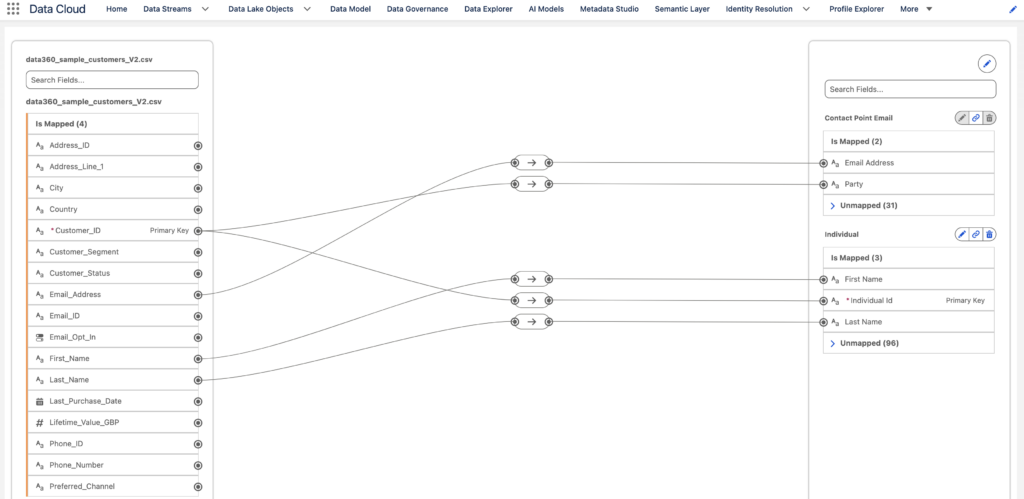
A Data Model Object (DMO) represents standardised business data within Data 360. While a DLO preserves the source structure, a DMO provides a common structure for working with information from different systems. For example, customer information from Salesforce CRM and an external loyalty platform can be mapped to the Individual DMO. Email addresses can be mapped to the Contact Point Email DMO. This allows customer information from different sources to be represented within a common data model.
Mapping DLOs to DMOs
After deploying the Data Stream, the next step is data mapping. Data mapping associates source DLO fields with their corresponding target fields in DMOs.
For example:
| Source DLO Field | Target DMO | Target Field |
|---|---|---|
| First Name | Individual | First Name |
| Last Name | Individual | Last Name |
| Member ID | Individual | Individual ID |
| Email Address | Contact Point Email | Email Address |
For custom Data Streams, the required field mappings and object relationships must be configured. Standard data bundles provide predefined mappings and relationships. For Profile and Other category DMOs, the primary key must be mapped. For Engagement category DMOs, both the primary key and Event DateTime fields must be mapped. Only mapped fields and objects with the required relationships can be used for segmentation and activation.
Understanding Data Stream Configuration
When creating a Data Stream, selecting the correct data category, primary key, and field configuration is essential. These settings determine how Data 360 interprets the source dataset.
Data Stream Categories
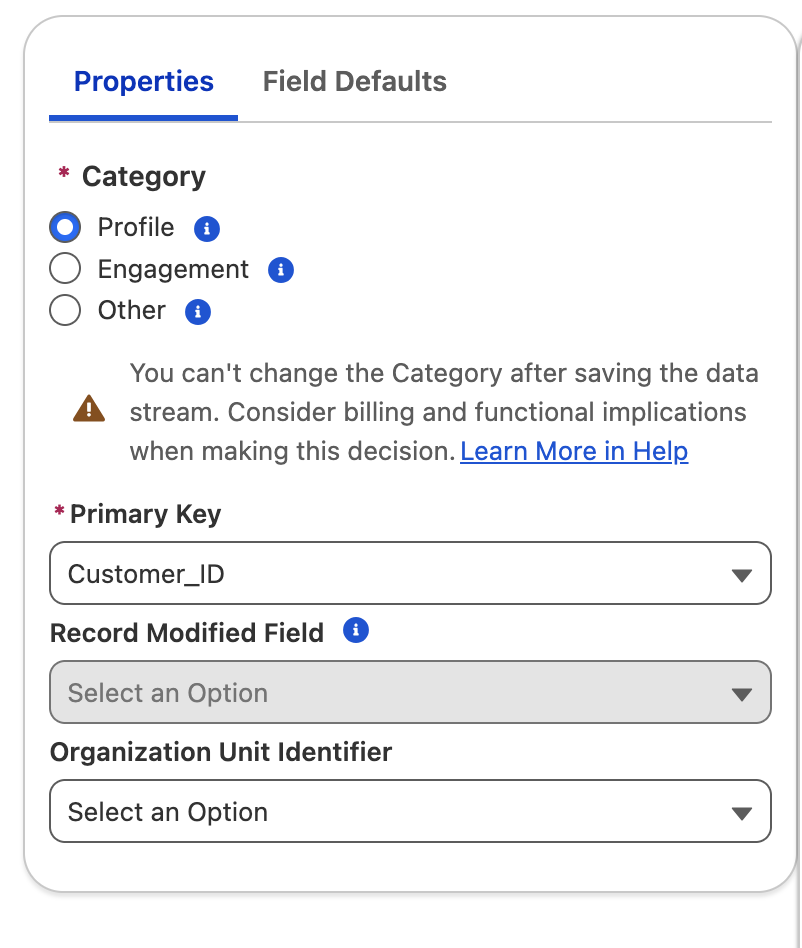
Data 360 provides three data categories: Profile, Engagement, and Other.
Profile
Select Profile when the dataset represents an individual, account, employee, or another entity that needs to be identified, unified, enriched, or used as a starting population for segmentation.
Example: A customer dataset containing Customer ID, First Name, Last Name, and Email Address.
Engagement
Select Engagement when the dataset contains time-series information representing customer activities or events. Examples include email opens, website interactions, and purchase events. An Engagement Data Stream requires an Event Time field using a Date or DateTime data type. This field represents when the event occurred.
Other
Select Other for supporting datasets that do not represent the primary population being segmented or time-series engagement events, such as product catalogues, store information, and other reference datasets. As the selected category cannot be changed after saving the Data Stream, choose the appropriate category based on the source dataset.
Primary Key Configuration
The primary key uniquely identifies records within the source dataset. Select a field that contains unique and stable values. For example, Customer ID or Member ID is generally more suitable than Email Address when an individual can change their email address. If the source dataset does not contain a single unique identifier, a composite key can be created using a combination of fields, where supported. For Engagement Data Streams, the Event Time field is also required. Select a date field that represents when the event occurred and does not change after the record is created.
For example, an email engagement dataset could contain:
| Field | Purpose |
|---|---|
| Subscriber Key | Identifies the subscriber. |
| Event ID | Identifies the engagement event. |
| Event Date | Records when the event occurred. |
| Event Type | Identifies the activity, such as Open or Click. |
Selecting an event date that changes after the original event is recorded can cause duplicate records in the DLO. Use a stable event timestamp rather than a field representing the record’s latest modification date.
Field Configuration
During Data Stream creation, review the source field names, API names, and data types. Data 360 uses the source schema to determine how records are stored in the DLO. If a source field has an incorrect data type, correct the schema before deploying the Data Stream. Formula fields are also available for supported Data Streams when source data needs to be cleansed or additional fields need to be created during configuration.
Data Spaces
Data Spaces provide logical separation for organising data, metadata, and processes within Data 360. For example, an organisation operating in the UK, Germany, and France can use separate Data Spaces to organise regional customer data.
When configuring a Data Stream, ensure that the DLO is associated with the appropriate Data Space. The required data model mappings must also be configured in that Data Space. This is particularly relevant when connecting Marketing Cloud Engagement business units to Data 360, because the relevant business units and Data Spaces must be configured as part of the connection setup.
Data Ingestion, Zero Copy and Refresh Modes
Data 360 supports different approaches for accessing source data. The appropriate approach depends on the source system, data volume, and data freshness requirements.
Standard Data Ingestion
Standard ingestion brings source data into Data 360 and stores it in DLOs.
For example, an organisation can ingest customer records from Salesforce CRM or purchase information from an external commerce platform.
The ingested records are available for subsequent data mapping and processing.
Zero Copy Data Federation
Zero Copy Data Federation provides access to supported external data sources without requiring the data to be physically ingested into Data 360 in the traditional way.
Data 360 supports two federation methods:
- Query Federation: Sends SQL queries to the external system’s compute engine, which processes the query and returns the relevant results.
- File Federation: Allows Data 360 to query supported external storage using its own query engine.
With Zero Copy, an external DLO acts as a reference to the source data rather than containing a conventional copy of the dataset. This approach is useful when organisations need to work with external data while reducing data duplication.
However, Zero Copy has its own supportability requirements. Some capabilities, such as streaming data transforms and near real-time identity resolution, are not supported for federated data.
Extraction and Refresh Modes
Extraction mode and refresh mode control different parts of the data ingestion process. Extraction Mode determines which records are retrieved from the source system and Refresh Mode determines how incoming records are applied to the DLO. The available options depend on the connector.
Common extraction approaches include:
- Full Extraction: Retrieves the complete source dataset.
- Delta Extraction: Retrieves new or updated records based on a suitable field, such as a modification date or numeric identifier.
Refresh modes include:
- Full Refresh: Replaces existing DLO data with the newly imported dataset.
- Incremental Refresh: Processes new or changed records based on the configured modification field.
- Upsert: Inserts new records and updates existing records using the configured key.
These options are not interchangeable: a delta extraction determines which records are retrieved from the source, while an incremental refresh determines how incoming records are applied to the destination. The available combinations depend on the connector, so configure the appropriate options using the Data Stream refresh settings and modes as a reference.
Preparing Data in Data 360 for Marketing Cloud Next
Marketing Cloud Next uses Data 360 as its data foundation. Data Streams bring customer information from Salesforce CRM and other connected external sources into Data 360, where the data can be mapped, unified and prepared for segmentation.
The following steps demonstrate how to prepare data in Data 360 for use in Marketing Cloud Next.
Step 1: Open Data Streams
Open the Data 360 app in Salesforce and navigate to Data Streams. Click New to create a Data Stream.
Step 2: Select a Data Source
Under Connected Sources, select an available source, such as Salesforce CRM or an external data source. The available options depend on the connections configured in your org.
Step 3: Select the Source Object or Dataset
Choose the Salesforce object or external dataset you want to ingest. For example, you can select Contact from Salesforce CRM or upload a customer CSV file.
Step 4: Configure the Data Stream
Configure the Data Stream properties, including:
- Data Stream name.
- Data Lake Object label and API name.
- Data category.
- Primary key.
- Source fields and field types.
- Applicable ingestion and refresh settings.
Select the appropriate category based on the type of data being ingested. Review the primary key and field configuration before saving the Data Stream.
Step 5: Deploy and Map the Data
Review the configuration and deploy the Data Stream. After deployment, map the source Data Lake Object fields to the appropriate Data Model Objects (DMOs). Configure the required object relationships so that the data can be used in downstream Data 360 processes.
Step 6: Use the Data in Marketing Cloud Next
For segments used with Marketing Cloud Next campaign flows, use the default data space and the Unified Individual object as the segmentation target. Once the segment is created and published, it becomes available for use in Marketing Cloud Next campaign flows. This workflow uses the published segment directly and does not require a separate Data 360 activation to an external destination.
Monitoring and Troubleshooting Data Streams
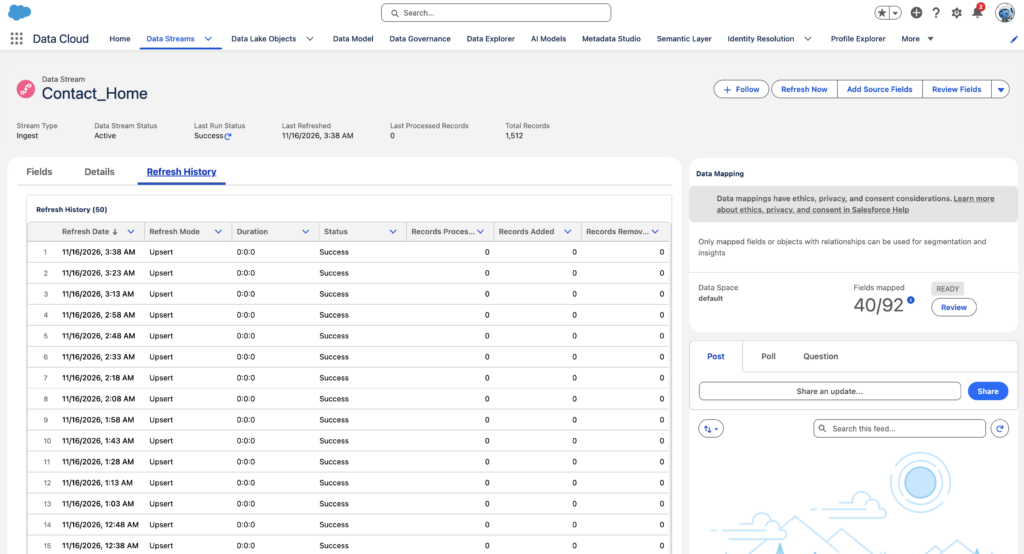
After deploying a Data Stream, monitor its refresh history to verify that source records are being processed correctly.
Refresh History
The Refresh History tab on the Data Stream record provides information about individual refresh operations.
Important fields include:
| Field | Description |
|---|---|
| Refresh Date | Date and time of the refresh. |
| Refresh Mode | The mode used during the refresh. |
| Duration | Time taken to complete the refresh. |
| Status | Result of the refresh operation. |
| Records Processed | Number of records processed. |
| Records Added | Number of records added. |
| Records Removed | Number of records removed. |
| Problem Records | Number of records that could not be ingested because of data quality issues. |
You can also initiate a manual refresh using Refresh Now when supported by the connector and stream configuration.
Common Configuration Issues
Data Stream deployment failures
A Data Stream can fail to deploy when the source connection, authentication details, or required configuration is incorrect. Check the source connection, permissions, and deployment status.
Incorrect primary key
The primary key must uniquely identify records in the source dataset. Selecting a field that contains duplicate or unstable values can affect record identification and subsequent data processing.
Incorrect field mapping
Source fields must be mapped to compatible target fields. Review field names, data types, primary keys, and object relationships before saving the mapping.
Data not available for segmentation
Records can be visible in the DLO but unavailable for segmentation because ingestion and data mapping are separate processes. Review the DLO-to-DMO mappings and verify that the required fields and relationships are configured in the correct Data Space.
Problem records
Records that cannot be ingested because of data quality issues are logged as problem records and stored in a problem record DLO. Review these records to identify issues such as invalid field values, incompatible data types, or records that do not satisfy ingestion requirements. The Data Stream Refresh History provides processing statistics, while Problem Record Monitoring helps identify records that failed ingestion.
How Data Streams Connect with Segmentation and Activation
Data Streams provide the source data required by downstream Data 360 processes. The relationship between ingestion, mapping, segmentation, and activation follows this sequence:
- Data Sources: Customer information originates from Salesforce CRM, Marketing Cloud Engagement, and external applications.
- Data Streams: Ingest data from configured source objects or datasets into Data 360.
- Data Lake Objects (DLOs): Store the ingested source records.
- Data Mapping: Maps DLO fields to the appropriate Data Model Objects (DMOs).
- Data Model Relationships: Connect customer records with related information, such as contact points and transactions.
- Identity Resolution: Unifies customer records across different sources when an identity resolution ruleset is configured and executed.
- Segmentation: Uses available customer attributes and relationships to define target audiences.
- Activation: Makes the selected audience available to supported marketing destinations.
For example, an organisation can ingest customer records from Salesforce CRM, purchase information from an external commerce platform, and email engagement data from Marketing Cloud Engagement. After the required mapping and relationship configuration, these datasets can support identity resolution and customer segmentation.
A marketer can then create a segment targeting customers who have made a recent purchase, have a Gold loyalty status, and meet the relevant marketing consent requirements. The resulting audience can be activated to a supported destination for a targeted marketing campaign.
Data Streams establish the ingestion foundation for this process. Data mapping, data model relationships, identity resolution, segmentation, and activation each have their own configuration and execution requirements.