Consent Management Basics in Marketing Cloud Next: Subscriptions, Channels, and Contact Points

Consent management in Marketing Cloud Next is built around 3 layers: subscriptions define what someone agreed to receive, channels define how it can be delivered, and contact points define the exact email address or phone number being used. These layers can be interconnected with flows to keep Marketing Cloud consents and CRM consents in sync in case someone decides to add little bit of spice into the project architecture.
How consent management works in Marketing Cloud Next
Marketing Cloud Next treats consent as operational data, not just as a checkbox on a marketing form. Salesforce surfaces dedicated consent tooling in Marketing Cloud Next, which means the implementation needs to connect consent records to the way audiences, journeys, and messages are actually built.
The practical model is simple, but the details matter:
- Subscription – the topic, category, or communication type the person can opt into or out of.
- Channel – the delivery method, such as email or SMS.
- Contact point – the specific destination, such as `person@example.com` or a mobile number.
A common issue is designing only one of these layers and assuming the platform will infer the rest. For example, someone might be opted into “Product Updates”, but that does not automatically answer whether SMS is allowed, whether a specific email address is valid, or whether another address on the same profile has a different permission state.
Subscriptions define what the person wants to receive
Subscriptions are the marketer-facing categories of communication. They answer the question: what type of message is this person agreeing to receive?
Typical examples include:
- Product Updates
- Promotional Offers
- Events and Webinars
- Newsletter
- Service Announcements
- Loyalty Program Messages
Subscriptions should map to real preference choices, not internal campaign names. “Spring Sale 2026” is usually a campaign, not a subscription. “Promotional Offers” is a better subscription because it can be reused across campaigns, journeys, and preference center screens.
Keep subscriptions stable and business-readable
A subscription should be stable enough to survive campaign changes. If marketers rename, reuse, or delete subscription categories too often, historical consent becomes hard to interpret.
A better pattern is:
| Weak subscription design | Better subscription design |
|---|---|
| April Promo Blast | Promotional Offers |
| Q3 Webinar Invite | Events and Webinars |
| New Feature Launch Email | Product Updates |
| VIP SMS Campaign | Loyalty Program Messages |
What typically happens in messy implementations is that subscriptions are created around campaigns because that feels faster. The problem appears later when a customer unsubscribes from one campaign and the team cannot tell whether that opt-out should suppress only that campaign, all promotions, all email, or all communication.
Avoid mixing subscription meaning with channel meaning
A subscription should not usually be named “Newsletter Email” or “SMS Promotions” unless there is a deliberate reason to combine topic and channel. In most consent models, “Newsletter” is the subscription and “Email” is the channel.
Separating them gives you more control. A customer might want the newsletter by email but not by SMS. Another customer might allow SMS for delivery alerts but not for promotional offers. If subscription and channel are blended into one field, those combinations become hard to support cleanly.
Channels define how the message can be delivered
Channels represent the communication method. In a Marketing Cloud Next consent design, channel consent answers: is this person contactable through this medium?
Common marketing channels include:
- SMS
- Mobile push
- WhatsApp or messaging apps, where supported
- Direct mail, where modeled as a contact point type
The important distinction is that channel consent is broader than subscription consent. If someone opts out of the email channel entirely, they should generally not receive any email marketing, even if they are still subscribed to a topic. If someone opts out of a specific subscription, they may still be eligible for other subscriptions on the same channel.
Channel-level opt-out usually acts as a broad suppression signal
In practice, channel-level consent is often used as a safety layer. For example:
- Email channel = opted out
- Product Updates subscription = opted in
- Target contact point = `alex@example.com`
A conservative send decision would suppress the email because the broader email channel is opted out. The subscription opt-in does not override the channel opt-out unless the business has explicitly designed that behavior and confirmed it with legal and compliance stakeholders.
A common issue is assuming that a subscription opt-in is enough. It is not always enough. The send process needs to know which consent layers are required for the message type.
Contact points define where consent applies
Contact points are the actual destinations used for communication. For email, the contact point is the email address. For SMS, it is the phone number. This layer answers: which exact address or number has permission?
This is where many real-world consent issues appear.
A customer can have:
- A personal email address
- A work email address
- An old email address
- A mobile number
- A secondary phone number
- Multiple CRM records with overlapping data
If consent is stored only at the person level, the platform may not know which destination the permission applies to.
In Marketing Cloud Engagement, we had a subscriber, and consent was related to that subscriber. We could even sometimes send an email to a different email address or use a different phone number, but the consent still revolved around the subscriber and a subscriber key. In Marketing Cloud Next, consent is linked to a specific email address or phone number, regardless of who it belongs to.
Contact point consent matters when people have multiple addresses
Consider this scenario:
- Customer: Jordan Lee
- Email 1: `jordan.personal@example.com`
- Email 2: `jordan.work@example.com`
- Subscription: Newsletter
- Channel: Email
Jordan opts into the newsletter using the personal email address. Later, a sales process adds the work email address to the CRM profile.
A weak implementation might treat Jordan as globally opted in and send the newsletter to the work address. A stronger implementation checks whether the specific contact point being used has the required consent or whether the organization has a documented rule allowing consent to apply across contact points.
In many marketing operations, the safer default is to avoid assuming that permission for one email address automatically applies to another.
Normalize contact points before attaching consent
Contact point quality directly affects consent reliability. If the same email address is stored in multiple formats, duplicate consent records can appear.
Common normalization rules include:
- Lowercase email addresses before matching.
- Trim spaces before saving or comparing values.
- Standardize phone numbers into a consistent format.
- Avoid overwriting historical contact point values without preserving consent history.
- Use external IDs or deterministic matching keys for imports.
For SMS, phone number formatting is especially important. If one system stores `+14155550123` and another stores `(415) 555-0123`, the platform may treat them as different destinations unless the integration normalizes them.
How subscriptions, channels, and contact points work together
The setup path is easier to understand through the practical flow of managing consent with subscriptions, channels, and contact points because it follows the same sequence used in implementation: define the communication choices, define the delivery methods, then connect permission to real destinations.
A practical send eligibility check often looks like this:
- Is the person eligible for marketing communication?
- Is the subscription allowed for this message?
- Is the channel allowed for this person?
- Is the selected contact point valid and consented, if contact point consent is required?
- Is there any broader opt-out that should suppress the send?
This layered structure helps prevent false assumptions. A person can be eligible at one layer and blocked at another.
Example: email newsletter consent
A clean email newsletter setup might look like this:
| Layer | Example |
|---|---|
| Subscription | Monthly Newsletter |
| Channel | |
| Contact point | `maya@example.com` |
| Consent status | Opted in |
| Capture source | Preference center |
| Capture date | Date and time of submission |
If Maya unsubscribes from the newsletter, the subscription consent changes. If Maya globally unsubscribes from email, the channel-level consent changes. If `maya@example.com` bounces or is replaced by a new address, the contact point layer becomes important.
The mistake to avoid is updating only a generic field such as `Newsletter Opt In = false` without recording which consent layer changed.
Example: SMS promotional consent
SMS usually needs tighter operational handling because the destination is tied to a phone number and the channel has stricter compliance expectations in many markets.
A practical SMS promotion setup might look like:
| Layer | Example |
|---|---|
| Subscription | Promotional Offers |
| Channel | SMS |
| Contact point | `+14155550123` |
| Consent status | Opted in |
| Capture source | Mobile sign-up form |
If the same customer later provides a second phone number, do not automatically treat the second number as opted in unless your consent policy explicitly allows it. From an implementation perspective, the second number is a different contact point.
Marketing Cloud Next vs older Marketing Cloud consent patterns
The biggest mindset shift is that Marketing Cloud Next consent behaves more like structured Salesforce data than a classic subscriber-list-only model. The Marketing Cloud on Core consent model is closer to CRM-style relationships between people, purposes, communication preferences, and contactability than to a single All Subscribers status.
For teams coming from Marketing Cloud Engagement, this difference changes how migrations and suppressions are designed.
| Area | Older Marketing Cloud pattern | Marketing Cloud Next pattern |
|---|---|---|
| Main identity pattern | SubscriberKey and list status often drive sendability | Consent is modeled through connected records around the person, channel, subscription, and destination |
| Subscription handling | Publication lists or custom preference fields were commonly used for email preferences, | Subscriptions should be formalized as reusable communication categories |
| Channel control | Main channels have dedicated studio: Email Studio – email channel – subscriber status handled unsubscribe-all. Mobile Studio – sms channel – used OptInStatusID and OptOutStatusID, while MobilePush had its own status and opt-in status. Other channels, such as WhatsApp, had to be managed separately. | Channel-level consent can sit alongside subscription and contact point logic |
| Contact point handling | One subscriber may map to one primary email address in practice | Multiple contact points can exist and may need separate consent decisions |
| Migration risk | Teams map list membership directly to preferences | Teams must decide how legacy unsubscribes map to subscription, channel, and contact point consent |
Data use purpose, consent status, and capture context
Subscriptions, channels, and contact points are the most visible pieces for marketers, but consent records also need enough context to be trusted operationally.
At minimum, a useful consent record should make these questions answerable:
- What did the person agree to or reject?
- Which channel was involved?
- Which contact point was involved, if applicable?
- When was the consent captured?
- Where did it come from?
- Was it captured through a form, import, preference center, API, or service interaction?
- Is the current value active, withdrawn, or unknown?
The exact fields and objects depend on configuration, but the implementation principle is consistent: consent should be explainable after the fact. If an internal user asks why someone received or did not receive a message, the answer should be visible from consent records and suppression logic, not hidden in a one-off automation.
Missing consent is not the same as opt-in
One limitation is that “no consent record” is ambiguous. It can mean:
- The customer has not made a choice.
- Historical data was not migrated.
- The preference center has not been used yet.
- The message type does not require explicit opt-in under the organization’s policy.
- The data exists in another system but has not synced.
For marketing operations, the important part is to define the default behavior before activating campaigns. Some organizations treat missing consent as not marketable. Others allow certain communications under specific legal bases or business rules. Marketing Cloud Next can store consent signals, but the organization still needs a clear decision framework for how missing, unknown, and conflicting records are handled.
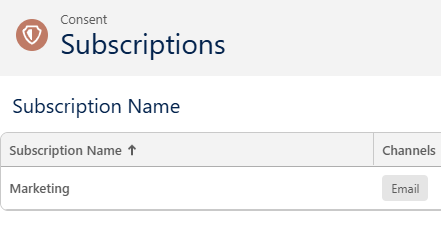
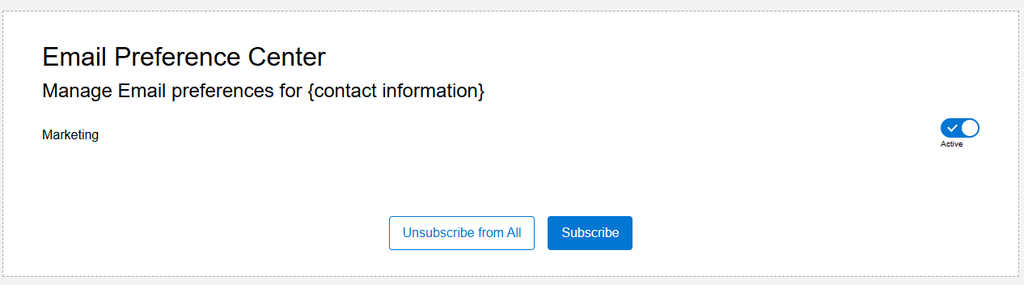
Preference center design in Marketing Cloud Next
A preference center follows your subscription and channel settings in Marketing → Consent. This means that what you set up there will automatically translate into a preference page. To me, it looks like there is one preference center per channel, as I could not select multiple channels or duplicate the main Preference component with different channel settings. I also do not see any option for subscribers to update or add additional information to their profile through the preference center. To me, this is not sufficient when a client uses multiple channels, and hopefully, it will gradually improve.