What Is Salesforce Marketing Cloud Next? A Beginner’s Overview

Salesforce Marketing Cloud Next is Salesforce’s agentic marketing solution, built natively on the Salesforce Platform. It helps marketers create personalized, two way experiences across the customer lifecycle, e.g. welcoming new customers, re engaging inactive ones, or delivering relevant offers in real time. Salesforce positions the platform around actionable customer data, connected workflows, and autonomous AI agents rather than isolated campaign execution.
The main architectural difference is that Marketing Cloud Next brings customer data, segmentation, campaign orchestration, content, AI, and activation closer together on the Salesforce Platform. Instead of treating marketing as a separate system that constantly exchanges data with CRM, Marketing Cloud Next uses Salesforce CRM, Data 360, Flow, and Agentforce as parts of the same broader architecture.
For teams already using Salesforce CRM, Data 360, formerly Data Cloud, or existing Marketing Cloud products, this matters because implementation decisions now extend beyond campaign configuration. They affect data architecture, identity resolution, consent handling, segmentation, automation, channel activation, and campaign operations.
Salesforce Marketing Cloud Next explained
The easiest way to understand Marketing Cloud Next is as a marketing application built on top of several Salesforce platform layers, rather than as one standalone marketing tool.
At the foundation is the Salesforce Platform and metadata layer. This provides shared capabilities such as CRM records, permissions, automation, analytics, custom applications, and Flow Builder. Marketing Cloud Next uses these existing Salesforce services rather than creating a completely separate environment for marketing. Salesforce itself describes CRM as being at the center of Marketing Cloud Next and Flow Builder as one of the main automation tools used by the platform.
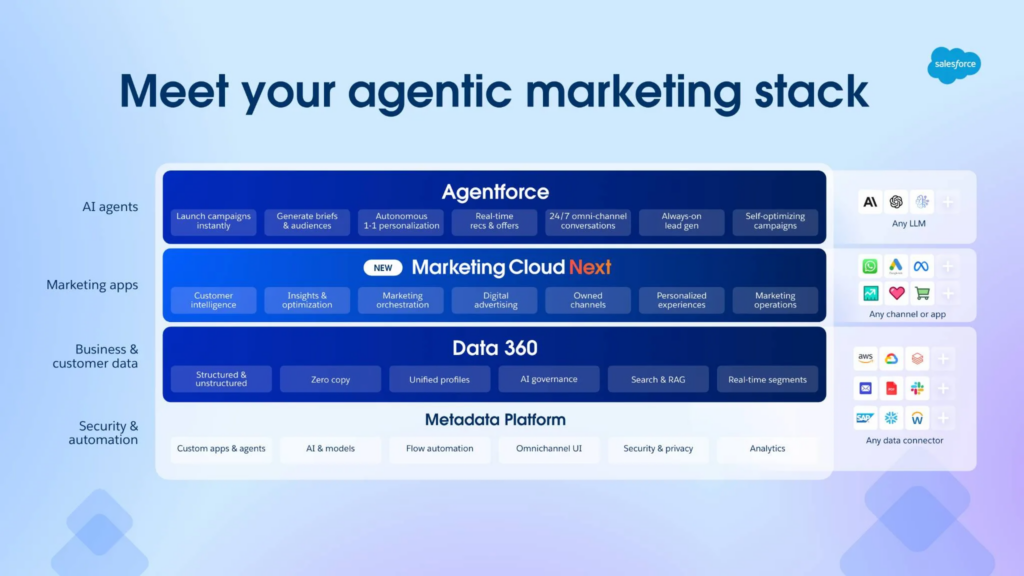
Above that sits Data 360, previously called Data Cloud. This is the customer data layer. It connects Salesforce and external data sources, harmonizes data, supports identity resolution, stores consent information, builds unified profiles, and provides segmentation capabilities used by Marketing Cloud Next. Salesforce documentation specifically notes that Marketing Cloud Next relies on Data 360 for functionality such as segmentation.
The next layer is Marketing Cloud Next itself. This is where marketers work with campaigns, audiences, content, marketing orchestration, channels, personalization, advertising, optimization, and marketing operations. Instead of preparing data in one platform and executing campaigns in another, the idea is that marketing activity can operate directly on the shared Salesforce data foundation.
For example, a segment created from Data 360 customer data can be used in a campaign, Flow can orchestrate what happens next, Marketing Cloud Next can deliver the communication through the configured channel, and the resulting engagement can feed back into the customer profile and future decision making.
At the top of the stack is Agentforce, Salesforce’s agentic AI layer. Agentforce can work with the data, metadata, workflows, and marketing capabilities underneath it. In Marketing Cloud Next, Salesforce uses agents for tasks such as creating campaign briefs, building audiences, generating content, creating journeys, analyzing performance, providing recommendations, and supporting two way customer conversations.
How Marketing Cloud Next differs from traditional Salesforce Marketing Cloud
The easiest way to understand Marketing Cloud Next is to compare it with the traditional Salesforce Marketing Cloud setup that many teams already know.
Traditional Salesforce Marketing Cloud Engagement is commonly associated with tools such as Email Studio, Journey Builder, Automation Studio, Mobile Studio, Contact Builder, AMPscript, SQL Query Activities, and Data Extensions. It is a powerful platform, but it often operates as a separate marketing execution environment. Most importantly, the platform resides outside the core Salesforce ecosystem, although it has a capable integration layer managed through Marketing Cloud Connect.
Marketing Cloud Next is more platform-centered. Its strategic direction is to connect marketing activities more closely with Salesforce data, AI, and shared platform services.
Content Builder has been replaced by the Content section within Salesforce CRM. Here, you can create landing pages, form handlers, email templates, and store brand assets. One of the most notable new features is the Form Handler, which may already be familiar to users coming from Pardot or Salesforce Account Engagement. I consider this one of the biggest improvements in Marketing Cloud Next.
Form submissions can then be processed using Salesforce Flows and protected with CORS policies or simple honeypot fields, making it easier to build secure, low-code data capture experiences.
Another addition is the new Prospect object. This is now or can be the primary entry object for marketing within Salesforce CRM, allowing marketing teams to capture and nurture prospects before they are qualified and converted into Leads for the sales team.
This creates a more marketing-focused lifecycle, where prospects can engage with forms, emails, and campaigns while remaining separate from the sales pipeline until they meet the organization’s qualification criteria.
Prospect cannot be added to campaign as campaign member. But can enter campaign via segment in case data cloud is used.

Marketing Cloud Next still supports AMPscript
A common misconception is that Marketing Cloud Next completely replaces the personalization techniques used in Salesforce Marketing Cloud Engagement. That is not the case. Marketing Cloud Next continues to support AMPscript, allowing marketers to personalize email content using subscriber attributes, conditional logic, lookup functions, and dynamic content. Existing Marketing Cloud developers who already use AMPscript will find that this knowledge remains valuable.
If you are not familiar with AMPscript here are some things that can be done with it:
- Personalize greetings
- Personalize subject lines
- Display different content based on customer attributes
- Lookup related records
- Format dates and numbers
- Show loyalty balances or account information
- Build reusable personalization logic
In subject line field:
%%[@subjectine]%%

In the body on the email
%%[
SET @firstName = $content.firstName
IF EMPTY(@firstName) THEN SET @firstName = "client" ENDIF
SET @subjectline = Concat("Hello ", @firstName, " don't forget to update your profile.")
]%%
This is particularly useful for organizations migrating from Marketing Cloud Engagement, as many existing email templates and personalization techniques can continue with some tweaks to be used instead of being completely rewritten.
That said, Marketing Cloud Next changes where personalization data often comes from. Rather than relying primarily on campaign-specific Data Extensions, personalization increasingly comes from shared customer data available across the Salesforce platform. AMPscript remains the rendering language inside emails, while the underlying customer profile becomes more unified.
For experienced Marketing Cloud developers, this means AMPscript is still an important skill, but understanding the customer data model becomes just as important as writing the personalization itself.
Data handling becomes more central
In traditional Marketing Cloud implementations, marketers often work heavily with data extensions. A data extension might contain customers, orders, preferences, loyalty fields, abandoned carts, or imported CRM attributes. These structures can be flexible, but they also create duplicated data models if governance is weak.
A common issue is that each campaign ends up with its own slightly different version of the customer. One data extension may use email address as the key. Another may use Contact ID. Another may include unsubscribed customers because suppression logic was copied incorrectly. These problems are not always obvious until personalization fails or a customer receives the wrong message.
Marketing Cloud Next puts more emphasis on the shared customer data layer. In practice, that means beginners should think less about “Where do I upload this list?” and more about “Which profile, identity, consent, and behavioral data should this campaign use?”
Campaign creation becomes more AI-assisted
Salesforce positions Marketing Cloud Next around a next-generation campaign workflow that includes AI support for campaign planning, content, and activation. That is useful, but it should be understood realistically.
AI can help generate campaign briefs, suggest audience logic, draft copy, or accelerate production steps. It does not remove the need for marketing operations review. Brand voice, legal requirements, consent rules, localization, accessibility, and deliverability still need human validation.
In practice, AI is most useful when the organization already has clean data, documented campaign rules, and strong approval processes. If the underlying customer data is messy, AI may simply help teams create bad campaigns faster.
Automation logic moves closer to platform workflows
Traditional Marketing Cloud users often think in terms of Journey Builder canvases, Automation Studio schedules, SQL queries, imports, extracts, and triggered sends. Those concepts are still important in many existing environments, especially where Marketing Cloud Engagement remains active.
Marketing Cloud Next changes the operating model by bringing marketing execution closer to Salesforce platform workflows and shared customer data. This can simplify cross-cloud use cases, such as marketing reacting to sales pipeline changes or service interactions.
The trade-off is that marketing teams may need new skills. Admins and architects may need stronger Salesforce platform knowledge, not just Marketing Cloud scripting and journey configuration experience.
Marketing Cloud Next delivers the most value with Data Cloud
Although Marketing Cloud Next can be implemented without Salesforce Data Cloud, the platform is designed to work particularly well alongside it. Many of the capabilities Salesforce demonstrates, such as unified customer profiles, AI-assisted segmentation, cross-channel personalization, and real-time activation, become significantly more powerful when Data Cloud is part of the solution.
The reason is simple. Marketing campaigns are only as good as the customer data behind them.
Without Data Cloud, customer information often remains spread across multiple systems. CRM data may live in Sales Cloud, ecommerce transactions in another platform, website behaviour in analytics tools, and loyalty information somewhere else. Marketing campaigns must either rely on integrations or duplicate portions of that data before it can be used.
Data Cloud changes this approach by creating a shared customer data foundation that Marketing Cloud Next can activate directly.
Instead of asking questions like:
- Which Data Extension contains this customer?
- Which nightly import updates this attribute?
- Which automation copies purchase history?
teams begin asking:
- Which customer profile should this campaign target?
- Which consent records apply?
- Which behavioural events should influence personalization?
- Which AI insights should be used?
The focus shifts away from moving data and towards using data.
Why Data Cloud makes Marketing Cloud Next stronger
The combination of Marketing Cloud Next and Data Cloud provides several practical advantages.
Unified customer profiles
One of the biggest challenges in marketing is that customers rarely exist as a single record.
A customer may have:
- multiple email addresses
- several devices
- a loyalty account
- an ecommerce account
- CRM records
- mobile app activity
- support interactions
Data Cloud helps connect these identities into a more complete customer profile through identity resolution.
Instead of building campaigns against isolated datasets, Marketing Cloud Next can activate audiences using a broader view of the customer.
Better segmentation
Without Data Cloud, marketers often build audiences using imported lists or campaign-specific tables.
With Data Cloud, audiences can combine information from multiple business systems.
For example:
- customers who spent over €500 this year
- opened fewer than two campaigns
- have Gold loyalty status
- visited the website this week
- have no open support case
- have valid email consent
Building these types of audiences traditionally requires numerous integrations and scheduled imports. With Data Cloud, much of that complexity is handled within the shared data model.
AI works with richer customer context
Generative AI is only as useful as the information available to it.
If AI only sees a customer’s first name and email address, personalization opportunities are limited.
When Data Cloud provides purchase history, engagement, preferences, lifecycle stage, service interactions, and behavioural events, AI can generate more relevant recommendations, content variations, and audience suggestions.
This does not replace human review, but it provides AI with much better context.
Reduced data duplication
Traditional Marketing Cloud implementations often accumulate hundreds or even thousands of Data Extensions.
Many contain duplicated customer information because each campaign imports its own copy of the data.
This increases maintenance effort and introduces inconsistencies.
Data Cloud encourages teams to activate data from a common customer profile instead of repeatedly copying it into campaign-specific datasets.
The result is fewer synchronization jobs, less duplicated logic, and easier governance.
Real-time activation
Many classic Marketing Cloud implementations rely on scheduled imports that run every few hours or once per day.
This works well for newsletters and batch campaigns but becomes limiting for real-time marketing.
With Data Cloud, customer profile updates and events can be made available much faster, allowing Marketing Cloud Next to react to changes such as:
- a customer making a purchase
- a support case being opened
- a loyalty tier changing
- a form submission
- website engagement
- product interest signals
This enables more responsive customer journeys.
Why architects should think differently
For Salesforce architects, the biggest mindset shift is that Data Cloud becomes the customer data layer, while Marketing Cloud Next becomes the activation layer.
Instead of building complex ETL processes to populate campaign-specific Data Extensions, architects spend more time designing:
- identity resolution
- data mapping
- consent management
- calculated insights
- unified customer profiles
- reusable audience definitions
- governance
Campaigns become simpler because the customer data foundation is stronger.
In many implementations, the complexity does not disappear, it moves from campaign execution into data architecture, where it is easier to standardize and reuse across the organization.
Core components beginners should understand
Marketing Cloud Next is easiest to understand as a set of connected capabilities rather than a single screen or feature.
Customer data foundation
The customer data foundation is the most important piece. Marketing Cloud Next depends on having usable customer profiles, attributes, behaviors, consent records, and identity logic.
In practice, this means implementation should start with questions like:
- Which customer identifiers are trusted?
- Is email address enough, or is Contact ID, Account ID, loyalty ID, or another key required?
- Where does consent live?
- Which systems update customer preferences?
- How often does behavioral data refresh?
- Which attributes are reliable enough for personalization?
A beginner mistake is to start with campaign design before validating the data model. That usually leads to rework. For example, a welcome journey may look simple until the team discovers that newsletter consent, product interest, region, and language preference are stored in four different systems.
Segmentation and audience building
Segmentation is where unified data becomes useful. Instead of only selecting a static list, marketers can build audiences based on profile data, behaviors, lifecycle stage, purchase history, or engagement signals.
A practical example would be:
- Customers in Canada
- With email consent
- Who purchased running shoes in the last 180 days
- Who have not opened the last three campaigns
- Excluding anyone with an open service complaint
That last condition is where Salesforce-native marketing becomes valuable. Marketing should not operate separately from service context. If a customer has an unresolved complaint, continuing promotional messaging can damage the customer experience.
The limitation is that segmentation quality depends on source data quality. If service case data is incomplete or delayed, the audience may still include customers who should be excluded.
AI-assisted campaign planning
Marketing Cloud Next places AI closer to campaign planning and production. For beginners, this usually means AI can support tasks such as audience recommendations, message drafting, campaign brief creation, or content variation.
The real value appears when AI works from approved data and guardrails. For example, a financial services company should not allow AI-generated content to bypass compliance review. A healthcare organization needs strict controls around sensitive data. A retailer may allow more experimentation but still needs brand and offer governance.
A common issue is treating AI output as final content. In marketing operations, AI-generated copy should be treated like a first draft, not an approved asset.
Journey and activation management
Activation is where audiences and content become customer-facing experiences. This could include email, mobile, advertising audiences, or other connected channels depending on the implementation.
The practical behavior to understand is that activation is not just “send a message.” It includes entry rules, exit criteria, frequency controls, suppression logic, channel eligibility, personalization rules, and measurement.
For example, a cart abandonment flow should not send a discount email if the customer already purchased. It should not send to someone who opted out. It should not send five minutes after a high-value customer opened a support case. These rules are where connected data matters.
Measurement and optimization
Marketing Cloud Next is also intended to improve how teams evaluate campaign performance across customer data and business outcomes. Instead of only looking at email opens or clicks, teams can connect activity to lifecycle progress, sales activity, ecommerce behavior, or customer service context.
That said, measurement still requires planning. Naming conventions, campaign taxonomy, source tracking, conversion definitions, and attribution logic need to be established early. If every team names campaigns differently, reporting will still be messy even on a newer platform.
Marketing Cloud Next versus Marketing Cloud Engagement
Marketing Cloud Engagement remains familiar to many Salesforce customers. Marketing Cloud Next does not make that knowledge useless, but it changes where some skills apply.
Marketing Cloud Engagement strengths
Marketing Cloud Engagement is mature and widely used for email, mobile, journeys, data extensions, automations, and scripting-heavy personalization. Experienced teams often rely on SQL, AMPscript, SSJS, Journey Builder, Automation Studio, and established operational processes.
It is especially strong when teams have already built reliable campaign frameworks and know how to manage deliverability, subscriber data, preference centers, and recurring automations.
The downside is that implementations can become complex over time. Data extensions multiply. Queries become hard to maintain. Journey logic is duplicated. Documentation falls behind. New team members may struggle to understand why a campaign works the way it does.
Marketing Cloud Next strengths
Marketing Cloud Next is stronger as a platform-native model. It is better aligned with Salesforce customer data, AI-assisted campaign work, and connected workflows.
Its advantage is not only new functionality. The bigger operational advantage is reducing the separation between marketing execution and customer context.
For example, marketing can be more responsive to sales status, service experience, and customer profile changes when those signals are part of the same platform strategy.
Where teams need caution
The main caution is feature parity and process maturity. Beginners should not assume every existing Marketing Cloud Engagement feature, script, automation pattern, or integration will map one-to-one into Marketing Cloud Next.
Before making architectural decisions, teams should identify:
- Required channels
- Required integrations
- Existing campaign dependencies
- Personalization complexity
- Data refresh expectations
- Regulatory requirements
- Reporting needs
- Skills available on the team
One limitation is that newer platform approaches often require changes in team roles. A marketer who previously managed journeys and data extensions may now need to work more closely with Salesforce admins, Data Cloud specialists, AI governance owners, and CRM architects.