Adobe Campaign Classic: Workflow Activities Explained
If you have ever opened an Adobe Campaign Classic workflow that was supposed to be simple but somehow turned into a spaghetti diagram, you are not alone.
The real power of Adobe Campaign Classic automation comes from becoming comfortable with workflow activities. These are the building blocks that allow you to pull data, segment audiences, orchestrate channels, and keep operations stable even when volumes spike or inputs change.
Adobe provides a large catalog of workflow activities. Once you understand what each activity family is designed for, designing cleaner and more maintainable workflows becomes much easier.
And if you ever reach the limits of the built-in activities, Adobe Campaign Classic also allows you to create custom workflow activities, giving you the flexibility to extend the platform when standard components are not enough.
To keep terminology precise, the activity families and examples below are based on Adobe’s official list of workflow activities in the Adobe Campaign workflow activities documentation.
How workflow activities are organized in Adobe Campaign Classic
Adobe Campaign Classic groups workflow activities into families so you can find what you need quickly while designing. Practically, this structure is also a mental model for architecture:
- Targeting activities: where records enter the workflow and where you filter, split, enrich, or deduplicate audiences before any campaign action happens.
- Flow control activities: control how the workflow progresses by introducing scheduling, delays, conditional branching, and execution logic between steps.
- Action activities: perform the actual operations in the workflow such as sending deliveries, updating data, exporting files, or executing scripts.
- Event activities: allow workflows to start or react based on external or internal triggers such as signals, file arrivals, or API calls.
This categorization matters because most “workflow bugs” are really mismatches between what an activity expects as input and what the previous activity actually outputs. Thinking in families helps you spot those mismatches early.
Targeting Activities
Targeting activities are where records enter the workflow and where you shape the audience that will move through the rest of the process. These activities allow you to select, filter, split, enrich, or deduplicate data before any marketing action happens.
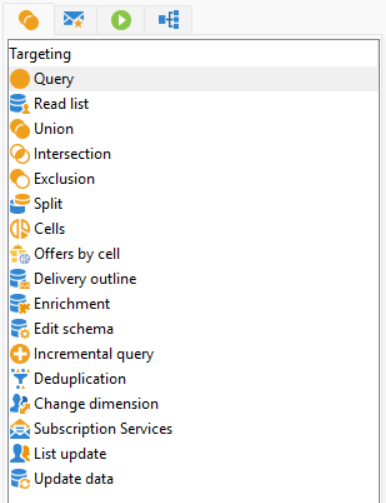
Typical targeting activities include Query, Intersection, Union, Exclusion, Deduplication, Enrichment and Split. They let you define exactly which recipients should continue in the workflow and how they should be grouped.
For example, you might start a workflow with a Query activity that selects customers who purchased within the last 30 days. From there, you could use Split to separate them into segments, such as high-value customers and regular buyers. A Deduplication activity might then ensure that the same recipient does not appear multiple times in the final audience.
Targeting activities are essentially the data preparation layer of Adobe Campaign workflows.
Flow Control Activities
Flow control activities determine how the workflow progresses from one step to another. They allow you to introduce logic, delays, and conditional paths so the workflow behaves dynamically instead of running as a simple linear process.
Common flow control activities include Wait, Scheduler, Test, Fork, Alert and End.
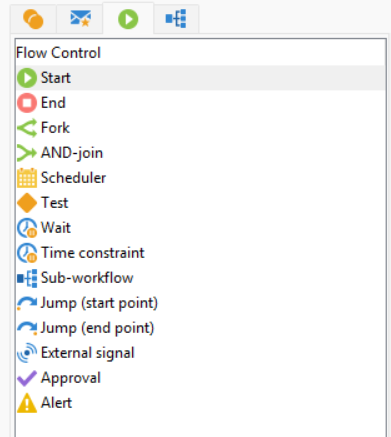
For example, a Scheduler activity can trigger the workflow every night to process new data. A Wait activity might pause execution until a specific time or delay processing by several hours. The Test activity allows you to create conditional logic, such as sending contacts down different branches depending on event, activity or workflow instance variables. Most used scenario to work with test activity is to check population count. You can also use advanced tab and prepare any instance variable with initialization script that can be check against.
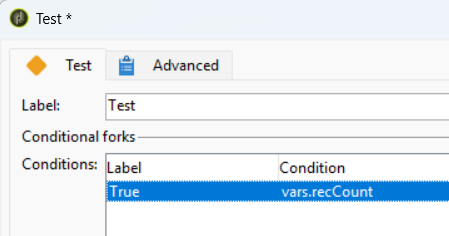
These activities help manage timing, sequencing, and branching, which is especially important for automated marketing processes that run continuously.
Action Activities
Action activities are responsible for executing tasks once the audience has been prepared. This is where the workflow actually performs operations such as sending messages, updating data, exporting files, or interacting with external systems.
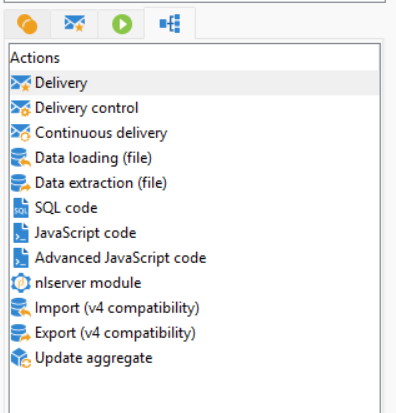
Examples include Delivery, Update Data, Data Extraction (File Export), Transfer File, and JavaScript Code.
A typical use case might involve sending an email delivery to the targeted audience, updating a field in the database to mark that the campaign was sent, and exporting campaign results to an external system for reporting.
Action activities are where workflows produce real outcomes, whether that is sending communications, updating data, or integrating with other platforms.
Event Activities
Event activities allow workflows to react to external or internal triggers. Instead of running on a fixed schedule, these workflows can start or continue when a specific event occurs. These activities are only available in workflows that are not part of a campaign and are typically used in technical workflows.
Examples include External Signal, Signal, and File Collector.
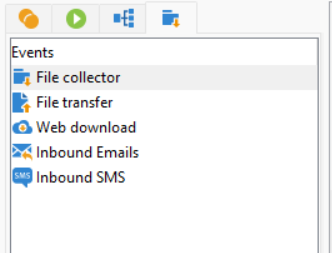
For example, an External Signal activity might start a workflow when another system triggers it via API. A File Collector activity could watch a directory and begin processing when a new file arrives. These types of activities are particularly useful for building event-driven automation, where workflows respond to real-time data instead of running only on schedules.
Event activities make Adobe Campaign workflows much more flexible by enabling integration-driven or event-based processes.
Deliveries activities
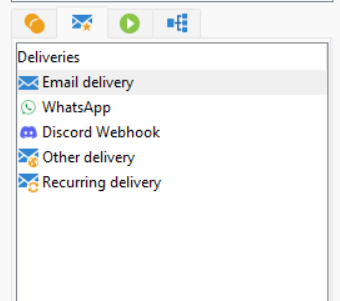
Delivery activities are used to send messages through a specific communication channel such as email, SMS, push notifications, or direct mail. These activities execute the actual campaign delivery to the targeted audience prepared earlier in the workflow. Delivery activities are only available in campaign workflows and are used to orchestrate outbound communications as part of a marketing campaign.
Share With Others
 Platinum