🔥 500+ people already subscribed. Why not you? Get our newsletter with handy code snippets, tips, and marketing automation insights.

background shape
background shape

What Is an Attribute Group in Salesforce Marketing Cloud Engagement?

Attribute Groups are the backbone of the Salesforce Marketing Cloud Engagement contact model. In practical terms, an Attribute Group is how Contact Builder knows which records in different Data Extensions (and other data sources) belong to the same person. If you have customer profile data in one table, preferences in another, and transactions in a third, Attribute Groups are what let Marketing Cloud treat that as one unified “contact” for segmentation, personalization, and automation. Without a clean Attribute Group design, what typically happens is messy joins, inconsistent counts between audiences, and personalization that breaks because the platform cannot reliably resolve the right row for the right subscriber.

Where Attribute Groups sit in Contact Builder (and why they matter)

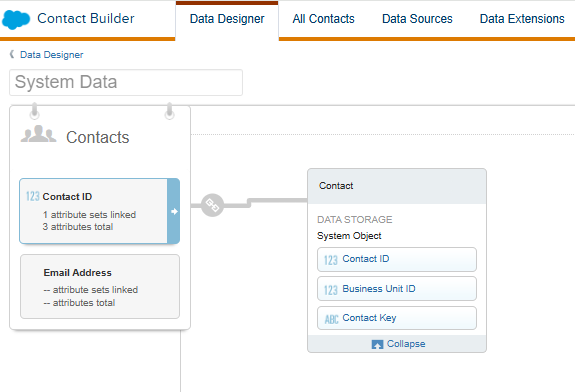
Contact Builder is the area where you define your contact model: the relationships between contact records and the data you want to use for targeting and personalization. The platform is explicit about Contact Builder being the place to manage those relationships, not something that’s inferred magically at send time, which is why the modeling step matters for almost every serious implementation: Contact Builder as the workspace for defining and managing contact relationships.

An Attribute Group is the container for that model. It gathers one “root” contact relationship and connects related attributes (tables) to it through keys you define.

What an Attribute Group actually is in Salesforce Marketing Cloud Engagement

An Attribute Group is a set of attributes (typically Data Extensions) tied together by relationships so they can be used as a coherent view of a contact. The key nuance is that it is not just a visual map. It’s a ruleset that establishes how data connects to the contact record. When configured properly, it becomes the foundation for:

  • building audiences off contact-connected data
  • using related data consistently across channels
  • reducing the need for one-off SQL “flattening” just to get a usable targeting table

The platform’s own description of Attribute Groups focuses on the idea of grouping attributes and defining the relationships between them so data can be leveraged together: how Attribute Groups organize attributes and relationships in Contact Builder.

Core pieces: root, relationships, and keys

Root attribute and “the contact” in your model

In practice, the first decision is what represents the person. Most teams pick a master Data Extension that holds a stable Contact Key, and then relate everything else back to it.

A common issue is confusing SubscriberKey, Email Address, and Contact Key. If different systems populate different identifiers, relationships become fragile. Your Attribute Group will only be as reliable as the key strategy behind it.

Relationships (1-to-1 vs 1-to-many) and what breaks when you get them wrong

Attribute Groups can represent different relationship types between the root and related data (for example, a single profile record vs multiple transaction rows). The relationship choice affects how segmentation and personalization behave.

What typically happens when a 1-to-many table is treated like 1-to-1 is that users expect a single deterministic value (for example, “last purchase date”) but the system has multiple eligible rows. You then get unpredictable results unless you aggregate or precompute the “one row per contact” fields somewhere else.

How Data Extensions fit into the Attribute Group model

Most implementations use Data Extensions as attributes. The practical impact is that your Data Extension design (primary keys, uniqueness, update cadence) directly determines whether the Attribute Group behaves predictably.

A useful mental model is: Attribute Groups don’t clean the data for you – they only connect it.

How Attribute Groups are used in day-to-day work

Audience building and segmentation

Attribute Groups give you a consistent data path from the contact to attributes used for segmentation. In real builds, this reduces the number of separate “segmentation DEs” you need to maintain, because relationships are already defined at the model level.

Contact modeling concepts like linking data to the contact record and using that connected data for marketing use cases are central to the Contact Builder learning path: contact model fundamentals and linking attributes in Contact Builder.

Personalization in email and dynamic content (AMPscript and SSJS nuance)

When your data is well-modeled, you can reference related data more confidently. In practice, many teams still use AMPscript Lookups or SSJS data calls, but the quality of results depends on whether your contact-to-attribute relationships are consistent and whether the “expected cardinality” is real.

A common issue is building personalization that assumes exactly one matching row, then discovering multiple matches (or none) because a relationship key was not enforced upstream. The fix is usually not “more AMPscript” – it’s tightening the data model or pre-aggregating a deterministic row per contact.

Automation and multi-step journeys

When data is connected properly to the contact model, it’s easier to standardize entry criteria and downstream decisions without constantly rebuilding query activities to stitch data together.

Creating an Attribute Group (what you actually do in the UI)

Creating an Attribute Group is a structured process: you add attributes (often Data Extensions) and define relationships between them using selected keys. The platform guidance is explicit that you’re building a relationship map by choosing attributes and then specifying how they connect: steps for creating an Attribute Group and defining attribute relationships.

In practice, the UI steps are straightforward. The hard part is choosing the right keys and enforcing them operationally.

A simple real-world data model example (3 Data Extensions)

A common starter model is:

  • Contacts (1 row per person)
  • Preferences (0-1 row per person, or 1 row per person if enforced)
  • Orders (many rows per person)

The practical gotcha is “Orders” is 1-to-many. If you try to use it as if it were profile data, segmentation results can be surprising (duplicate contact counts, or filtering that behaves like an implicit join). The recommended approach is usually either:

  • keep Orders as 1-to-many and accept that you’re segmenting based on transactional existence/conditions, or
  • create a rollup Data Extension (one row per contact) for deterministic personalization fields (last order date, lifetime value, etc.)

This basic modeling pattern and how Attribute Group relationships are typically interpreted is discussed in a real implementation thread that highlights how the relationships work across multiple Data Extensions: example Attribute Group relationship pattern for three related Data Extensions.

Common implementation issues and trade-offs

Duplicate or unstable keys

If Contact Key values aren’t stable across imports and integrations, the Attribute Group becomes unreliable. You see symptoms like:

  • segments shrinking or growing unexpectedly after loads
  • personalization falling back to blanks
  • Journey entry conditions missing people who “should” qualify

Cardinality mismatch (the silent killer)

Teams often design a table that “should be one row per contact” but isn’t enforced. One limitation is that your segmentation and scripting will behave differently depending on whether there is truly one match. Fixing this usually means enforcing uniqueness upstream or creating an aggregated DE with a true primary key on Contact Key.

Needing SQL anyway (and when it’s the better option)

Even with Attribute Groups, SQL remains essential for:

  • rollups and aggregation (orders to contact)
  • deduplication
  • creating purpose-built sendable Data Extensions

What usually happens in mature accounts is a hybrid approach: Attribute Groups define the canonical model, and SQL creates stable, deterministic “activation tables” for sending and decisioning.

How Attribute Groups relate to the wider Marketing Cloud Engagement setup

Marketing Cloud Engagement (the product formerly branded as Email Studio plus the broader platform) relies heavily on a consistent contact model when you start connecting data, channels, and automation. The platform positioning emphasizes orchestrating engagement using unified customer data and cross-channel capabilities, which is difficult to do well without a clean contact model foundation: how Marketing Cloud Engagement is positioned around connected data and cross-channel execution.

Practical tips that make Attribute Groups behave predictably

  • Treat Contact Key design as a data governance problem, not just a Marketing Cloud config task.
  • Keep “profile-like” attributes truly 1-to-1 with the contact, or build a rollup table that is.
  • For 1-to-many tables, decide up front whether the use case is segmentation (exists/conditions) or personalization (requires deterministic selection).
  • Expect to complement the model with SQL for aggregation and for building send-ready Data Extensions.

For teams that want a more implementation-focused view of Contact Builder and modeling decisions, there’s a solid breakdown of how Contact Builder is used to structure contact data and relationships in day-to-day Marketing Cloud work: practical overview of Contact Builder and structuring data relationships.

Oh hi there 👋
I have a SSJS skill for you.

Sign up now to get an SSJS skill that can be used with your AI companion

We don’t spam! Read our privacy policy for more info.

Share With Others

The Author
Marcel Szimonisz

Marcel Szimonisz

MarTech consultant

I specialize in solving problems, automating processes, and driving innovation through major marketing automation platforms, particularly Salesforce Marketing Cloud and Adobe Campaign.

Your email address will not be published. Required fields are marked *

Buy me a coffee
Subscribe

Get exclusive tips, scripts and news

Choose your topics

We don’t spam! Read our privacy policy for more info.

Similar posts