Salesforce Revenue Cloud Basics: A Beginner’s Guide to Revenue Management

Salesforce now refers to Revenue Cloud as Revenue Management, although both names can still appear across the application and documentation. Revenue Management provides extensible, API-first components for managing the complete product-to-cash lifecycle
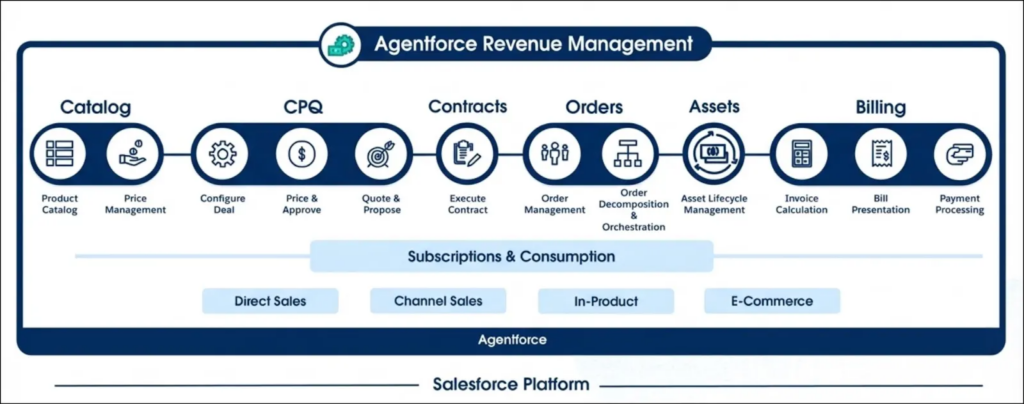
In simple terms, it helps a company manage:
What it sells
    ↓
How products can be configured
    ↓
How prices are calculated
    ↓
What is quoted to the customer
    ↓
What the customer orders
    ↓
What the customer owns or subscribes to
    ↓
How the product is fulfilled
    ↓
How usage is measured
    ↓
How the customer is billed
Revenue Cloud goes beyond Closed Won
In a basic Sales Cloud implementation, the sales process often appears to finish when an Opportunity reaches the Closed Won stage.
But for many businesses, closing the opportunity is only the beginning.
After the sale, the business still needs to:
- Create the order.
- Generate a contract.
- Provision or fulfil the product.
- Track the customer’s subscription.
- Process upgrades and cancellations.
- Measure consumption.
- Generate invoices.
- Collect payments.
- Renew the agreement.
Revenue Management connects these activities into a broader product-to-cash process. A simplified lifecycle looks like this:
Product Catalog
    ↓
Product Configuration
    ↓
Pricing
    ↓
Quote
    ↓
Order
    ↓
Contract and Assets
    ↓
Fulfilment
    ↓
Usage and Rating
    ↓
Billing
    ↓
Renewal, Amendment or Cancellation
Product Catalog Management: what do we sell?
Product Catalog Management defines the products and services that a company makes available to customers.

A catalog can contain:
- Simple products
- Subscription products
- Product bundles
- Add-ons
- Product categories
- Product classifications
- Product attributes
- Product relationships
- Qualification rules
- Product selling models
The standard Salesforce Product2 object remains important, but Revenue Management extends the product model significantly.
For example, imagine a company selling a software subscription called Analytics Pro.
The product might have these attributes:
Analytics Pro
├── Number of users
├── Storage allowance
├── Support level
├── Contract term
└── Billing frequency
The product can also belong to a classification such as Software Subscription.
A classification acts somewhat like a reusable product template. Products belonging to the same classification can share common attributes and behaviour.
The developer guide provides standard objects, business APIs, Metadata API types, Tooling API objects, and Product Discovery APIs for managing and retrieving catalog information.
Product selling models
A product selling model describes how a product is sold.
A product might be sold as:
- A one-time purchase
- A recurring subscription
- A fixed-term subscription
- A usage-based service
- A combination of recurring and usage charges
For example:
Product: Analytics Pro
Selling model: Term subscription
Term: 12 months
Billing frequency: Monthly
Separating the product from its selling model allows the same underlying product to be offered in multiple commercial forms.
Salesforce Pricing: how much does it cost?
Salesforce Pricing determines the final price of products on quotes and orders.
Pricing is not limited to looking up a value from a price book. Revenue Management can support more sophisticated pricing processes, including:
- List prices
- Volume discounts
- Attribute-based adjustments
- Bundle discounts
- Contracted prices
- Promotional discounts
- Manual adjustments
- Proration
- Usage rates
- Derived pricing
The pricing process can be viewed as a waterfall:
List price
− volume discount
− promotion
− contracted discount
± attribute-based adjustment
+ tax
= final customer price
Important pricing objects include:
PriceBook2PriceBookEntryPriceAdjustmentSchedulePriceAdjustmentTierContractItemPriceProductSellingModelProrationPolicy
Volume pricing example
Imagine that Analytics Pro costs €100 per user per month.
The company offers these discounts:
5–19 users: No discount
20–49 users: 10% discount
50 or more users: 20% discount
<br><br>A customer buying 25 licences would receive a 10% adjustment:25 users × €100 = €2,500
10% discount = €250
Final monthly price = €2,250Salesforce Pricing exposes business APIs, Apex capabilities, and standard invocable actions that can be called from Flow. The guide includes separate actions for normal and headless pricing scenarios.
Product Configurator: what combinations are allowed?
The Product Configurator controls how products, bundles, components, and attributes can be combined.
Consider a laptop bundle:
Laptop
├── Processor
├── Memory
├── Storage
├── Operating system
└── Support plan
The company may need rules such as:

If memory is 64 GB,
the entry-level processor cannot be selected.

If Linux is selected,
Microsoft Premium Support cannot be included.

If Premium Support is selected,
its term must match the laptop subscription term.
The configurator can manage:
- Required components
- Optional components
- Minimum and maximum quantities
- Attribute dependencies
- Product exclusions
- Product recommendations
- Configuration validation
Revenue Management also supports Constraint Modeling Language, or CML. This allows teams to define complex configuration logic declaratively instead of implementing every rule in Apex or another general-purpose programming language.
Transaction Management: from quote to customer asset
Transaction Management manages the commercial lifecycle of a sale.
The main sequence is:
Quote
    ↓
Quote Line Items
    ↓
Order
    ↓
Order Items
    ↓
Contract
    ↓
Assets
A quote represents what is being proposed to the customer.
An order represents what the customer has committed to purchase.
A contract represents the commercial agreement between the customer and the business.
An asset represents something that the customer currently owns, uses, or subscribes to.
This distinction is important:
Product = What can be sold

Quote = What is being proposed

Order = What the customer agreed to purchase

Contract = What both parties agreed

Asset = What the customer currently owns or subscribes to
Managing the subscription lifecycle
After an asset is created, the customer may want to change it.
Revenue Management supports lifecycle operations such as:
- Amendments
- Upgrades
- Downgrades
- Renewals
- Cancellations
- Transfers
- Rollbacks
For example, a customer may begin with 25 Analytics Pro users and later upgrade to 40 users.
Instead of treating this as an unrelated new sale, Revenue Management can create an amendment transaction based on the customer’s existing assets.
The developer guide includes standard invocable actions for operations such as:
- Creating an order from a quote
- Creating multiple orders from a quote
- Creating a contract
- Creating or updating assets from an order
- Initiating amendments
- Initiating renewals
- Initiating cancellations
- Transferring assets
- Rolling back the most recent asset action
Dynamic Revenue Orchestrator: how is the product delivered?
Dynamic Revenue Orchestrator, commonly shortened to DRO, manages fulfilment.
A commercial product may need to be converted into several technical or operational tasks.
For example, selling a business internet package may require:
Customer orders Business Internet
    ↓
Create the network service
    ↓
Assign a router
    ↓
Schedule installation
    ↓
Activate the connection
    ↓
Start billing
    ↓
Send confirmation
The customer sees one commercial product, but the company must perform several fulfilment activities behind the scenes.
Dynamic Revenue Orchestrator supports concepts such as:
- Fulfilment plans
- Fulfilment steps
- Step dependencies
- Product decomposition
- Fulfilment assets
- Task assignment
- Fallout handling
- Jeopardy rules
- External system callouts
A decomposition rule can convert a commercial product into the technical components required to deliver it.
For example:
Commercial product:
Business Internet Package

Fulfilment products:
- Network connection
- Router
- Installation appointment
- Customer activation
Usage and Rate Management: what did the customer consume?
Usage Management is relevant when customers are charged based on consumption.
Common examples include:
- API requests
- Data storage
- Electricity
- Phone minutes
- Messages
- AI tokens
- Streaming hours
- Distance travelled
A simplified usage process looks like this:
Usage event
    ↓
Aggregation
    ↓
Rating
    ↓
Apply included allowance
    ↓
Calculate overage
    ↓
Create billable charge
Revenue Management separates usage management from rate management.
Usage Management
Usage Management tracks what the customer consumed and which entitlements or allowances apply.
Rate Management
Rate Management determines how that consumption should be priced.
For example:
Subscription includes 10,000 API calls.

0–10,000 calls:
Included in the subscription

10,001–100,000 calls:
€0.01 per call

Above 100,000 calls:
€0.007 per call
The relevant configuration can include:
- Usage resources
- Usage grants
- Usage policies
- Rate cards
- Rate card entries
- Rating frequencies
- Overage policies
- Rollover policies
The developer guide exposes business APIs and invocable actions for creating usage summaries, processing consumption overages, refreshing entitlements, and invoking the rating service.
Billing: how does the customer get invoiced?
Billing converts orders, assets, and usage information into financial transactions.
A simplified billing lifecycle is:
Order Item
    ↓
Billing policy and treatment
    ↓
Billing schedule
    ↓
Invoice batch
    ↓
Draft invoice
    ↓
Posted invoice
    ↓
Payment, credit memo or refund
Billing supports objects and processes related to:
- Billing schedules
- Billing policies
- Billing treatments
- Invoices
- Invoice lines
- Credit memos
- Debit memos
- Payments
- Refunds
- Payment schedules
- Accounting periods
- Tax
- Legal entities
- General ledger assignments
The distinction between an asset and an invoice is important:
Asset = What the customer owns or consumes

Invoice = What the customer must pay
Revenue Management Billing also includes standard invocable actions for operations such as:
- Creating billing schedules
- Posting draft invoices
- Issuing credit memos
- Applying credits
- Processing refunds
- Extending invoice due dates
- Suspending billing
- Writing off invoices
- Sending dunning emails
A complete subscription example
Imagine that a company sells this product:
Analytics Pro

Price:
€100 per user per month

Minimum:
5 users

Contract:
12 months

Included:
1 TB storage

Additional storage:
€20 per 100 GB
Product catalog
Product: Analytics Pro
Classification: SaaS Subscription

Attributes:
- Number of users
- Storage allowance
- Support level
Selling model
Selling model: Term subscription
Term: 12 months
Billing frequency: Monthly
Pricing
Base price: €100 per user

5–19 users:
No discount

20–49 users:
10% discount

50 or more users:
20% discount
Configuration
Minimum number of users: 5

Premium Support requires:
At least 20 users

Storage add-ons:
Must be purchased in 100 GB blocks
Transaction
Quote:
Analytics Pro × 25 users
Premium Support

    ↓

Order

    ↓

Contract

    ↓

Customer assets
Usage
The subscription includes 1 TB of storage, but the customer uses 1.3 TB.
Included storage: 1 TB
Actual usage: 1.3 TB
Billable overage: 300 GB
Overage charge: 3 × €20 = €60
Invoice
Subscription:
25 × €100 = €2,500

Volume discount:
10% = −€250

Storage overage:
€60

Invoice before tax:
€2,310
At the end of the contract, Revenue Management can initiate a renewal based on the existing customer assets.
How developers extend Revenue Management
The developer guide exposes several different extension layers.
Standard Salesforce objects
Standard objects can be used for:
- SOQL queries
- Reporting
- Relationships
- Custom fields
- Validation rules
- Security
- Apex automation
However, complex Revenue Management processes should not be reduced to unrelated CRUD operations.
Changing a quote line directly does not necessarily mean that configuration, pricing, asset lifecycle, and fulfilment processes have also been completed.
Business APIs
Business APIs perform complete domain operations.
They can be used to:
- Search product catalogs
- Retrieve product bundles
- Configure products
- Calculate prices
- Place quotes
- Create orders
- Amend assets
- Process billing scenarios
These APIs often process an entire transaction graph instead of only one record.
Invocable actions
Revenue Management includes standard invocable actions that can be called from:
- Flow Builder
- Salesforce automation
- REST Invocable Actions API
- Orchestration processes
For example:
Order is activated
    ↓
Create or update customer assets
    ↓
Create the contract
    ↓
Start fulfilment
    ↓
Create billing schedules
Apex
Salesforce provides built-in Apex namespaces and classes for selected Revenue Management operations.
Apex is useful when custom server-side logic needs to invoke pricing, transaction, billing, or other Revenue Management capabilities.
Platform events
Revenue Management uses platform events for asynchronous processing.
Examples include events associated with:
- Quote saving
- Quote-to-order processing
- Order placement
- Asset creation
- Billing schedule creation
- Invoice processing
- Fulfilment decomposition
An integration can subscribe to these events instead of repeatedly checking whether a background process has completed.
Metadata API and Tooling API
Metadata and Tooling APIs manage configuration rather than customer transactions.
They can be used for components such as:
- Revenue Management settings
- Pricing recipes
- Pricing procedures
- Configurator settings
- Flows
- Fulfilment configuration
- Usage settings
- Billing settings
A useful distinction is:
Business APIs:
Operate on products, quotes, orders, assets and invoices

Metadata APIs:
Define how Revenue Management behaves
Revenue Management deployment requires careful planning
Revenue Management deployments are more complicated than ordinary Salesforce metadata deployments.
Some Revenue Management configuration is stored as metadata, while other configuration is stored as records in standard objects.
That means a complete deployment may involve:
Salesforce metadata
+
Configuration records
+
Object relationships
+
Activation steps
+
Post-deployment processing
The deployment order matters.
For example:
Deploy metadata
    ↓
Create parent configuration records
    ↓
Create products and classifications
    ↓
Create selling models
    ↓
Create price books and prices
    ↓
Create dependent rules
    ↓
Activate products
    ↓
Rebuild or refresh required indexes
The guide recommends a structured DevOps process because Revenue Management contains complex dependencies between metadata and data records. Incorrect sequencing can result in failed deployments, broken lookups, or inconsistent configuration.
What should a beginner learn first?
Trying to learn every Revenue Management object is not practical.
A better learning sequence is:
Learn the product model
Start with:
Product2
Product Classification
Product Attributes
Catalogs
Categories
Bundles
Product Selling Models
Learn basic pricing
Understand:
Price Book
Price Book Entry
Price Adjustment Schedule
Price Adjustment Tier
Pricing waterfall
Learn the transaction lifecycle
Focus on:
Quote
    ↓
Order
    ↓
Contract
    ↓
Asset
Then learn how assets are:
Amended
Renewed
Cancelled
Transferred
Build one configurable bundle
Create a small bundle with:
- One parent product
- Two optional components
- One required component
- Two configuration rules
Automate the lifecycle with Flow
Use standard invocable actions to:
- Create an order from a quote
- Create a contract
- Create assets
- Initiate a renewal
Add advanced capabilities later
Only after the basic transaction lifecycle works should you move to:
- Dynamic Revenue Orchestrator
- Usage Management
- Rate Management
- Billing
- Advanced integrations
- Automated deployments