
🔥 600+ people already subscribed. Why not you? Get our newsletter with handy code snippets, tips, and marketing automation insights.

background shape
background shape

Adobe Campaign crashes when viewing list

Have you ever encountered a situation where the Adobe Campaign console crashes while you’re trying to view something? This issue often occurs with lists, especially when previewing their data contents. The root cause lies in changes made to the list structure. Adobe’s cache retains the old structure, and when it attempts to display columns that no longer exist, the console may not take it well and crashes on you.

To restore balance to the universe and put an end to those pesky Adobe Campaign console crashes, you need to do just one thing: clear your cache!

File -> Clear the local cache..
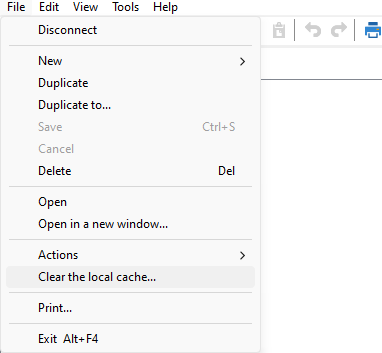
Clear the local cache in adobe campaign classic

Oh hi there 👋
I have a SSJS skill for you.

Sign up now to get an SSJS skill that can be used with your AI companion

We don’t spam! Read our privacy policy for more info.

Share With Others

The Author
Marcel Szimonisz

Marcel Szimonisz

MarTech consultant

I specialize in solving problems, automating processes, and driving innovation through major marketing automation platforms, particularly Salesforce Marketing Cloud and Adobe Campaign.

Your email address will not be published. Required fields are marked *

Buy me a coffee
Subscribe

Get exclusive tips, scripts and news

Choose your topics

We don’t spam! Read our privacy policy for more info.

Similar posts