SFMC Data Extension Export: Extract & File Transfer

Exporting a Data Extension in Marketing Cloud Engagement uses a Data Extension Extract Activity to create the export file and a File Transfer Activity to move that file to another configured file location. The two activities have separate roles: the extract creates the file from Data Extension data, while File Transfer activity handles moving file to FTP location.
Configure the Data Extension Extract Activity
Create a Data Extract Activity in Automation Studio and select Data Extension Extract as the Extract Type. The Data Extension is identified using its DECustomer Key, which is the Data Extension’s External Key. The activity also requires a File Naming Pattern that defines the name of the generated file.
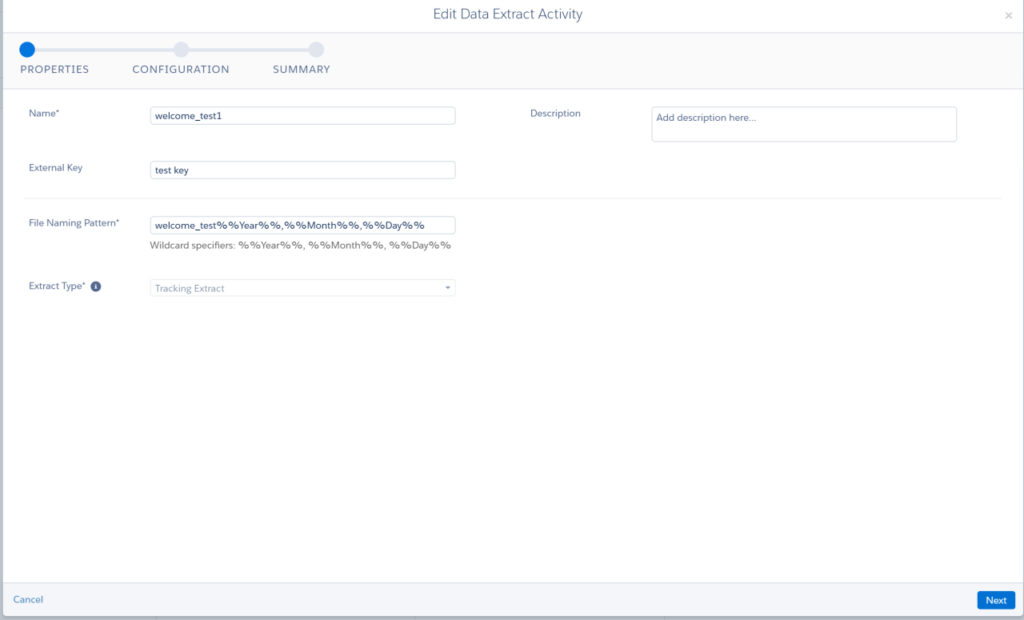
The date-based personalisation strings allow the filename to change according to the automation run date. File naming patterns are case-sensitive, and the pattern needs to be planned together with the File Transfer Activity that processes the resulting file.
Data Extension Extract Configuration
The Data Extension Extract creates the export file in the Marketing Cloud Safehouse before the file is processed by the File Transfer Activity. The extract output is generated in a compressed format, which is then available for the subsequent file operation.
This means the Data Extract Activity itself should not be treated as the step that delivers the file to an external destination. The File Transfer Activity handles the next stage.
Add File Transfer After the Extract
Add a File Transfer Activity after the Data Extension Extract Activity when the generated file needs to be moved or processed further.
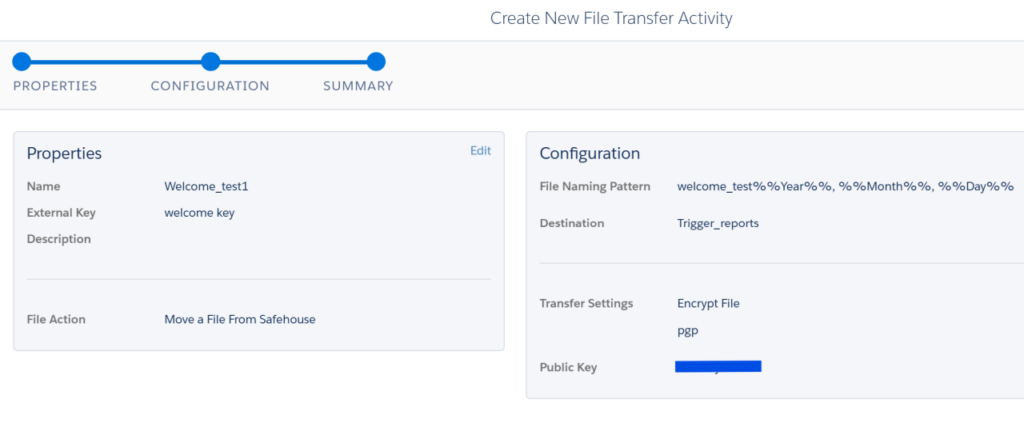
For an extract created in Safehouse, the File Transfer Activity can use Move a File From Safehouse as the file action and move the file to the configured destination.
The File Transfer Activity needs to be configured to identify the file produced by the extract. The File Naming Pattern should therefore correspond to the pattern used by the Data Extension Extract.
Keep the Extract and File Transfer in Separate Steps
The Data Extension Extract and File Transfer activities should run in sequence, with the extract completing before File Transfer attempts to process the file.
In Automation Studio, place the activities in separate steps rather than putting both activities in the same step. This prevents the File Transfer Activity from attempting to process the file before the extract has completed.
A typical Automation structure is:
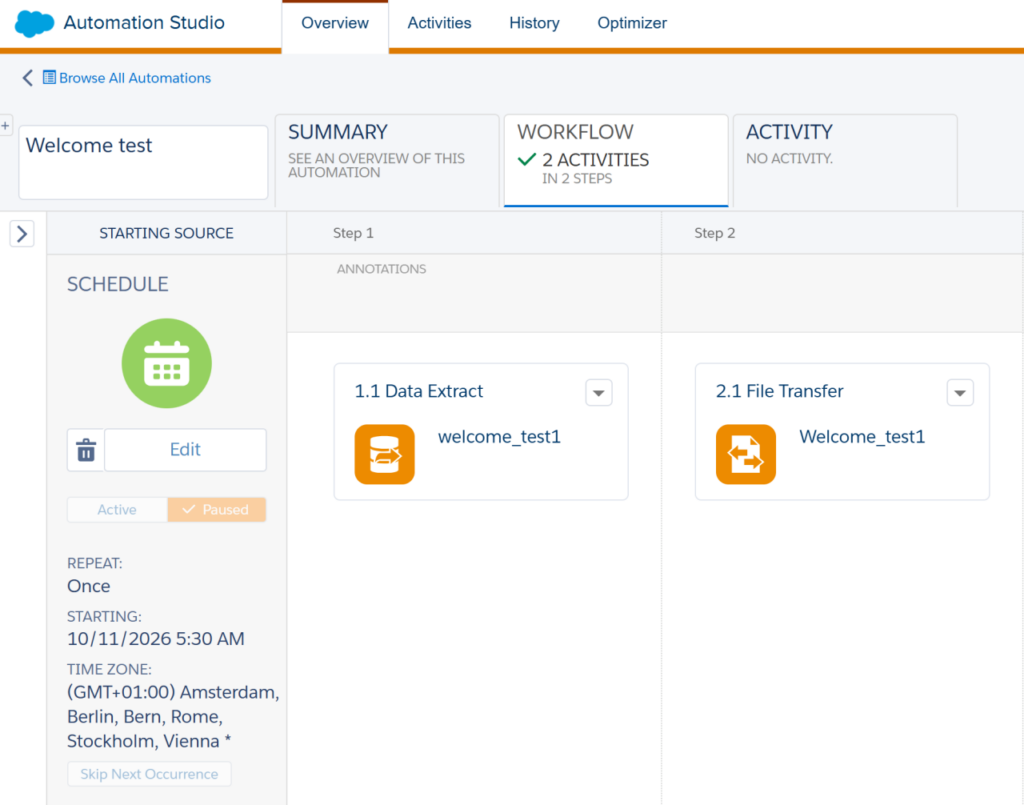
The dependency is important because the second activity depends on the file produced by the first activity.
Configure the File Location
The destination for the File Transfer Activity is configured through a File Location in Marketing Cloud Engagement.
Depending on the account configuration and supported functionality, file locations can include Enhanced FTP, Safehouse, and supported external cloud storage locations.
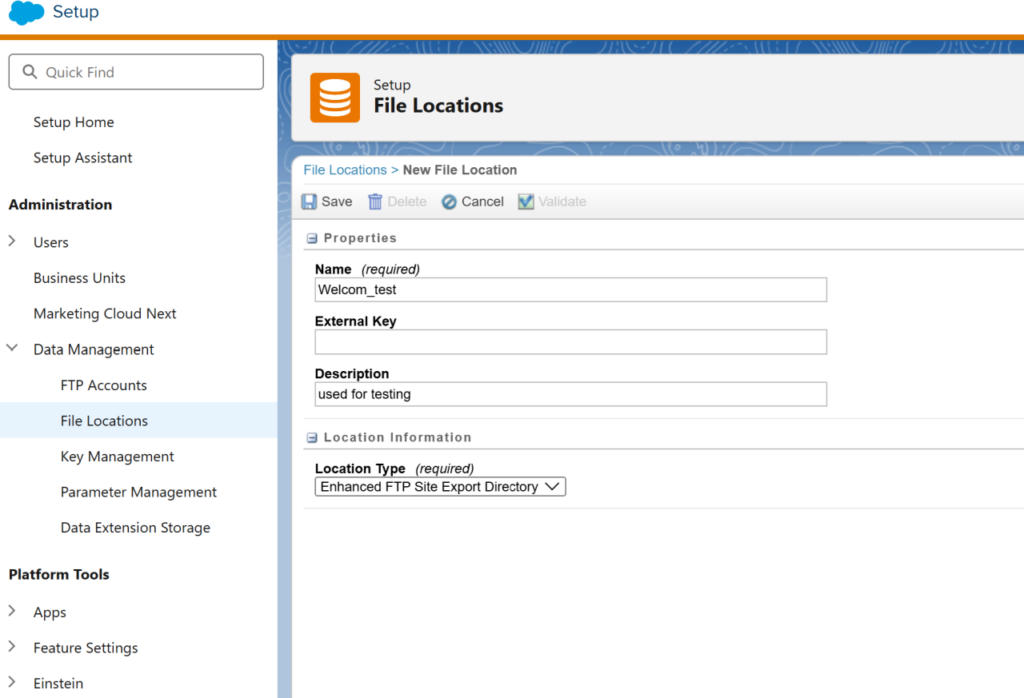
The important distinction is that Safehouse is the internal file location used during the file handling process in Marketing Cloud Engagement, while the configured file location determines where the File Transfer Activity moves the file.
Check the Activity Dependency When the Export Fails
If the Data Extension Extract completes but the File Transfer Activity fails, the automation sequence and file configuration should be checked before changing the Data Extension.
Verify:
- The Data Extension Extract Activity runs before File Transfer.
- The File Transfer Activity is configured to process the file created by the extract.
- The File Naming Pattern matches between the extract and transfer activities.
- The selected File Transfer operation matches the required file handling.
- The destination File Location is correctly configured.
A filename mismatch is particularly important because the File Transfer Activity needs to identify the file produced by the extract.
File Naming Pattern Issues
If File Transfer cannot find the extracted file, check the filename configuration first.
For example, if the extract creates:
Welcome_test_20261008.csv
but File Transfer is configured to look for a different filename pattern, the transfer step will not identify the expected file.
The filename pattern should therefore be planned when configuring both activities rather than treating the extract and transfer configuration as unrelated steps.
Large Exports Take Longer to Process
Large Data Extension extracts can require significant processing time. The automation schedule should allow enough time for the Data Extract Activity to complete before the File Transfer Activity starts.
For recurring exports, the expected data volume should therefore be considered when deciding how frequently the automation runs and when downstream systems should expect the file.
Extract Provisioning and Configuration
Data Extract types need to be provisioned for the account before they can be used. If Data Extension Extract is not available when creating a Data Extract Activity, the account provisioning and available file-transfer configuration should be checked before troubleshooting the Data Extension itself.