How Data 360 Data Spaces Support Marketing Cloud Next

Salesforce Data 360 helps organisations bring customer data together from different systems, including Sales, Service, Commerce, and Marketing. Instead of keeping customer information isolated in separate systems, Data 360 helps create a more connected view of the customer.
Marketing Cloud Next uses this connected data to support marketing activities such as segmentation, personalisation, and customer engagement. A clear understanding of Marketing Cloud Next’s capabilities provides useful context for exploring how it works with Data 360. Because of this, understanding how data is organised in Data 360 is important for anyone working with Marketing Cloud Next.
What Is a Data Space?
A Data Space is a way to organise data in Salesforce Data 360. Think of it as a separate working area within Data 360 where an organisation can manage data and related processes for a particular business context.
For example, a company may operate in several countries or manage multiple brands. Each region or brand may have its own customer information, marketing requirements, and business rules. Data Spaces help the organisation organise this information according to those different requirements.
It is important to remember that Data Spaces are part of Data 360, not a feature created by Marketing Cloud Next. Administrators configure Data Spaces in Data 360. Marketing Cloud Next can then use the relevant customer data and audiences available through that Data 360 setup.
Every Data 360 organisation has a Default Data Space. If an organisation needs to support different brands, regions, departments, or business requirements, it may also use additional Data Spaces. The availability of additional Data Spaces depends on the organisation’s Salesforce licensing, configuration, and permissions.
Data Spaces can be used with processes such as identity resolution, calculated insights, segmentation, and activation. However, what users can do within a Data Space depends on the organisation’s data model, configuration, and assigned permissions.
Example: Using Data Spaces Across Regions
Imagine a company that operates in both the United Kingdom and the United States. The company may use one Data 360 environment, but its regional teams might have different customer data, marketing requirements, and business processes.
To organise these different business contexts, the company could use separate Data Spaces:
- UK Data Space — For data related to UK customers and business activities
- US Data Space — For data related to US customers and business activities
This arrangement gives each regional team a clearer data boundary and helps the organisation manage its data according to regional business and governance requirements.
How Data Spaces Support Marketing Activities
Data Spaces provide the business context in which customer data can be organised and used for marketing activities such as segmentation and activation.
For example, imagine a marketing team wants to create a segment of UK customers who:
- Have made a purchase recently
- Have opted in to marketing communications
- Have a valid email address
Before creating the segment, the team needs to make sure it is working in the correct Data Space and that the required customer, purchase, consent, and contact information is available.
When the relevant data is correctly organised and connected, the team can create an audience that matches its marketing requirements more accurately. This helps ensure that the right customers are included in the segment and that the audience can be used for the intended marketing activity.
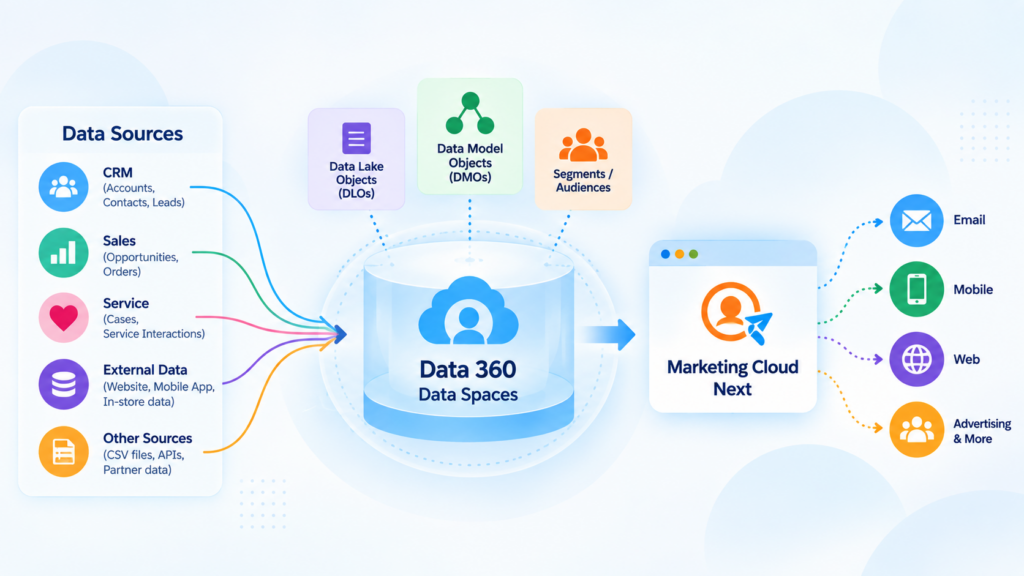
This illustration shows how data from sources such as CRM, Sales, Service, websites, mobile apps, and external systems can be brought into Data 360 Data Spaces. The data is organised using Data Lake Objects (DLOs) and Data Model Objects (DMOs), which can then support audience segmentation and activation through Marketing Cloud Next across channels such as email, mobile, web, and advertising.
Why Organisations Use Data Spaces
Organisations use Data Spaces to keep their customer data organised and to support their data governance requirements.
For example, a large company may have different brands, regions, or departments, and each one may need to work with different customer information or follow different business rules. If everyone works with the same data without clear boundaries, it can become more difficult to manage access and make sure teams are using the right information.
Data Spaces help create a clearer structure for managing data. Depending on how the organisation is set up, they can help with:
- Organising data for different regions, brands, or business areas
- Making sure segmentation and reporting use the appropriate data
- Supporting data access and governance requirements
- Helping teams work with data relevant to their responsibilities
- Reducing the risk of data being used outside its intended business context
For example, a global organisation may have separate marketing teams in the UK and the US. Each team may need to work with different customer data, reporting requirements, and marketing processes. Data Spaces can help the organisation organise these different requirements within the same Data 360 environment.
Data Spaces and Business Units
Data Spaces and Business Units may seem similar because both can help organisations separate different business areas. However, they are used for different purposes.
In Marketing Cloud Engagement, Business Units are part of the platform’s account structure. They help organisations manage marketing activities, users, content, and data for different business areas. For more information, see Understanding Business Units.
Data Spaces, on the other hand, are part of Salesforce Data 360. They provide a way to organise and manage data and related processes within a particular business context.
Therefore, a Data Space should not be considered a replacement for a Business Unit. Instead, Data Spaces form part of the underlying data architecture that can support applications such as Marketing Cloud Next. In Marketing Cloud Next, Business Units can use Data Spaces to support data separation between different business areas.
Core Building Blocks Inside a Data Space
To understand how Data 360 uses data, it helps to understand two important types of objects: Data Lake Objects (DLOs) and Data Model Objects (DMOs). These objects are part of the Salesforce Data 360 data model, which provides the structure for organising and connecting data from different sources.
- Data Lake Objects (DLOs): These hold data brought into Data 360 from different source systems. They represent the data in its ingested form, before it is mapped to the standard Data 360 data model.
- Data Model Objects (DMOs): These contain data that has been mapped and organised according to the Data 360 data model. This structure makes the data easier to use for activities such as identity resolution, calculated insights, segmentation, and activation.
For example, when an organisation configures the Marketing Data Kit for Marketing Cloud Next Growth or Advanced Edition, CRM data such as Contacts and Leads can be brought into Data 360. The data is first ingested into DLOs and then mapped to the appropriate DMOs within the selected Data Space.
In this particular setup, the initial CRM ingestion is performed as a full data load. This means the standard setup does not provide an option to filter the CRM records before the initial ingestion. Any further filtering or audience selection is generally carried out later through data configuration, segmentation, or activation.
Why Relationships Matter
Having data available in a DLO or DMO does not automatically mean that the data can be used in a segment. Data 360 also needs to understand how the different objects are connected.
For example, customer information, purchase history, and engagement data may be stored in separate objects. The relationships between these objects help Data 360 connect the information and understand which records belong to the same individual.
Where required, the relevant objects must also be connected to the Individual object. This helps Data 360 associate records from different sources with the correct person.
If these relationships are missing or configured incorrectly, some data may not be available as expected when creating a segment.
Therefore, successful segmentation depends not only on bringing data into Data 360 and mapping it to DMOs, but also on making sure that the data model and object relationships are configured correctly.
How Marketing Cloud Next Uses Data Spaces
Marketing Cloud Next uses the Data Space configured in Salesforce Data 360 as the data context for its marketing activities.
During the Marketing Cloud Next setup process, an administrator selects a Data Space. This determines the Data 360 environment and data context that Marketing Cloud Next uses for supported capabilities, such as working with customer data, creating segments, and activating audiences.
For example, customer information, purchase data, consent information, and engagement data may be available in Data 360. Marketing Cloud Next can use the relevant data from the selected Data Space to support marketing activities such as audience creation, personalisation, and customer engagement.
The data must be correctly ingested, mapped, and related within Data 360 for it to be used effectively. Marketing Cloud Next does not independently create or manage Data Spaces it uses the Data Space configured in the underlying Data 360 environment.
Setting Up a Data Space for Marketing Cloud Next
Before setting up Marketing Cloud Next, administrators need to make sure that Data 360 is enabled and that they have the necessary permissions to access the required Data Space.
As part of the setup process, Salesforce asks the administrator to select the Data Space that will be used by the Marketing Cloud Next environment. If the organisation has not created or purchased additional Data Spaces, the Default Data Space can be selected.
The setup process generally involves the following steps:
- Open Salesforce Setup.
- Go to the Marketing Cloud Next setup area or Assisted Setup.
- Open Basic Settings.
- Complete any prerequisite tasks shown on the page.
- If prompted, configure the required data protection and privacy settings.
- Select the appropriate Data Space.
- Save the configuration and continue with the remaining setup steps.
Once the Data Space has been selected, Salesforce continues with the remaining Marketing Cloud Next configuration. Depending on the organisation’s setup, this may include installing the required data kits, deploying data streams, and configuring identity resolution.
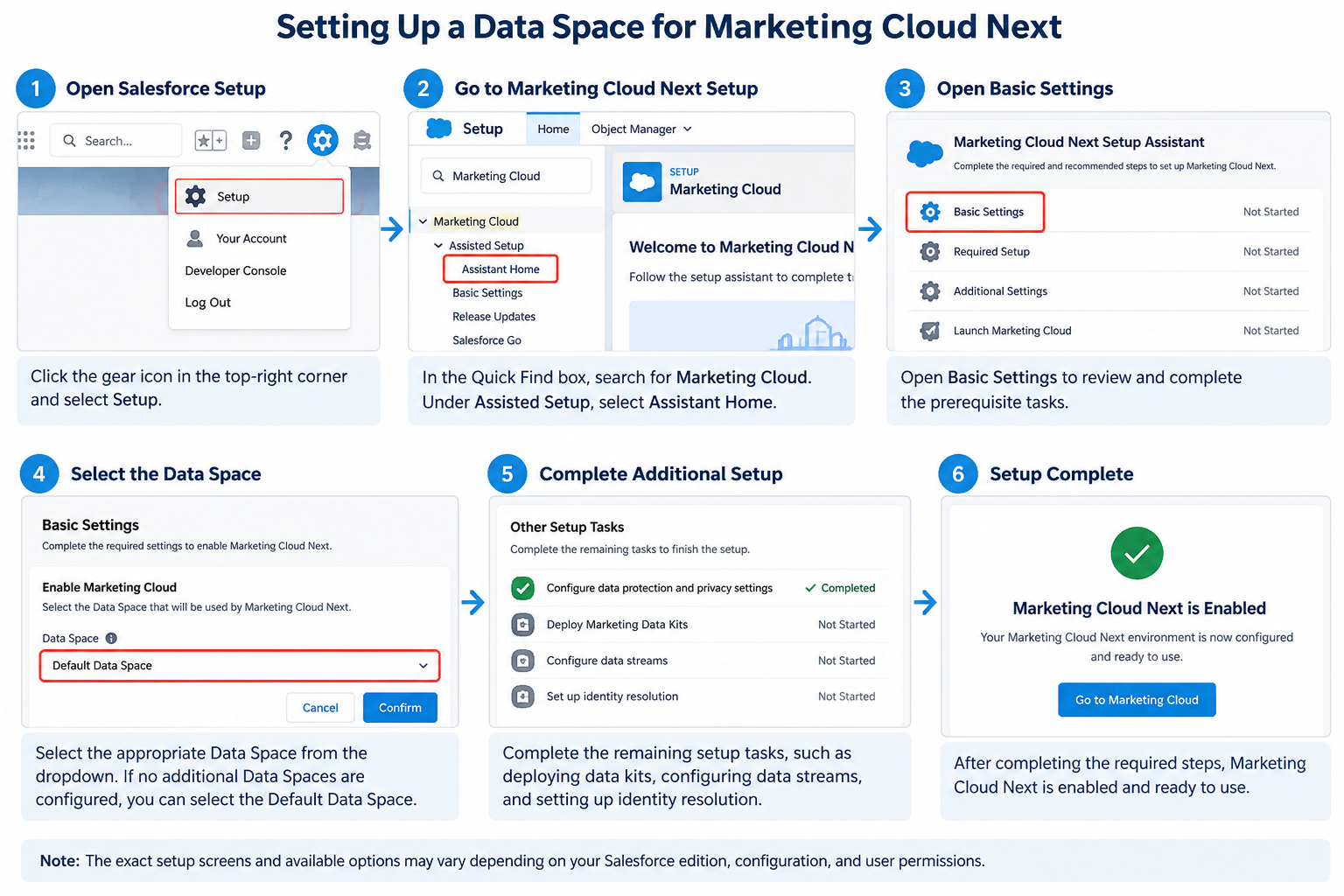
This illustration shows the main steps for setting up a Data Space for Marketing Cloud Next. It covers opening Salesforce Setup, accessing the Marketing Cloud Next Setup Assistant, reviewing the Basic Settings, selecting the appropriate Data Space, completing the remaining setup tasks, and enabling Marketing Cloud Next.
Troubleshooting Data Space Access
Sometimes, a Data Space may exist in the organisation but may not appear for the current user. In this situation, the user might see an error such as:
“We couldn’t find your data space. Make sure at least one data space exists and that you have access to all data spaces you want data from.”
This error does not necessarily mean that the Data Space is missing. It may indicate that the user does not have the required permissions to access it. To resolve the issue, an administrator should check the relevant Data Space permissions and confirm that the user has access to the Default Data Space or the specific Data Space required for the setup.
Data Space Filters
After selecting a Data Space, an organisation may also want to use Data Space Filters to control which records from a data source are included.
For example, a company may want to include only customers from a particular region or only contacts who have a valid email address. A filter allows administrators to define conditions so that only records matching those conditions are included in the Data Space.
For a marketing use case, a team could configure a filter to include contacts with valid email addresses. This can help make the data available for supported marketing activities more relevant to the organisation’s requirements.
Data Space Filters can be configured for supported objects, such as Contact or Lead, from the Data Space configuration area in Data 360. Administrators can use conditions such as AND or OR, depending on the available filter configuration, to define which records should be included.
It is important to remember that Data Space Filters are only one part of the overall data setup. They do not replace data cleansing, consent management, segmentation, or activation rules. Instead, they help control which records are included within a particular Data Space.
Common Issues to Watch For
When setting up Data Spaces and using them with Marketing Cloud Next, a few issues may occur. Most of these can be avoided by checking permissions, data relationships, and configuration before creating or activating an audience.
Permission issues: Sometimes, a Data Space exists but is not visible to a particular user. This may happen if the user does not have the required permissions or access to that Data Space. An administrator should check the user’s permission sets, Data Space access, and any relevant licensing requirements.
Incorrect DMO relationships: Data may be successfully ingested into Data 360 and appear in the relevant objects, but it may not be available for segmentation if the required relationships are missing or incorrectly configured. For example, administrators should check whether customer-related data is correctly connected to the Individual object and other relevant Data Model Objects.
Unexpected audience results: If Data Space Filters, segmentation conditions, or object relationships are not configured correctly, the resulting audience may contain fewer records than expected. Consent-related limitations can also affect whether records are included in a segment. For example, Marketing Cloud Next Consent Segmentation Gap in Data Cloud discusses a specific issue related to consent segmentation. Reviewing the filter logic, checking the source data, and validating the audience can help identify issues before the audience is used in a marketing activity.
Missing or incomplete source data: A segment may not include all expected records if customer, consent, purchase, or engagement data has not been ingested, refreshed, or mapped correctly. In this situation, administrators should check the relevant data streams, mappings, refresh status, and data availability.
Before activating an audience, it is good practice to review the data, confirm the segmentation criteria, and validate that the audience matches the intended marketing requirements.