
Marketing Cloud Next: Business Units & Data Spaces

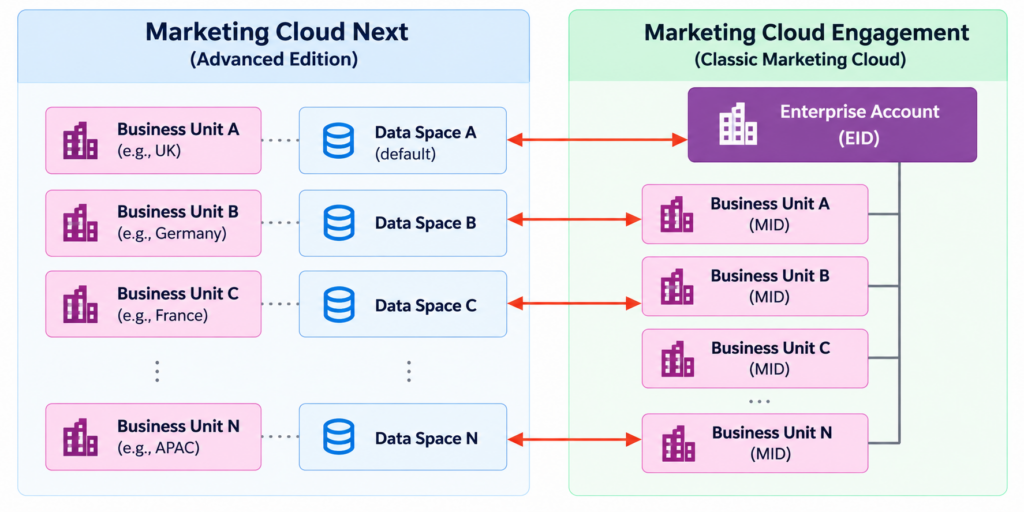
Marketing Cloud Next uses business units to organise marketing operations and Data 360 Data Spaces to separate customer data. Each business unit maps to one unique Data Space, creating a defined relationship between the marketing team, its campaigns, and its data scope.
Business units are useful for separating brands, regions, product lines or marketing departments. The architecture should be planned around business ownership, user access, data separation, and content management before configuration begins.
Use the Marketing Cloud Next Business Unit Model
Business units in Marketing Cloud Next are different from the parent and child business unit hierarchy in Marketing Cloud Engagement. Marketing Cloud Next does not use a formal parent-child hierarchy. Instead, users can belong to multiple business units and access the data and marketing assets permitted by their membership and permissions.
A business unit represents a marketing operating area. For example, a company can have separate business units for UK and Germany marketing, with each unit managing its own campaigns, users, settings, and content workspaces.
The Marketing Cloud Next business unit model describes how business units relate to Data Spaces, campaigns, users, and CMS workspaces.
Understand the Business Unit and Data Space Relationship
Business units and Data Spaces have different responsibilities.
- Business unit: Defines the marketing operating area, including campaign ownership, users, settings, and content workspaces.
- Data Space: Provides the data partition used by that business unit. Data Spaces separate data so that one business unit’s data is not automatically available to other business units.
The relationship is one-to-one. Each business unit maps to one unique Data Space, and a Data Space can be associated with only one business unit. A business unit can have multiple CMS workspaces, but it cannot be map to multiple Data Spaces.
A business unit name alone does not define which customer records are available. The associated Data Space and its data configuration determine the data scope for marketing activities.
Plan the Operating Boundary Before Configuration
Before creating business units, document the decisions that will shape their configuration.
- Business boundary: Identify the brand, region, product line, or department the unit represents.
- Ownership: Define responsibility for administration, campaign execution, content, and approvals.
- User access: Identify which users need membership in each unit and which permissions they require.
- Data scope: Determine which customer data is needed and confirm that it will be available in the associated Data Space.
- Content ownership: Decide which team owns each content set and whether content needs to be reused across business units.
Business units should represent stable operating boundaries rather than temporary campaigns or short-lived project teams. Campaigns and content can then be organised within the appropriate unit.
For more detail on the data architecture, see how Data 360 Data Spaces support Marketing Cloud Next. Data Space design defines the data boundary, while business unit planning defines operational ownership and responsibility.
Check Setup Prerequisites and Constraints
Before enabling business units, ensure that the org has at least two Data Spaces and that Marketing Cloud Next is configured in one of them. The documented creation process requires a System Administrator profile and the Marketing Cloud Admin permission set. The first two business units are created consecutively.
Each business unit needs a unique Data Space and a default CMS workspace. The initial business unit uses the existing marketing configuration, including its Data Space and default content workspace.
Business units cannot be edited or deleted after creation. The associated Data Space and workspace assignments therefore need to be checked carefully before completing setup.
The business unit creation instructions cover the prerequisites, permissions, and creation process for supported editions.
Validate Data Space Configuration
Each business unit maps to one unique Data Space, which defines its associated data partition. Before creating a business unit, confirm that the correct Data Space is available and contains the data required for the business unit’s marketing activities.
Data Space configuration should align with the intended business boundary, customer data requirements, and access model. This helps ensure that the business unit is associated with the appropriate data scope.
Avoid Cross-Product Assumptions
Marketing Cloud Engagement and Marketing Cloud Next have different business unit models, access patterns, and content management approaches. An existing Engagement hierarchy should not be reproduced in Marketing Cloud Next without assessing how the business boundaries, permissions, data scope, and reporting requirements will work in the new model.
For organisations using both products, a one-to-one mapping between existing Engagement business units and Marketing Cloud Next business units is a recommended starting point, not the only possible architecture. Alternative mappings can support business unit consolidation or analytics across multiple units, depending on the requirements.
Common Planning Problems
Creating business units for temporary work
Temporary campaigns or short-lived project teams do not usually need their own business units. Unnecessary units add overhead for ownership, user membership, data configuration, and ongoing administration.
Treating the business unit as the data configuration
A business unit has a one-to-one relationship with a Data Space, but that relationship does not automatically configure every required data stream, mapping, or filter. Validate the data setup before building segments or relying on campaign reporting.
Assuming data is always exclusive to one Data Space
The business unit-to-Data Space relationship is one-to-one, but Data Extension data can be configured for use in multiple Data Spaces. Determine which records each marketing team needs and apply the appropriate filters instead of assuming all shared datasets must be confined to a single space.
Assuming content is automatically shared
Content does not automatically move between business units. Common Assets can support reuse, but copies are independent and library access is not restricted to selected business units. Plan content ownership and review the sharing limitations before publishing reusable assets.
Reusing the Engagement hierarchy without redesign
Marketing Cloud Next does not use the same formal parent-child hierarchy as Engagement. Review the intended access model and reporting needs before mapping existing business units. A one-to-one mapping is a useful baseline, while consolidation or broader analytics may require a different design.
Creating units before confirming the design
Business units cannot be edited or deleted after creation. Confirm the intended ownership, Data Space, default workspace, user membership, and data requirements before completing setup.