What Is Tracking Extract in Salesforce Marketing Cloud Engagement?
Tracking Extract in Salesforce Marketing Cloud Engagement is the Automation Studio extract type for tracking data that turns engagement records into a file for reporting, transfer, or archiving. It matters when native tracking screens or SQL-only reporting are not enough – especially when another system needs the data on a schedule or when engagement history has to be stored outside the platform.
Tracking Extract is a file export, not a reporting view
Tracking Extract is best understood as a batch export mechanism. In practice, it sits in Automation Studio and produces a file that another step can move, ingest, or archive. That is very different from querying live reporting tables inside the platform.
Under the hood, Marketing Cloud exposes TrackingExtract as a dedicated extract object, which is why teams usually create it as a named, reusable configuration instead of treating it like a one-off report download. That design makes it workable for repeatable automations, but it also means file handling becomes part of the implementation.
How Tracking Extract actually runs in Automation Studio
The extract step is only part of the workflow
What typically happens is the tracking file is created first, with use of data extract activity, then a file transfer activity that moves output from Safehouse to Enhanced FTP makes it available for anything downstream. This is one of the most important real-world details. A lot of failed setups are not caused by the extract itself, but by missing the transfer step or pointing the next process to the wrong location.
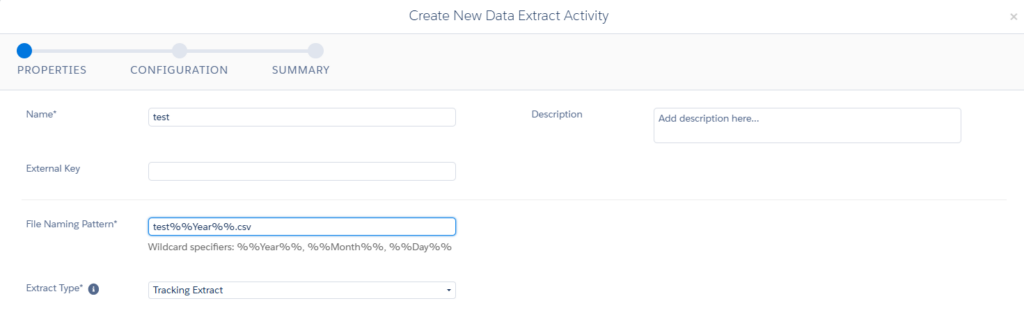
Because of that, Tracking Extract works best in scheduled, file-oriented processes. If the business wants a predictable handoff to a data warehouse, SFTP pickup, or archive process, the model fits well. If the business wants interactive reporting inside Marketing Cloud Engagement, it usually does not.
Naming and scheduling matter more than most teams expect
In practice, teams that standardize filenames, run order, and destination folders early have far fewer support issues later. A common issue is assuming the file will be available as soon as the extract starts. It will not. The extract has to finish, the transfer has to run, and only then can another system reliably pick it up.
Tracking Extract vs Data Views in Marketing Cloud Engagement
The closest internal alternative is working with system data views that expose tracking and subscriber data through SQL. Data views are better when the job is to filter, join, and transform data inside Marketing Cloud Engagement before writing the result to a standard data extension.
Tracking Extract is better when the desired output is a file from the start. That distinction sounds small, but it changes the whole implementation pattern. With data views, the logic usually lives in SQL. With Tracking Extract, the logic usually lives in automation sequencing and downstream file processing.
Another upside of tracking extract, it is the only place where you can find the link between campaign and send.

When data views are usually the better option
If the reporting requirement includes custom joins, subscriber-level filters, calculated fields, or business-rule enrichment, SQL against data views is normally easier. You can basically shape the dataset before anything leaves the platform.
When Tracking Extract is usually the better option
If another system expects delivered files, Tracking Extract is the more direct tool. It avoids the extra step of querying Marketing Cloud Engagement externally and makes the handoff predictable inside Automation Studio.
This is especially useful for historical archiving. In practice, many teams start with data views for operational reporting and move to Tracking Extract when retention, audit requirements, or warehouse ingestion become more important than in-platform analysis.
What Tracking Extract is good at
Tracking Extract works well when the goal is transport. It gives you a repeatable way to package tracking data and hand it to another system on a schedule.
Typical use cases include:
- nightly engagement exports to a data warehouse
- recurring archive files for governance or compliance
- handoffs to reporting pipelines that already ingest files from FTP
- separating operational reporting inside Marketing Cloud from long-term storage outside it
What typically happens in mature setups is a split model. Data views handle short-term querying and reporting logic inside the platform, while Tracking Extract handles delivery.
Where Tracking Extract becomes limiting
It does not replace SQL-based reporting
One limitation is that Tracking Extract is not built for data shaping. If the business needs a curated reporting table with custom logic, segmentation rules, or nontrivial joins, you usually still need SQL or external transformation after the file lands.
That is why Tracking Extract can feel blunt compared with data views. It solves the export problem well, but it does not solve modeling, cleansing, or enrichment on its own.
File behavior varies across extract types
A common issue is assuming every Automation Studio extract behaves the same once the file leaves the platform. There is a UTF-8 setting on Data Extension Extract activities for file output, which is a useful reminder that downstream file handling depends on the exact extract type and configuration being used. In practice, encoding, delimiters, and import expectations should be tested with the real downstream system, not assumed from another extract pattern.
It is not the right tool for custom table change capture
Tracking Extract is built for tracking data, not for detecting row-level changes in your own data extensions. If the actual requirement is extracting only changed rows from a data extension, that is a different extraction pattern entirely. Mixing those use cases is a common design mistake.
Share With Others
 Platinum