
What Are Data Views in Salesforce Marketing Cloud Engagement?
Data Views in Salesforce Marketing Cloud Engagement are system-generated tables that expose email and automation tracking data for querying, troubleshooting, and reporting. If you are building dashboards, validating sends, debugging journeys, or trying to answer “who actually got what, when, and how did they interact?”, Data Views are usually the most reliable place to start because they reflect platform tracking events rather than whatever you happened to store in a Data Extension. In practice, they let you join “send context” (job, list, subscriber) with “behavior” (opens, clicks, bounces, unsubscribes) using SQL in Automation Studio, without needing to instrument custom logging.
What Data Views are (and what they are not)
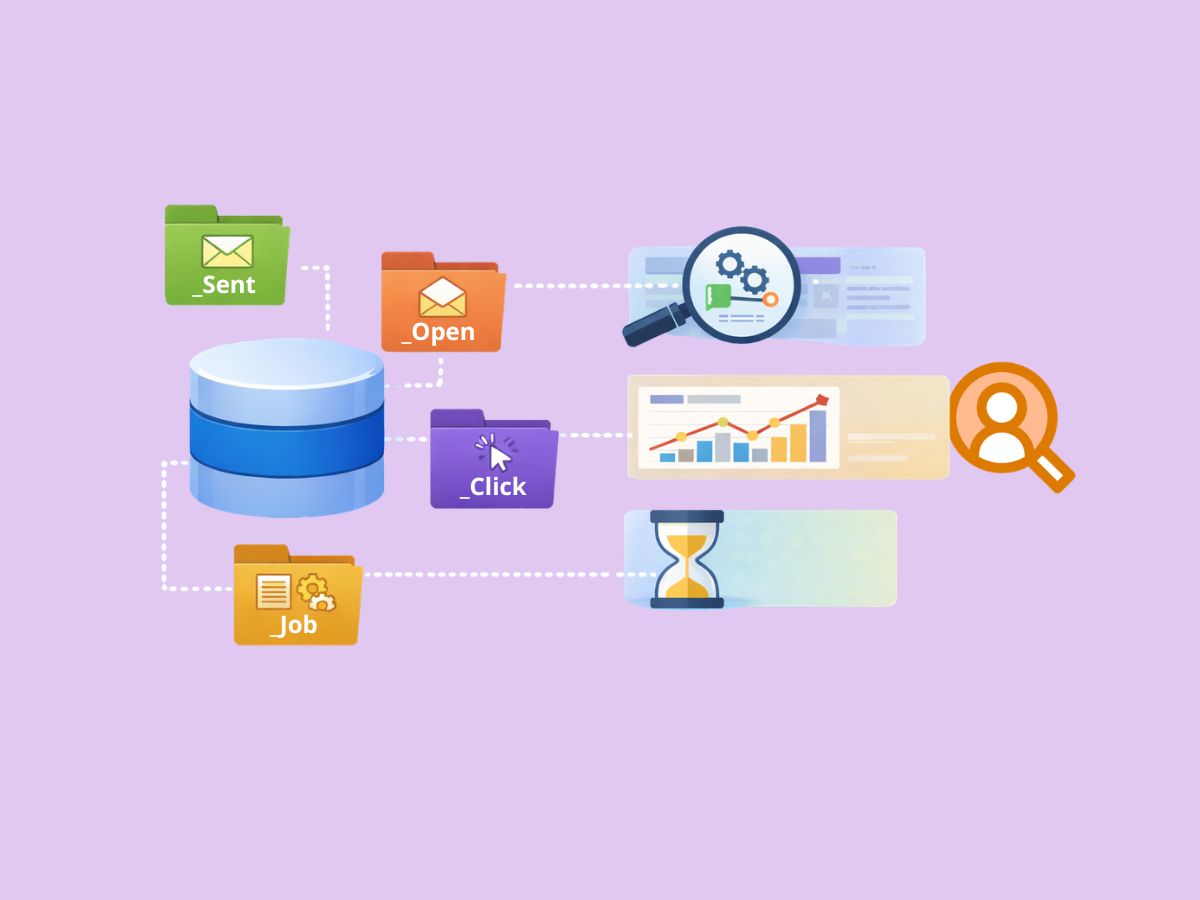
Data Views are read-only system tables (exposed in SFMC SQL as names like `_Sent`, `_Open`, `_Click`, `_Bounce`, `_Unsubscribe`, etc.) designed for analysis. They are not Data Extensions, and you do not control their schema, retention, or refresh behavior. A practical way to frame them is: Data Extensions store the marketing data you model, while Data Views expose the behavioral exhaust the platform produces.
SalesforceBen’s breakdown is useful here because it calls out that these tables are primarily intended for querying tracking data and include common send and engagement objects such as sends, opens, clicks, bounces, and unsubscribes, which makes them ideal for building custom performance reporting beyond standard Tracking dashboards: how SFMC data views map to core tracking events like sends, opens, clicks, and bounces.
Why Data Views matter in real implementations
A common issue is assuming your audience table or sendable Data Extension tells the whole story. It rarely does. What typically happens is:
- A record exists in your audience Data Extension, but the send failed for that subscriber.
- A send occurred, but the contact changed attributes later, and you need the historical send context.
- You need to reconcile Journey Builder outcomes with email engagement and find gaps.
Data Views help because the tracking record is generated by the platform as the message is processed and interacted with, so you can validate what happened even when your audience data changes.
Where Data Views fit in SFMC’s data model
Marketing Cloud’s core data concept is still “tables and relationships,” but SFMC splits responsibilities: you model audience and business data in Data Extensions, and you query system activity through Data Views.
Trailhead’s data management module reinforces this separation by emphasizing that Data Extensions are your primary storage for subscriber and business attributes while tracking and system datasets are queried differently for reporting and operational insights: how SFMC separates data extension storage from system and tracking data used for analysis.
Data Views vs Data Extensions: practical differences that change how you query
Data Extensions are configurable tables you own
From a platform behavior standpoint, Data Extensions are the “predictable” part of SFMC. You define fields, data types, primary keys, retention, and whether the table is sendable.
Salesforce’s developer documentation highlights that Data Extensions are table-like objects with defined fields and can be configured for sendability and relationships, which is why they are the right choice for durable customer attributes or campaign inputs, not behavioral tracking: how data extensions behave like configurable database tables with schema you control.
Data Views are fixed, read-only, and designed for tracking queries
You query Data Views like tables, but you cannot insert, update, or change them. You also need to design queries around platform constraints (for example, time windows, job-level identifiers, and the fact that tracking records can be event-based and high volume).
A practical implication: your reporting output almost always lands in a Data Extension you create, because Query Activities write results to Data Extensions even when the input comes from Data Views.
Common Data Views you will actually use (and what they’re good for)
Most day-to-day work uses a short list:
- `_Sent`: the baseline “attempted send” log; use it as your denominator for engagement rates when you want control.
- `_Open`: open events (be careful: opens are not the same as reads).
- `_Click`: click events (often more trustworthy than opens for engagement).
- `_Bounce`: bounce category and reasons.
- `_Unsubscribe`: unsubscribe events at send context.
- `_Job`: metadata about the send job (email name, send classification context, etc.).
There can be delays in data loading, especially in the
_Clickview. When working with this table, make sure to allow at least 72 hours after your send.

You will also see `_Subscribers` in many examples, but many implementations now anchor identity around Contact Key rather than Subscriber Key, so your join strategy matters.
Querying Data Views with SQL in Automation Studio
The normal workflow is:
- Write a SQL Query Activity against Data Views (and sometimes against Data Extensions).
- Write the output to a reporting Data Extension (overwrite or append).
- Schedule in Automation Studio.
MartechNotes’ SQL examples are valuable because they reflect the patterns people actually run in SFMC Query Activities, including joins between tracking tables and audience tables to create consumable reporting datasets: real-world SFMC SQL patterns used to join tracking data to data extensions.
Example: building a “send to click” dataset you can report on
Below is a typical pattern: start from `_Sent` (so you keep non-openers/non-clickers), then left join `_Open` and `_Click` to derive flags and timestamps. Output to a Data Extension like `rpt_EmailEngagementDaily`.
SELECT
 s.JobID,
 s.SubscriberKey,
 s.EventDate AS SentDate,
 MIN(o.EventDate) AS FirstOpenDate,
 MIN(c.EventDate) AS FirstClickDate,
 CASE WHEN MIN(o.EventDate) IS NULL THEN 0 ELSE 1 END AS Opened,
 CASE WHEN MIN(c.EventDate) IS NULL THEN 0 ELSE 1 END AS Clicked
FROM _Sent s
LEFT JOIN _Open o
 ON o.JobID = s.JobID
 AND o.SubscriberKey = s.SubscriberKey
LEFT JOIN _Click c
 ON c.JobID = s.JobID
 AND c.SubscriberKey = s.SubscriberKey
WHERE s.EventDate >= DATEADD(day, -7, GETDATE())
GROUP BY
 s.JobID,
 s.SubscriberKey,
 s.EventDate
In practice, you’ll usually add `_Job` to attach email name or subject metadata, and you will constrain the date range aggressively to keep queries performant.
Retrieving data without SQL: SSJS, AMPscript, and why it matters
Data Views are queried via SQL in Query Activities, but sometimes you need retrieval at send time or in a custom process. That’s where Data Extension retrieval methods come in.
Salesforce’s docs describe how Data Extensions can be retrieved programmatically (for example, via WSProxy/SSJS patterns) which is useful when you need runtime lookups or operational scripts, but it also underscores a key limitation: this retrieval model is oriented around Data Extensions you control, not high-volume tracking tables designed for reporting: how SFMC supports programmatic retrieval patterns for data extensions in scripts.
MartechNotes shows how teams mix SQL for batch reporting with SSJS or AMPscript for targeted runtime lookups, which is often the real operational split: SQL for aggregations and tracking joins, script lookups for personalization and decisioning: practical patterns for mixing SQL with SSJS and AMPscript data extension lookups.
Identity and join keys: the hidden source of “wrong numbers”
Most “my open rate is wrong” troubleshooting ends up being a join problem.
SubscriberKey, ContactKey, JobID, and why you can’t guess
Data Views frequently key engagement by `SubscriberKey` and `JobID`. Your audience tables might be keyed by `ContactKey`, CRM ID, email address, or a composite. When those don’t align, joins silently drop rows, and your counts fall apart.
A practical workaround is normalizing to a consistent key in your reporting layer. If your source data does not share a stable ID, hashing can be used as a deterministic bridge.
MartechNotes’ hashing approach is useful because it focuses on generating consistent MD5 outputs across SFMC SQL and AMPscript, which helps when you need the same derived key in both batch queries and send-time logic: how to produce consistent MD5 hashes across SQL and AMPscript for stable join keys.
Data Views and personalization: where tracking data helps (and where it hurts)
Personalization often starts with profile attributes, but behavior is what makes it smarter. Data Views can feed behavioral segments like “clicked in last 14 days” or “no opens in 90 days,” which then get written into a segmentation Data Extension for targeting.
MartechNotes’ automation-focused personalization guidance aligns with what works in the field: personalization systems stay maintainable when you compute behavioral signals in automations and store them as simple flags or scores, rather than trying to do complex logic inside every email: why precomputing behavioral flags in automations scales better than complex per-email logic.
When AMPscript is not enough
When teams try to do heavy, conditional personalization at render time, email performance and maintainability can degrade fast. One common pattern is moving complex decisioning to server-side JavaScript where needed, but keeping the underlying “facts” (segments, eligibility, last engagement date) precomputed via SQL from Data Views.
MartechNotes captures that real constraint: AMPscript is great for straightforward dynamic content, but more complex logic often becomes clearer and more maintainable in JavaScript, especially when you combine it with prebuilt data sets coming out of automations: why heavy personalization logic often shifts from AMPscript to JavaScript for maintainability.
Troubleshooting and edge cases you’ll see in production
“My numbers don’t match the Tracking tab”
This is extremely common. The Tracking tab is a productized view with its own rules. Your SQL is rawer, and you control grouping, deduplication, and lookback windows. A tiny change (first open vs all opens) can create big deltas.
The quickest path is to define your metric rules explicitly: unique vs total events, time window, and what counts as the denominator (sent vs delivered).
“Query runs forever” or “data disappears”
Data Views can be large, and platform retention windows apply. You need tight `WHERE` clauses, indexed join paths where possible (typically on `JobID` and `SubscriberKey`), and reporting tables that store daily snapshots if you need longer history.
Stack Exchange threads on Data Views repeatedly surface the same practical debugging themes: retention limits, needing date filters, and confusion around which tracking view to use for a given metric, which mirrors what you see on real projects when reporting is built without explicit constraints: common production issues like retention, date filtering, and metric definitions when working with SFMC data views.
Reddit discussions add a more candid layer: teams often discover Data Views only after leadership asks for cross-journey reporting or deliverability troubleshooting, and the repeated advice is to treat Data Views as the source of truth for tracking, then persist what you need into your own reporting Data Extensions for stability: practitioner discussions on using data views as tracking truth and persisting rollups into reporting tables.
A practical implementation pattern that holds up
If you want Data Views to be useful long-term, the pattern that typically survives platform changes and reporting requests looks like this:
- Daily extraction queries against Data Views with strict time windows. Do mind that there is delay in writing data into the data views (For some tables like _Click the delay we have seen surpassed 72 hours)
- Write to curated reporting Data Extensions designed for consumption (job metadata, subscriber identity, derived flags).
- Build segmentation on top of curated tables, not directly on Data Views.
- Reconcile identities early (SubscriberKey vs ContactKey), and document your joins.
- Keep send-time personalization lightweight by using precomputed fields where possible.
That setup prevents the usual pain: slow ad-hoc queries, inconsistent metrics, and last-minute reporting that breaks because the tracking window moved or identity keys drifted.
Share With Others
 Platinum