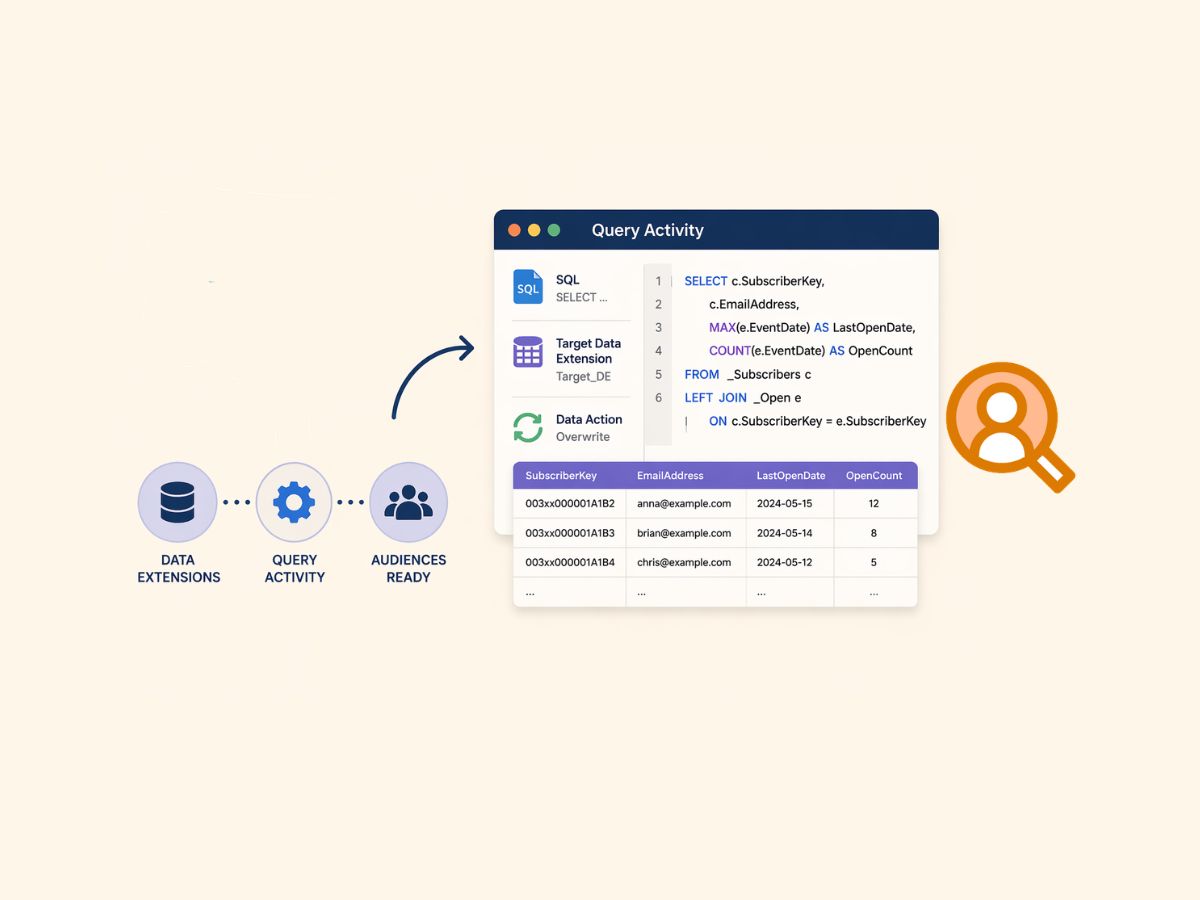
What Is a Query Activity in Salesforce Marketing Cloud Engagement?

The main difference between a Query Activity and simply “running SQL” in Marketing Cloud Engagement is that a Query Activity is a saved, repeatable automation step that turns SQL into an operational data process. In practice, it matters because most scalable segmentation, suppression, and data prep work in Marketing Cloud relies on reliably reshaping Data Extension data on a schedule, not one-off queries.
Query Activity definition (and what it actually does)
A Query Activity is an Automation Studio activity that runs a SQL SELECT statement against Marketing Cloud data sources and writes the result set into a target Data Extension using a defined data action such as overwrite, append, or update behavior. That “write the results somewhere” aspect is what makes it production-friendly compared with ad-hoc querying, and it’s central to how the platform expects you to build durable audiences and downstream-ready tables using the built-in Query Activity configuration and data actions.
What typically happens in real accounts is that Query Activities become the backbone of “audience factories”: a chain of queries that standardize raw customer data into clean, indexed, channel-ready Data Extensions.
Where Query Activities live: Automation Studio in real builds
Query Activities run inside Automation Studio automations, alongside other activities such as imports, extracts, filters, scripts, and sends. The practical benefit is orchestration: you can run the same query nightly, after an import finishes, or before a send starts, without relying on someone to manually execute anything. That overall workflow model is part of how Automation Studio structures activities into scheduled automations.
One limitation is that teams often treat Automation Studio like a “scheduler” only. In practice, it’s closer to a lightweight ETL layer inside Marketing Cloud, and Query Activity is the piece that does most of the transformation work in that layer, as described in how Automation Studio is used to operationalize repeatable marketing data processes.
Query Activity vs Query Studio: why the difference matters
Query Studio is typically where SQL gets drafted, tested, and debugged. Query Activity is what you promote into an automation once it’s stable and you’ve decided the target Data Extension design and refresh pattern.

A common issue is assuming Query Studio behavior is the same as a scheduled Query Activity. In practice, the query text might be identical, but operational concerns change: target Data Extension keys, update rules, and downstream dependencies start to matter more than “does it return the right rows right now.” The most reliable workflow is to validate logic and row counts in practical Query Studio testing patterns and then translate that into a Query Activity with explicit data actions and a purpose-built target table.
Query studio is a free App from AppExchange. It is not even native feature. Query Studio is heavily used by many to perform investigations or draft segmentation queries.

How Query Activity writes data: target Data Extension design and data actions
The target Data Extension isn’t an afterthought. It’s part of the contract of the Query Activity:
- Column names and data types need to match what your SELECT returns.
- Key strategy affects update behavior and deduplication.
- Refresh strategy (overwrite vs append vs update-style behavior) determines whether the table is treated like a snapshot, a log, or a slowly changing dimension.
In real-world implementations, the query is often less “hard” than the table design decisions around it. If the target is a sendable audience, overwrite-style snapshots are common. If the target is an event log (clicks, form submits, transactions), append is common. If the target is a “current state” table keyed by ContactKey or SubscriberKey, update behavior becomes central.
For platform-specific behavior and implementation details, Marketing Cloud’s developer documentation focuses on how Query Activities are defined and executed as a first-class automation object, including how they’re represented and managed in the platform’s tooling through the Query Activity object model and execution behavior.
Practical SQL patterns that work well in Query Activities
Most Query Activities in production fall into a few repeatable patterns:
Audience selection (segmentation tables)
Build a target DE that is sendable (or at least keyed to a contact identifier), then SELECT only the fields needed for personalization and compliance checks.
Suppression and eligibility logic
Create “eligible” and “ineligible” tables and join them in later steps. This keeps email send filters simpler and more transparent.
Aggregations for personalization
Pre-aggregate metrics (last purchase date, total orders, preferred store) into a compact profile DE that can be joined into send audiences quickly.
When you need concrete starting points, having a library of common Marketing Cloud SQL constructs helps, especially because the platform’s SQL dialect and marketing data models lead to very specific query shapes. That’s why curated collections of Salesforce Marketing Cloud SQL query examples for segmentation and transformation tend to map closely to what actually shows up in working automations.
Common limitations and trade-offs that affect Query Activity reliability
Trade-off: “all-in-SFMC” transformation vs upstream data prep
Query Activity is convenient because it keeps transformation close to activation. The trade-off is that you’re doing data engineering inside a marketing platform, with constraints that are different from a full database or warehouse.
What typically happens is teams start with everything in Query Activities, then gradually move heavier transformations upstream (CDP, warehouse, iPaaS) once query runtimes, debugging overhead, or data governance gets painful.
Common issue: mismatched columns, null handling, and silent logic drift
Query Activities are sensitive to schema alignment. Minor changes to source Data Extensions (added columns, renamed fields, changed lengths) can break queries or, worse, change results subtly. In practice, the risk isn’t just query failures – it’s quiet audience drift.
A disciplined approach is to standardize SQL conventions (explicit column lists, consistent casting and aliasing, stable join keys) and follow platform-specific best practices and “gotchas” that come up repeatedly in Marketing Cloud work, like the ones captured in field-tested Marketing Cloud SQL tips that reduce query breakage.
Trade-off: overwrite snapshots vs append logs
- Overwrite snapshots are easier to reason about but can erase history if you later realize you need auditability.
- Append logs preserve history but can grow quickly and complicate deduplication.
In practice, many teams use a hybrid: append raw events into a log DE, then create an overwrite “current state” DE via a second Query Activity for activation.
Real-world scenarios where Query Activities become essential
Marketing Cloud Engagement is often used as the execution layer for cross-channel campaigns (email and more), where data needs to be shaped into the exact structure the channel tools expect. That’s why Query Activities become the “last-mile transformation” step between raw customer data and activation-ready audiences, especially in environments that lean heavily on Data Extensions as the operational store described in how Marketing Cloud supports data-driven digital marketing execution.
Typical scenarios where Query Activities do the heavy lifting:
Building a daily send audience from multiple sources
Example: join a customer master DE, a preferences DE, and a recent engagement DE, then output a sendable audience DE with only eligible customers.
Maintaining suppression lists that change constantly
Example: create a suppression DE that unions opt-outs, bounces, complaint flags, and internal exclusions, then reference that table in later audience queries.
Creating “ready for journey” entry tables
Example: reshape transactional events into one row per contact per trigger condition, so Journey Builder entries are controlled and deduplicated.
Implementation details that improve stability over time
Treat each Query Activity as a data product, not just a query
In practice, the query text is only half the work. The maintainable part is the contract around it:
- Clear naming for source and target Data Extensions
- A target schema designed for the specific downstream consumer (send, journey entry, reporting)
- A refresh strategy that matches the business meaning of the data
Design automations so failures are obvious and isolated
When Query Activities are chained, a failure upstream often creates misleading “success” downstream if later steps still run against old target data. The most robust builds isolate stages (import -> normalize -> segment -> activate) and avoid reusing the same target DE for multiple logical purposes, aligning with how Automation Studio typically organizes repeatable activity sequences in day-to-day automation usage patterns.
Keep Query Studio for experimentation, Query Activities for production
A common operational split that works well:
- Query Studio: quick checks, join validation, row count inspection
- Query Activities: versioned, scheduled, dependency-aware processing
That separation reduces the chance of “someone tested it once” logic getting mistaken for production-ready processing.
Query studio tips
I’m going to share a few tips that are often overlooked by consultants when working with the platform. This is one I discovered quite…
🔒 Premium Subscriber Content
What you can learn with Premium
Unlock the full article to explore these topics in detail.
Already a Premium subscriber? Log in to continue reading, or register to create your account.
You must log in and have a Premium Subscriber account to read the full article.
When upgrading, please use the same email address as your WordPress account so we can correctly link your Premium membership.
Please allow us a little time to process and upgrade your account after the purchase. If you need faster access or encounter any issues, feel free to contact us at info@martechnotes.com or through any other available channel.
To join the Discord community, please also provide your Discord username after subscribing, or reach out to us directly for access.
You can subscribe even before creating a WordPress account — your subscription will be linked to the email address used during checkout.
Premium Subscriber
29,99 € / Year
- Free e-book with all revisions - 101 Adobe Campaign Classic (SFMC 101 in progress)
- All Premium Subscriber Benefits - Exclusive blog content, weekly insights, and Discord community access
- Lock in Your Price for a Full Year - Avoid future price increases
- Limited Seats at This Price - Lock in early before it goes up
- Monthly 15-Minute Call - Discuss any topic directly