



What Is a Workflow in Adobe Campaign Classic?

Adobe Campaign Classic workflows are the platform’s main automation layer for moving data, applying targeting logic, and triggering marketing operations without manual steps. In practice, a “workflow” is less about drawing a diagram and more about building a repeatable process that can ingest data, segment audiences, enrich records, send deliveries, and write results back to the database on a schedule or based on events – all with logging and restartability built in. That’s why understanding what a adobe campaign’s workflow the number one feature anybody has to learn when starting to work with the platform.
Workflow Types in Adobe Campaign Classic
A workflow in Adobe Campaign Classic is a server-executed process made up of connected activities that run in a defined order. What typically happens is that each activity produces an output (often a target set or a dataset), and the next activity consumes it. When it’s built cleanly, a workflow becomes the “source of truth” for how data turns into marketing action: imports, segment logic, exclusions, enrichment, delivery triggers, and post-send updates.
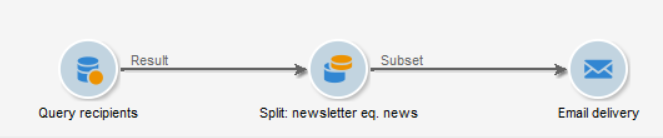
We have two types of workflows:
- targeting workflow – campaign workflow
- technical workflow
Campaign Targeting Workflow
A campaign targeting workflow is focused on audience selection and campaign execution – it defines who will receive the communication and what will be sent to them. In platforms like Adobe Campaign, these workflows live inside a campaign and are used to build segments, apply filtering logic, and trigger deliveries across channels (email, SMS, etc.), often combining targeting with message orchestration in one flow. In practice, this means selecting contacts based on data (behavior, attributes, scoring) and then guiding them through a structured campaign journey with personalized messaging driven by triggers and conditions
A campaign workflow usually lives under the campaign folder. This hierarchy enables delivery activities that you can use to send communications.
Technical workflow
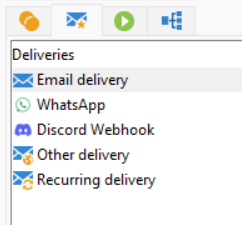
A technical workflow is focused on backend processing and data operations, not marketing communication itself – it handles how the system works behind the scenes. These workflows automate tasks like data imports, exports, cleansing, deduplication, calculations, and system integrations (for example loading files from servers or updating databases), ensuring the data foundation for campaigns is accurate and up to date. Unlike campaign workflows, they are not tied to a specific campaign or audience journey but instead support the overall marketing ecosystem by automating repetitive processes and maintaining data pipelines that other workflows depend on.
A technical workflow does not live under the campaign folder. Instead, it is located in a separate section and includes its own tab for managing background or system processes.

Workflows matter because they’re where most production incidents show up first:
- segmentation logic that silently pulls the wrong population
- performance bottlenecks from large intermediate datasets
- deliveries that trigger twice because scheduling logic is off
- upstream data not being ready when a workflow starts
Those issues are workflow design issues as much as they’re marketing ops issues.
How workflows are structured: activities, transitions, and execution behavior
At build time, a workflow is a graph of activities connected by transitions. At run time, it behaves like a job pipeline: activities execute based on the incoming transitions, and each step may create intermediate results that feed downstream logic. The platform provides a large library of built-in activity types (targeting, data management, flow control, and action steps)
Activities are not “just steps” – they define data contracts
In practice, most workflow bugs happen when an activity’s output isn’t what the next activity expects. A query might output profiles, but the next activity expects a different targeting dimension; or an enrichment changes the dataset shape; or a split introduces branches that aren’t reconciled later.
A reliable mental model is:
- each activity has an input shape
- it performs a transformation
- it produces an output shape that downstream steps must be compatible with
Flow control is first-class: scheduling, waits, branches, and scripting
Workflows aren’t limited to linear chains. They can branch, wait, run on schedules, and execute scripts. That flexibility is what enables real operational automation – and also what creates edge cases (race conditions, duplicate runs, and partial data updates) if control flow isn’t explicit. The core behavior and library of flow-control options are part of the built-in Adobe Campaign Classic workflow activity types.
Common real-world uses of Adobe Campaign Classic workflows
Most production ACC environments settle into a few repeatable workflow patterns. The key is that a workflow usually sits between a system of record and a delivery action: it normalizes data, computes an audience, then triggers something.
A practical breakdown of how teams automate recurring marketing operations (imports, segmentation, delivery prep, and post-processing) shows up clearly in workflow-driven marketing automation patterns in Adobe Campaign.
Data ingestion and normalization
Typical pattern:
- ingest flat files or connector outputs
- standardize values (country codes, opt-in flags, subscriber keys)
- deduplicate or reconcile identifiers
- write to the right schema with auditability
This is where workflow design determines whether downstream segmentation is trustworthy.
Audience selection and preparation for delivery
Typical pattern:
- query the correct dimension
- apply business rules (eligibility, suppression, frequency)
- enrich with attributes needed for personalization and routing
- create a stable target set for delivery execution
One limitation is that “almost correct” targeting logic is hard to detect after the fact unless the workflow writes checkpoints or extracts counts for validation.
Post-send updates and feedback loops
Common examples:
- set “last contacted” dates
- update eligibility flags
- export delivery logs to analytics
- trigger follow-ups based on response events (opens/clicks) where applicable
Workflow activities you’ll touch constantly (and the gotchas that come with them)
Adobe’s activity library is broad, but in most builds, a small subset does most of the work: queries, splits, enrichments, unions/intersections, deliveries, and updates.
Query and enrichment: the “SQL reality” in ACC
Even when you’re using the UI-driven query builder, you’re effectively designing database operations: joins, filters, and projections that can balloon intermediate datasets. A common issue is creating an enrichment that multiplies rows unexpectedly because the join cardinality wasn’t what you assumed.
In practice:
- keep joins intentional and test row counts after enrichment
- avoid dragging unnecessary columns downstream
- treat intermediate populations as data products, not temporary clutter
JavaScript in workflows: powerful, but it changes the risk profile
If you’re coming from Salesforce Marketing Cloud, this won’t feel completely new. Adobe Campaign uses a server-side JavaScript engine similar to SSJS, but instead of Platform.Functions and helper libraries, you work with a native JSAPI layer that exposes platform capabilities directly (for example xtk.queryDef, xtk.session, etc.)
The big difference is where and how you can use it. In Adobe Campaign, the same JavaScript can run inside workflows, inside delivery logic, and even inside personalization, which means you’re not limited to one execution context like in Salesforce Marketing Cloud. You can dynamically adjust logic at runtime – calculate date ranges, modify targeting, enrich data, or even call external APIs directly from a workflow using script activities.
In Salesforce Marketing Cloud, something like calling an external API or building custom logic often pushes you toward SSJS in CloudPages or building a custom activity. In Adobe Campaign, most of these use cases are handled natively with JavaScript inside the workflow itself – no external hosting required. And if you really need it, you can still go further and build custom activities or extend the platform directly on the application server, which removes the need for separate middleware layers.
In practice, this makes JavaScript in Adobe Campaign not just a “helper scripting tool,” but a core part of orchestration and data processing, giving you far more control over how campaigns behave compared to typical Salesforce Marketing Cloud patterns.
Loops and iterative logic: when you actually need them (and when you don’t)
Loops are useful, but they’re also a common source of stuck workflows and runaway processing if boundaries aren’t strict. Most marketing automation doesn’t need loops – it needs sets. Where loops *do* make sense is when you must iterate over partitions (countries, brands, file batches) or retry controlled operations.
A practical approach to building iterative patterns safely, including guardrails to prevent infinite execution, is described in loop handling patterns in Adobe Campaign workflows.
In practice, a safe loop design usually includes:
- an explicit counter or exit condition
- logging at each iteration
- a hard fail path when the loop exceeds expected bounds
Operational stability: errors, retries, and what breaks in production
A workflow that “runs on my machine” is not the same as a workflow that survives real data variability. The most common failures are boring:
- file missing or empty
- upstream system late
- unexpected nulls causing downstream join failures
- permission issues writing to schemas
- delivery activity failing and blocking the run
A solid pattern is to treat error routing as part of the design, not as an afterthought. Handling failures with dedicated error branches, clear logging, and restart logic is covered in practical error-handling techniques for Adobe Campaign Classic workflows.
One limitation is that “silent partial success” can be worse than a hard stop. If a workflow updates some records and then fails, reruns can duplicate changes unless you design idempotent updates or checkpointing.
Workflow best practices that actually reduce risk (not just style preferences)
Some workflow best practices sound like hygiene, but they directly reduce incidents and server load. A well-built workflow is easier to support because it’s observable: you can see what it did, when it did it, and why.
The platform guidance that maps closely to real-world stability includes recommendations around design clarity, performance, and maintainability in Adobe Campaign Classic workflow best practices.
Practical habits that consistently help:
- keep workflows modular rather than building one “mega-workflow”
- store intermediate validation counts where failures are costly
- make scheduling explicit and avoid overlaps unless you truly want concurrency
- name activities based on outcomes, not generic labels (so logs are readable at 2 AM)
Adobe Campaign Classic workflows vs Adobe Campaign Standard workflows (what changes conceptually)
The concept of “workflow as orchestration” exists across Campaign products, but implementation details and day-to-day behavior differ. If you work across both, it helps to treat them as related but not interchangeable. The parallel definition and high-level behavior of workflows in Standard is described in Adobe Campaign Standard workflow automation concepts.
In practice, the skills transfer well (thinking in target sets, transitions, and scheduling), but the operational details – available activities, how data is modeled, and how execution is monitored – are where teams get tripped up when they assume Classic and Standard behave the same way.









