How to Build Engagement Studio Programs in Pardot

Engagement Studio programs in Pardot (Account Engagement) are built by combining a clear entry list with a visual flow of emails, waits, and branching logic so prospects are automatically nurtured, qualified, and routed without constant manual work. This matters because what typically breaks in real implementations is not the email content – it’s unclear entry criteria, weak data hygiene, and program logic that doesn’t match how prospects actually behave. A solid build process keeps nurture predictable, reporting trustworthy, and sales handoffs consistent.
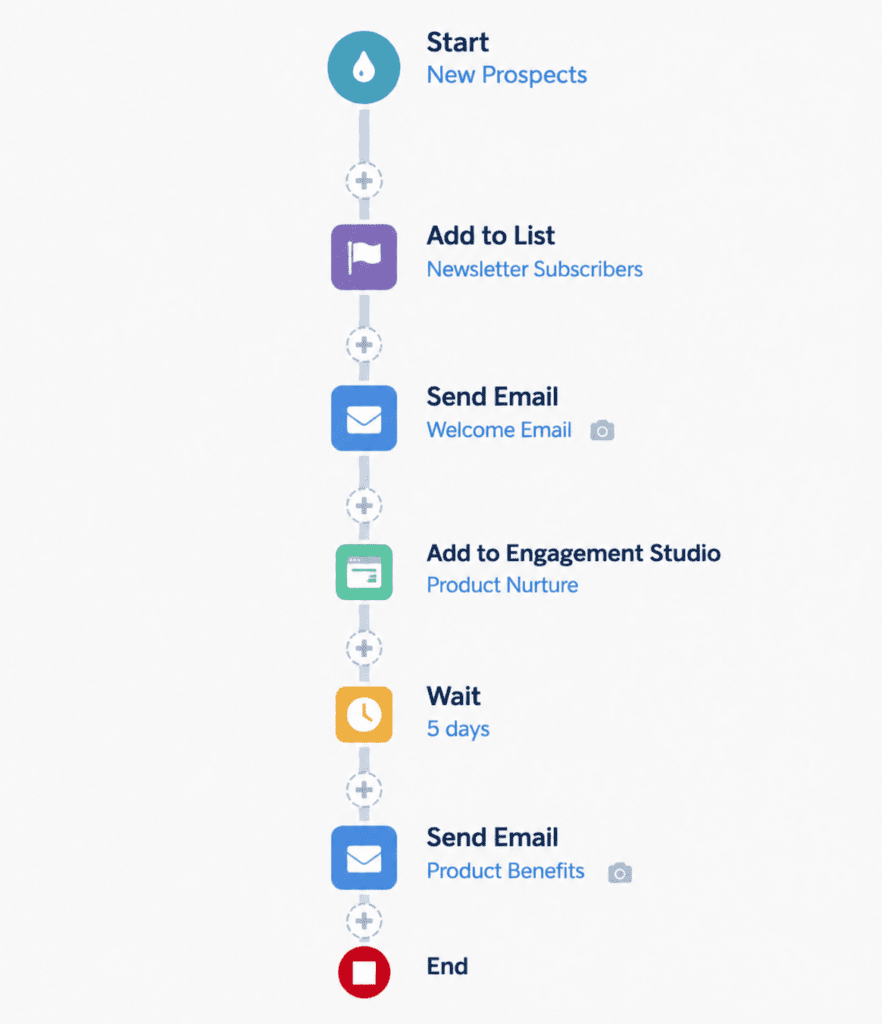
Start with the program outcome and the decision points
Before touching the canvas, lock down three things: the outcome you want (for example, “request demo,” “book a meeting,” “reach MQL threshold”), the decision points that indicate progress, and the data you’ll rely on to branch.
In practice, the fastest way to derail an Engagement Studio build is to use fields that are rarely populated, inconsistent, or overwritten by integrations. If a branch depends on “Industry” but that field is blank for 40% of prospects, the program becomes a randomizer.
Define entry criteria that reflect intent, not just list membership
Entry should represent a meaningful starting condition, not “anyone who ever filled a form.” Common real-world patterns include:
- A specific content download (top-of-funnel nurture)
- Webinar registration (time-sensitive follow-up)
- Product page engagement or trial interest (high-intent track)
What typically happens when entry is too broad is that engaged and unengaged prospects get the same sequence, which hurts email performance and makes “unresponsive” look like “unqualified.”
Decide what “success” and “exit” mean up front
Every program needs at least one explicit exit path. Otherwise, prospects linger in long wait steps and keep receiving messages after they’ve converted or become sales-active.
A common issue is forgetting to define what happens after a prospect becomes an opportunity, is actively working with sales, or has already booked the meeting the nurture is trying to drive.
Get your assets and segmentation ready before building the flow
Build the program logic around assets that already exist and are QA’d:
- Email templates and approved copy
- Landing pages and forms (if applicable)
- Suppression lists (customers, competitors, internal domains)
- Core segmentation fields (persona, product interest, region)
In practice, teams often start building Engagement Studio while emails are still “in review,” then later swap assets in a rush. That’s how you end up with broken links, missing tracking, or the wrong sender profile on a high-volume send.
Standardize naming and foldering so reporting stays usable
Engagement Studio reporting becomes harder to interpret when assets are scattered or inconsistently named. A simple convention like:
- `ES – Product A – TOFU – Email 01`
- `ES – Product A – TOFU – Email 02`
keeps filters, comparisons, and audits straightforward later.
Build the Engagement Studio program using the right building blocks
Engagement Studio is designed around a small set of building blocks – sends, waits, and branching logic – that combine into a nurture journey. The key is understanding how actions, triggers, and rules are used as the core program logic so each branch is intentional rather than “extra complexity.”
Use waits strategically (and avoid “dead air”)
Wait steps are where programs most commonly feel “broken,” even when they’re technically working. Overusing long waits creates two issues:
- Prospects lose context between touches
- Internal stakeholders assume the program stopped
A practical approach is to align waits to observable behavior:
- Short wait after a send to allow opens/clicks
- Longer wait after a content-heavy step where consideration time is realistic
Branch on stable signals, not fragile ones
Branching is powerful, but fragile signals create fragile programs. In practice:
- Field-based logic is only as good as your data quality and sync rules
- Activity-based logic needs careful timing so prospects have a real chance to perform the activity
A common issue is branching immediately on “clicked email,” then sending a fallback email too soon to people who simply hadn’t opened yet.
Configure entry, re-entry, and program behavior intentionally
Program settings determine who can enter, whether they can re-enter, and what happens when they no longer meet criteria. This is where platform behavior matters most, because small choices can cause unexpected re-nurturing or prevent intended recycling.
The most reliable way to avoid surprises is to build around how prospects enter and progress through Engagement Studio programs and match those mechanics to your segmentation model.
Choose static vs dynamic entry lists based on your use case
In practice, dynamic list entry can be useful when you want a program to continuously pick up new prospects who match criteria. The trade-off is that you need tighter governance on list rules and exclusions, because small rule changes can materially change who starts receiving messages.
Static entry is often simpler for time-bound campaigns where you want a controlled cohort and cleaner reporting comparisons.
Decide whether prospects should be allowed to re-enter
Re-entry can be valuable for recurring events (quarterly webinar series) or when you intentionally recycle stalled leads. The downside is message fatigue if you don’t add guardrails like suppression lists, “recently nurtured” flags, or time-based qualification rules.
A common issue is enabling re-entry without updating emails, so prospects see the exact same sequence repeatedly.
Design the journey around real sales and marketing handoffs
Engagement Studio is at its best when it moves prospects toward a defined next step and stops when that step happens.
Use branching to route to the right next message, not to “personalize everything”
Over-branching usually reduces maintainability and makes QA unreliable. A strong pattern is to branch only on:
- Persona (decision-maker vs practitioner)
- Product line interest
- Lifecycle stage (new lead vs recycled vs sales-ready)
Everything else tends to be “nice to have” until it creates conflicting logic.
Add clear handoff points and stop conditions
In practice, the handoff is where automation and CRM reality collide. If sales is working a lead, nurture should usually pause or exit. If an opportunity is created, continuing nurture can confuse attribution and frustrate prospects.
QA the program like a system, not a diagram
Engagement Studio programs look simple on a canvas, but they behave like a system with dependencies: lists, fields, asset tracking, and timing.
A practical QA checklist:
- Test with a small internal segment first
- Confirm every branch condition with real prospect records (not assumptions)
- Verify suppression logic (especially customers and internal users)
- Validate links and tracking parameters in every email variation
A common issue is testing only the “happy path” and never validating what happens when a prospect does nothing for several steps.
Common pitfalls and limitations that show up in production
Even well-built programs run into operational friction once real prospects start flowing through them. The most frequent issues are rarely “bugs” – they’re mismatches between business expectations and how the platform actually executes.
Many of the day-to-day fixes come down to patterns like tightening entry rules, simplifying branches, and using clearer suppression logic, which are covered well in practical Engagement Studio configuration pitfalls and fixes.
Prospects getting the wrong track due to ambiguous criteria
If two branches can both be “true” depending on field values and timing, results become unpredictable. Keep criteria mutually exclusive where possible, and use explicit “catch-all” branches only when you’re comfortable with the fallback message.
Reporting that looks inconsistent because the journey is changing midstream
If you frequently edit programs while they’re live, comparisons between cohorts can get messy. In practice, it’s better to treat major changes like a new version: duplicate the program, adjust, and control entry so you can compare performance cleanly.
Over-automation that creates deliverability or fatigue risk
Engagement Studio makes it easy to “just add one more email.” The trade-off is that you can quietly increase send pressure across multiple programs, especially when prospects qualify for more than one nurture at once. Suppression lists and clear lifecycle ownership are the usual fixes, but they need to be designed, not bolted on.
Maintenance overhead from excessive branching and edge-case paths
A program with 25+ nodes may work, but it becomes fragile:
- QA takes longer
- Small field mapping changes have bigger consequences
- Handoffs are harder to reason about
In practice, simpler programs outperform complex ones more often than teams expect, mainly because they stay accurate as your CRM and segmentation evolve.