




What is auto-suppression list in Salesforce Marketing Cloud Engagement
Highlight text, then choose “Suggest an edit”.Your selection is saved in the bottom bar.
An Auto-Suppression List in Salesforce Marketing Cloud Engagement is a send-time filtering mechanism used to automatically exclude specific contacts from receiving an email.
Unlike unsubscribe functionality, auto-suppression lists do not remove contacts from the platform or change their subscription status. Instead, Salesforce Marketing Cloud checks these lists during send preparation and removes matching recipients before the email is delivered.
This functionality is commonly used in enterprise environments where different Business Units, brands, or automated campaigns require additional exclusion logic beyond standard unsubscribe management.
Auto-suppression lists are lists where you can configure additional attributes, but in most cases the default prepopulated fields used to suppress records are already sufficient.

Auto-suppression lists can be accessed similarly to Data Extensions in SQL activities. The difference is that records cannot be populated directly using Query Activities. Instead, records are usually maintained through Import Activities, API integrations, or Automation Studio workflows using data extension exports and imports.
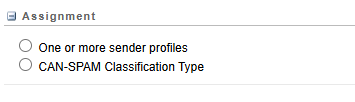
Apart from own attributes you can also assign sender profiles and classification types to define how the suppression logic behaves.
- One or more sender profiles – Defines which sender profiles the auto-suppression list applies to. Sender profiles contain the From name and email address used for sends, allowing the suppression list to affect only specific brands, departments, or sending identities instead of all sends across the Business Unit.
- CAN-SPAM Classification Type – Determines whether the suppression list applies to Commercial sends, Transactional sends, or both. Commercial emails are marketing or promotional messages, while Transactional emails are operational messages such as password resets, order confirmations, or account notifications.
Where to Find Auto-Suppression Lists in Salesforce Marketing Cloud Engagement
In Salesforce Marketing Cloud Engagement, suppression lists can be configured in:
Email Studio -> Admin -> Send Management -> Auto-suppression ConfigurationIn enterprise setups, suppression can also come from the parent Business Unit, meaning a contact may be excluded even if the suppression record is not visible directly inside the current BU. Because of this, troubleshooting suppression issues often requires checking multiple Data Extensions, send configurations, and inherited enterprise-level settings.
How Auto-Suppression Lists Work
When an email send starts, Salesforce Marketing Cloud Engagement validates recipients against all configured suppression sources before delivery.
The process usually works like this:
- Audience is prepared
- Send definition is evaluated
- Auto-suppression lists are checked
- Matching recipients are excluded
- Remaining contacts receive the email
Because the suppression happens during send preparation, contacts may still exist inside the audience Data Extension or Journey entry source while being silently removed before delivery.
Troubleshooting a missing recipient of a delivery in Salesforce Marketing Cloud Engagement
In practice, a Business Unit usually does not operate with a single suppression list. Enterprise Marketing Cloud Engagement setups often use multiple suppression lists across automated campaigns, sometimes with different priorities and logic.
Contacts may be suppressed by multiple lists simultaneously, including suppression lists configured at the parent Business Unit level, not only those directly configured within the current BU.
Inside the journey, when you click on View Contact Details -> View Details, you may see certain records with the status Hard Error and the detail “Contact is on suppression list.”
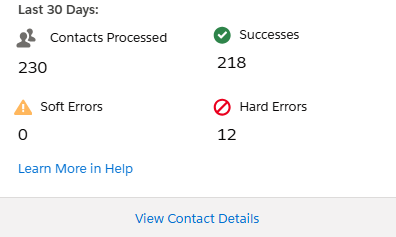

To identify which suppression list the contact belongs to, you can cross-check all your suppression lists using queries. If you cannot find the contact in any of them, raise a ticket with Salesforce Support, as they can directly see the suppression list name behind the journey records.
Share With Others
 Platinum


