
How to Set Up Personalization in Marketing Cloud Next

Marketing Cloud Next personalizes messages through merge fields, dynamic content, repeaters, recommendations, and scripting. These features can use unified customer profiles, related records, event data, segment attributes, Flow inputs, and custom data providers. The available options depend on the message channel, Salesforce release, and enabled capabilities.
Merge Fields
Merge fields insert values from a content item’s data sources into the message. In email, they can personalize the subject line, preheader, and message content.
The merge field picker exposes the attributes available through the connected data sources. When a field references related records through a Data Graph, an expression can filter and sort those records before selecting the value.
System fields also provide organization information and recipient-specific unsubscribe and preference-center links.
Data Sources for Message Personalization
The data sources connected to the content determine which attributes the message can reference. You can add data source in content template Data sources tab.
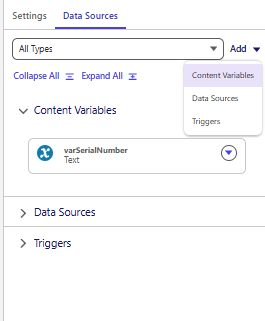
| Data source | What it provides |
|---|---|
| Unified Individual | Fields from the recipient’s unified profile |
| Profile Data Graph | Selected profile attributes and related Data 360 records |
| Lookup Data Graph | Additional Data 360 data retrieved through a matching key |
| Salesforce Record | Fields from Salesforce CRM objects |
| Event | Attributes defined by the event’s schema |
| Activation | Recipient attributes included in a Data 360 segment activation |
| Content Variable | Values mapped from Flow resources at run time |
| Apex Class | Structured data supplied through an Apex-defined schema |
| Marketing Object | Marketing data accessed through supported scripting |
| Offer | Attributes from managed offers |
| Personalization Recommender | Personalized results returned by Salesforce Personalization |
These sources have different configuration and execution behavior. Selecting a source makes its supported data available; the content still needs merge fields, rules, or scripting to use it.
Unified Individual and Profile Data Graphs
Unified Individual merge fields are available in email even without a configured Data Graph. This supports personalization using attributes on the unified profile itself.
A profile Data Graph extends access to selected related objects. Its configuration determines which relationships and fields are available to the content.
For graph-based personalization, configure the graph in the marketing Data Space, include the required identity and contact fields, and select it in the personalization settings. Align that configuration with the Data Space used by Marketing Cloud Next.
Lookup Data Graphs and Salesforce Records
A Lookup Data Graph provides an additional lookup against Data 360 data. A primary key identifies the relevant record. It complements the profile graph and can expose data outside the recipient’s profile structure.
The Salesforce Record provider gives content access to CRM object fields. This is a separate source from the Data 360 profile graph and supports personalization with current business-record data.
Event and Activation Data
An Event data source exposes the attributes defined in an event schema. Flow passes that event data to the content. A Flow resource becomes available through this source only when it belongs to the supported event structure.
Activation data comes from a Data 360 segment activation. It exposes the recipient attributes included in the activation payload.
The developer documentation distinguishes these payloads: a message can use an Event source or an Activation source, with one of either type at a time.
Content Variables and Flow Resources
Content Variables give campaign managers more direct control over message personalization, particularly when they already work with Salesforce Flow. You define the inputs in the content template, then map Flow resources to them in the send action. Marketing Cloud Engagement already provides several ways to supply personalization data, including Journey Data, Data Extensions, AMPscript, and API attributes. Content Variables add another approach in Marketing Cloud Next, allowing more of the preparation and mapping to happen visually within Flow.
Content Variables define inputs that Flow populates when it executes the send action. They support text, Boolean, number, date, date-time, and record-reference values.
The configuration has three connected parts:
- The content defines the Content Variable.
- A merge field references that variable.
- The send action maps a Flow resource to the content input.
Flow can retrieve, calculate, or obtain data through supported connectors before supplying it to the message. This makes Content Variables useful when personalization depends on the current automation context.
For email, Content Variables are mapped under Personalize Message in the Send Email Message element. Record variables receive a record ID, which determines the record whose fields the content can access.
For other channels, use the Content Variable inputs exposed by the selected message and its send action.
Apex-Defined Data Providers
An Apex data provider supplies a developer-defined structure to the content. The Apex class defines the schema, and the sending process supplies values matching that structure.
This approach supports structured payloads and collections that require more control than individual content inputs. The template then references fields within the supplied structure.
A message can use one Apex Class data source at a time. Creating the class establishes the data contract; the Flow or API integration must also populate that contract.
Saved Expressions
Expressions control how personalization selects data across related objects. They define filters and sorting criteria, then expose the selected attribute to the content.
Saved expressions retain those criteria and object references for reuse in email, SMS, and WhatsApp messages.
Expressions matter when a relationship returns multiple records. The relationship establishes which records are connected; the expression establishes which matching data the message should use.
Dynamic Content Variations
Dynamic content variations change the content or styling shown to a recipient according to targeting rules.
In email, variations can apply to components, subject lines, and preheaders. Rules use attributes available through the configured Data Graph.
Each variation has eligibility conditions and a priority. When several variations qualify, priority determines which appears. The default variation appears when no personalized variation qualifies.
Personalization points hold the associated decisions and targeting rules. Linking components to the same point shares that configuration across them. Cloning a point creates a separate configuration that can be edited independently.
Repeaters
A repeater component renders a collection of records inside an email.
The repeater connects to a supported collection source. Nested components use merge fields from the current collection item, while expressions refine the items through filtering and sorting.
Repeaters personalize both the content and the number of items displayed. If the source has no applicable data for the recipient, the repeater appears empty.
Recommendations and Offers
Salesforce Personalization recommenders select content for individual recipients through configured recommendation logic. They require the appropriate Personalization setup and entitlement.
Recommendation results can populate repeaters. The available trained recommenders must use the same Data Graph as the email.
Objective-based recommenders can also select image content at send time, using engagement to improve selection over time.
Offers provide managed promotional data as a content source. Merge fields insert offer attributes, and dynamic targeting rules control which offer content a recipient sees.
Handlebars and AMPscript
Handlebars adds conditional rendering, iteration, formatting, data access, and reusable content logic to message templates. Marketing Cloud Next supplies helpers for working with its data sources and nested structures.
AMPscript provides another scripting option for retrieving data, transforming values, applying conditions, and including reusable content. Its function reference identifies Marketing Cloud Next support, including functions whose behavior differs from Marketing Cloud Engagement.
Marketing Objects can supply data through either scripting language. They provide marketer-managed data that templates can query during personalization.
Scripting adds rendering logic and supported data access. It still depends on the data sources, identifiers, permissions, and functions available in the execution context.
Language Variants
Email language variants manage translated content within one email asset.
Variants inherit layout, style, and data-source updates from the default version. Translations can be maintained in Email Builder or through XLIFF export and import.
Language variants handle localized content, while merge fields and other personalization features continue to operate within each variant.
Dynamic Sender and Reply Information
Dynamic From and Reply addresses personalize the email’s display name, sender address, and reply destination using CRM or Data 360 values.
The available sender configuration depends on domain authentication. Dynamic reply addresses require an authorized domain, and fallback values handle missing or invalid results.
API-Supplied Personalization
The Direct Email Send API supplies personalized email through application-initiated requests.
It uses a deployed send definition referencing published content. Request attributes match the Apex class schema defined in that content, allowing the application to supply structured personalization data.
This provides another execution path for the content and its data contract.
Channel and Release Differences
Winter ’27 expands reusable personalization across SMS, WhatsApp, RCS, push, and in-app messages. The updated experience organizes resources into Inputs, Data, and Expressions and adds broader scripting support.
Channel availability therefore needs to be checked against the organization’s release, enabled features, content editor, and send-action inputs. Older tables that list a provider only for email do not fully describe the expanded experience.