MCP for Salesforce Marketing Cloud: What Developers Need to Know
AI is already becoming a useful part of Salesforce Marketing Cloud development. Developers can use it to write and review SQL, understand AMPscript and SSJS, troubleshoot errors, and work through different development problems. The interesting part is what happens when AI can go beyond answering questions and actually work with the Marketing Cloud environment.
Model Context Protocol (MCP) makes this possible by providing a standard way for AI applications to connect with external tools and services. Salesforce now provides a dedicated Marketing Cloud Engagement MCP Server, which allows compatible AI clients to interact with supported Marketing Cloud capabilities.
Why Context Matters In SFMC Development
If you’ve spent any real time working with Salesforce Marketing Cloud, you probably know some of the challenges that come with building and maintaining solutions on the platform. AMPscript and SSJS are useful for personalisation and server-side processing, but they work within the specific context of Marketing Cloud. At the same time, general-purpose AI coding assistants can help with coding and troubleshooting, but they don’t automatically understand your Marketing Cloud environment, including your Data Extensions, Journeys, Automations, or platform-specific APIs.
This becomes even more noticeable when you want to use AI to work with your actual Marketing Cloud account. An AI assistant might be able to explain how a Data Extension works or generate a piece of SQL, but it doesn’t automatically know which Data Extensions exist in your account, what fields they contain, which Journey you are referring to, or how your existing configuration is structured. Traditionally, you would need to provide that context yourself, copy schemas into a prompt, or build your own API integration to connect the AI tool with Marketing Cloud.
This is where Model Context Protocol (MCP) becomes interesting for SFMC developers. Salesforce provides a hosted MCP server for Marketing Cloud Engagement that acts as a bridge between an MCP-compatible AI assistant and Marketing Cloud. Instead of manually providing all the relevant platform context or building a separate integration for every task, the AI assistant can use the MCP server’s available tools to interact with supported Marketing Cloud capabilities such as Data Extensions, Journeys, Automations, Content Builder and other supported functions.
What MCP Actually Is
Model Context Protocol (MCP) is a standard way for AI applications to connect to external tools and systems. The easiest way to understand it is to think of MCP as a common connection between an AI assistant and the systems it needs to work with.
Before MCP, if you wanted an AI application to work with a particular system, you would generally need to build a specific integration between the two. If you then wanted another AI application to work with the same system, you might need another integration. MCP provides a common approach that makes these connections easier to build and reuse.
A simple analogy is USB-C. You don’t need a completely different type of connector every time you connect a device. As long as the device supports the standard, the same connection can be used. MCP works in a similar way for AI, an MCP-compatible AI application can connect to an MCP server and use the capabilities that the server makes available.
To understand how this works, there are three main pieces to know about: the AI model, the MCP client, and the MCP server.
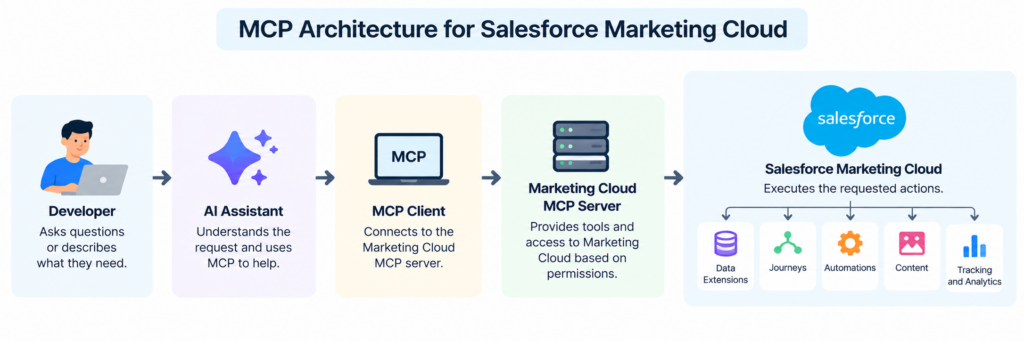
The AI model is the part that understands your request. The MCP client sits within the AI application and handles the communication with the MCP server. The MCP server exposes the tools and capabilities that the AI is allowed to use and passes requests to the connected system.
In the Salesforce Marketing Cloud context, the MCP server provides the connection between an MCP-compatible AI client and Marketing Cloud. This means that instead of simply asking an AI assistant a general question about Marketing Cloud, the assistant can potentially interact with supported Marketing Cloud capabilities through the MCP server. Salesforce currently provides tools for areas such as Data Extensions, Journeys, Automations, Content Builder, Email and Tracking.
For example, imagine you ask:
“Create a Data Extension for new customers with Email Address, First Name, Last Name and Signup Date.”
The AI assistant first needs to understand what you are asking for. It can then use the appropriate MCP tool exposed by the Marketing Cloud MCP server, which communicates with Marketing Cloud to perform the requested operation.
This is the part that makes MCP particularly interesting for SFMC developers. Instead of only using AI to help write code or explain a piece of SQL, you can give the AI a way to interact with supported Marketing Cloud capabilities.
It is also important to understand that MCP does not replace Marketing Cloud APIs. The MCP server provides a layer that allows AI applications to discover and use supported Marketing Cloud functionality through a standardised approach. Salesforce’s documentation describes the Marketing Cloud MCP server as providing access to existing Marketing Cloud Engagement API functionality.
Where Salesforce Fits In
MCP isn’t something Salesforce is treating as a separate experiment. Salesforce is incorporating MCP into its wider platform and providing hosted MCP servers that allow AI applications to work with Salesforce capabilities through a standardized approach. Salesforce has also made hosted MCP servers available in Developer Edition alongside Agentforce Vibes, giving developers a way to explore AI-assisted development and MCP-based integrations.
One of the important parts of this approach is control. Connecting an AI application to Salesforce doesn’t mean giving it unrestricted access to everything in an organisation’s environment. The connection still depends on authentication, permissions and the capabilities that have been made available to the AI.
Salesforce also supports different MCP-compatible clients and external integrations. Developers can connect supported clients to Salesforce-hosted MCP servers, while tools such as MuleSoft can be used to connect MCP with external APIs and services. This makes MCP useful as a common integration approach rather than something tied to one particular AI application.
Salesforce has brought this approach into Marketing Cloud Engagement through its Marketing Cloud Engagement MCP Server. This is particularly relevant to SFMC developers because it exposes supported Marketing Cloud functionality through MCP, allowing AI clients to interact with areas such as Data Extensions, Journeys, Automations, Content Builder and tracking.
Two Ways Developers Can Use MCP
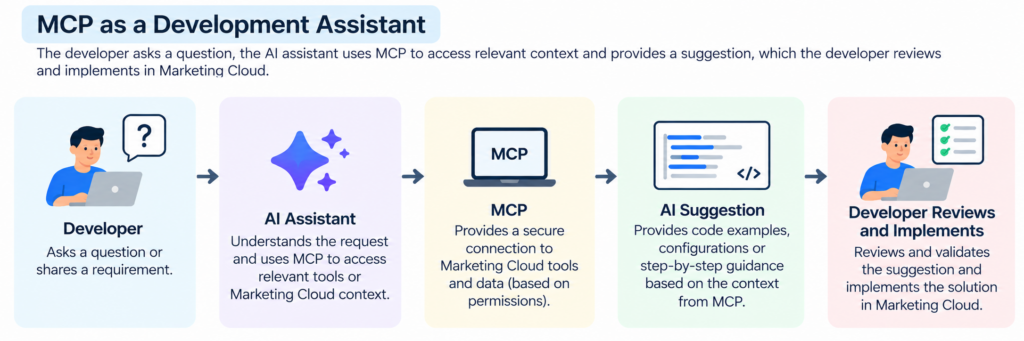
1. MCP as a Development Assistant
Imagine you’re working on an SFMC solution and want help understanding some AMPscript, reviewing SSJS, checking a SQL query, or finding information about your Marketing Cloud configuration. The AI can assist you while you remain in control of the development process. You review the suggestion, make any necessary changes, and decide what eventually gets deployed.
2. MCP as a Workflow
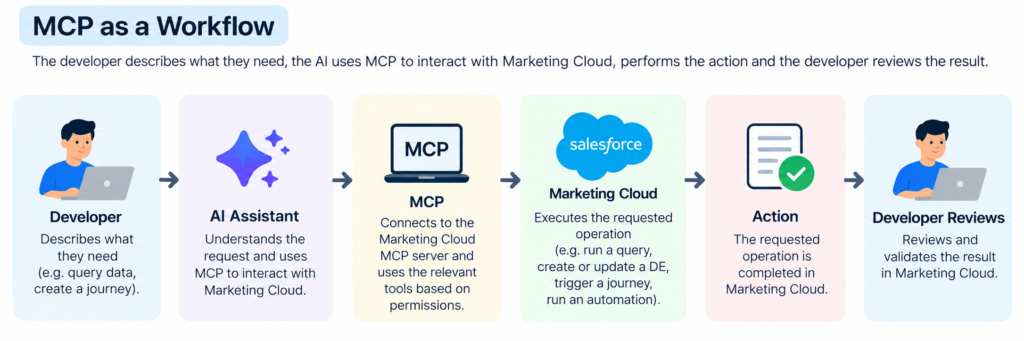
The second use case is quite different. Here, an AI agent isn’t just helping you write something; it can use the tools made available through MCP to perform actions in Marketing Cloud. Depending on the permissions and tools configured, this could involve working with customer data or changing Marketing Cloud assets.
That distinction is important. Asking an AI assistant to help you write a SQL query is very different from allowing an AI agent to execute that query against production data. Similarly, asking for help designing a journey is different from allowing an agent to create or modify the journey itself.
The technology behind both scenarios can involve MCP, but the level of control and review is different. The closer the AI gets to making changes to live Marketing Cloud data or configuration, the more carefully the permissions, testing and approval process need to be considered.
What This Means for SFMC Developers
This is where MCP becomes particularly interesting for someone working with Salesforce Marketing Cloud. So far, we’ve looked at what MCP is and how Salesforce is bringing it into Marketing Cloud. But what does that actually change for a developer working with Data Extensions, SQL, Journey Builder and Automation Studio?
One of the biggest changes is that AI can work with the Marketing Cloud environment itself, rather than only helping you write code or answer general questions. Salesforce’s Marketing Cloud Engagement MCP Server provides tools for working with areas such as Data Extensions, Journeys, Automations, Content, Email, Contacts and Tracking.
Working with Marketing Cloud Data
Think about a task you may already have done many times: checking a Data Extension before writing a SQL query. Normally, you would open Marketing Cloud, find the Data Extension, check the fields and data types, and then write your query.
With MCP, an AI assistant can retrieve the Data Extension and its field definitions through the available MCP tools. You can then ask the assistant to help you build or review a query using the actual structure of your Marketing Cloud data, rather than copying the schema into a prompt yourself. Salesforce documents tools for searching Data Extensions, retrieving their fields, querying records and creating or updating Data Extension data.
Salesforce’s own MCP documentation gives a similar example: an AI assistant connected to Marketing Cloud can work with Data Extension schemas and help create and test SQL.
But the developer still needs to review the result. The AI may help with the query, but you still need to make sure it selects the right audience, handles duplicates correctly, follows consent and suppression rules, and is safe to run in the intended environment.
Working with Journeys and Automations
The same idea applies to Journey Builder and Automation Studio. Instead of manually navigating through Marketing Cloud for every configuration task, you can describe what you want and let the AI assistant use the relevant MCP tools. Salesforce provides tools for working with journeys and Automation Studio activities, including SQL Query Activities. If you want to understand Automation Studio and how it fits into Marketing Cloud, you can explore Automation Studio in more detail.
For example, you could ask:
“Create a welcome journey for customers who enter the New Customers Data Extension. Send the first email immediately, wait three days, and then send the second email.”
The assistant can interpret the requirement and use the appropriate Marketing Cloud tools to build the configuration. Salesforce provides similar examples in its documentation, including creating a Data Extension and creating a Welcome Journey using natural-language requests.
But this doesn’t mean the developer simply hands over the entire process to AI. You still need to review the entry source, email assets, wait periods, decision logic, exit criteria and overall customer experience before activating anything.
What About AMPScript and SSJS?
AMPscript and SSJS are still important skills for SFMC developers. MCP doesn’t change that. If you want to understand the differences between the two and when each is typically used, you can explore AMPscript and SSJS in more detail.
AI can already help developers understand code, troubleshoot errors, generate examples and explain functions. However, Marketing Cloud has its own syntax, functions and platform-specific behaviour, so developers still need to understand the environment well enough to recognise whether an AI-generated solution is actually appropriate.
There are also third-party MCP implementations focused specifically on Marketing Cloud development and language tooling. These are part of the wider MCP ecosystem rather than Salesforce’s first-party Marketing Cloud Engagement MCP Server. Keeping this distinction clear is important, as not every SFMC-related MCP tool available in the ecosystem is officially provided by Salesforce.
From Code Assistance to Platform Assistance
This is probably the biggest change to understand.
Previously, you might ask an AI assistant:
“Write a SQL query to find customers who purchased in the last 30 days.”
With an MCP connection, the request can become much more contextual:
“Look at the available Data Extensions, identify the fields needed to find customers who purchased in the last 30 days, and help me create the query.”
The difference is that the AI can work with information exposed by the connected Marketing Cloud environment. It isn’t relying entirely on information you manually copy into the conversation.
What Developers Still Need to Own
MCP can make certain tasks faster, but it doesn’t remove the need for SFMC knowledge. In fact, understanding Marketing Cloud becomes even more important because someone still needs to decide whether the result is correct.
For example, an AI assistant might be able to create a SQL Query Activity, but you still need to ask:
- Is the correct population being selected?
- Are duplicate contacts handled correctly?
- Are consent and suppression rules respected?
- Is the target Data Extension appropriate?
- Could the query affect production data?
- Does the Journey behave as intended?
Salesforce also makes it clear that AI assistants can produce inaccurate or harmful results and recommends assigning only the permission scopes required for the tasks being performed and reviewing the assistant’s responses carefully.
This is especially important because some MCP tools can make irreversible changes. The Salesforce Marketing Cloud MCP documentation identifies destructive tools and recommends using a dry run or reviewing what the assistant plans to execute before carrying out the operation.
Security, Permissions and Governance
Once an AI assistant can actually interact with Marketing Cloud, security becomes much more important. There is a big difference between asking AI to explain a SQL query and giving it permission to create, update or delete something in your Marketing Cloud account.
The AI should only have access to the things it actually needs. For example, if the purpose is to help developers work with Data Extensions, there is no reason to give unnecessary permissions to other areas of the platform. This is where the principle of least privilege becomes important.
It is also worth remembering that the AI is working with real Marketing Cloud functionality. A request that sounds simple could still have an impact on customer data or live configuration. For that reason, developers should review what the AI is planning to do before allowing the action to run, particularly when the operation could change or delete data.
Another consideration for SFMC developers is the Business Unit structure. Many Marketing Cloud environments contain multiple Business Units with different data, users and permissions. When introducing MCP, access should therefore be considered in the context of the specific Business Units and use cases involved, rather than assuming that access to one part of Marketing Cloud should automatically extend across the entire environment. Understanding how the MCP connection maps to existing Marketing Cloud permissions is important before using it with production data.
Data Privacy and Marketing Data
There is another consideration when AI starts working with Marketing Cloud the data itself. Marketing Cloud can contain subscriber information, contact details, consent and opt-in status, so connecting an AI assistant to the platform needs to be considered from a data privacy perspective.
Before connecting an MCP server to a production Marketing Cloud environment, it is important to understand what data the AI can access, what it can change, and where that data goes during processing. If a third-party AI service is involved, organisations also need to understand how the data is handled and whether the arrangement fits within their existing data processing and privacy requirements.
This is particularly important when working with customer data. MCP may provide the technical connection, but the organisation still needs to decide what customer information can be exposed to the AI and under what conditions.
New Skills to Learn, Not Just New Tools
MCP doesn’t mean that SFMC developers only need to learn how to use another AI tool. It also introduces areas such as authentication, permissions, integration configuration and AI governance.
For example, when connecting an AI client to Marketing Cloud, developers need to understand how access is authenticated, what permissions are being granted and which MCP tools are available to the AI. The same principle applies when working with Salesforce more broadly: access should be limited to what is actually required, rather than giving an AI assistant unnecessary permissions.
This means that the skill set for an SFMC developer could gradually expand beyond AMPscript, SSJS, SQL and Journey Builder to include AI tool integration, MCP configuration and governance.
Getting Started with MCP
For developers who want to experiment with MCP, the safest approach is to start away from production. A Salesforce Developer Edition environment can provide a useful place to explore Salesforce’s MCP capabilities without immediately connecting an AI assistant to live Marketing Cloud data.
From there, developers can experiment with an MCP-compatible client and explore the Marketing Cloud capabilities exposed through the available MCP tools. Start with lower-risk tasks such as understanding Data Extension structures, working with test data or getting assistance with development tasks before considering access to production data.
Once the basic workflow is understood, the next step is to evaluate how MCP could fit into existing development processes. At that point, authentication, permissions, Business Unit access and data privacy should be reviewed before connecting the solution to a production Marketing Cloud environment.
What MCP Means for SFMC Developers
MCP doesn’t replace the skills SFMC developers already use. AMPscript, SSJS, SQL, Journey Builder and a good understanding of Marketing Cloud are still important. What changes is the way developers can interact with the platform and the tools around it.
Instead of using AI only to explain code or generate a SQL query, developers can start using AI to work with information and capabilities from their Marketing Cloud environment. That could mean spending less time gathering context manually, checking configurations or writing small scripts just to provide information to an AI assistant.
At the same time, this doesn’t mean handing everything over to AI. Developers still need to understand the data, review what the AI produces, consider permissions and privacy, and decide whether an action is appropriate for the environment.
For SFMC developers, MCP is therefore best viewed as another layer of tooling rather than a replacement for existing development skills or processes. The practical way to understand its value is to experiment with it in a controlled, non-production environment and see where it can genuinely improve the development workflow.
Share With Others
 Bronze