
How to Configure the External Signal Activity in Adobe Campaign Classic

The Adobe Campaign Classic External signal activity holds a workflow at a defined point until it receives its configured signal, then releases the outgoing transition. Configure the activity in the workflow that must wait, and place it immediately before the activities that depend on the event. The External signal activity configuration defines the waiting signal.
How the External Signal Activity Works
The workflow runs until it reaches the External signal activity. It remains at that activity until the configured event is received, then continues through the next transition.
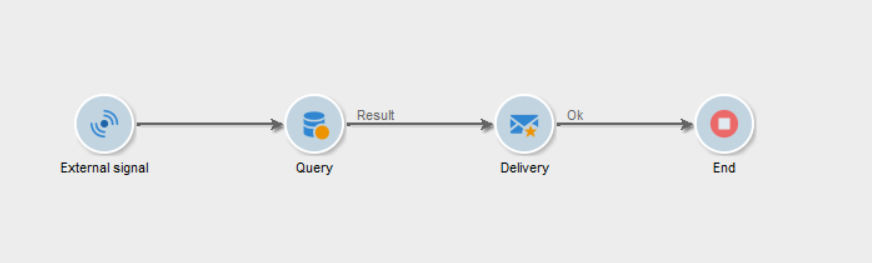
The activity is a workflow control point. It does not replace the data-processing activities that prepare, query, reconcile, or update records before downstream processing.
How to activate external signal activity
When an External signal activity is activated, the workflow pauses at that step until it receives an external event or the configured timeout expires.
Calling the External signal from another worklfow
The activity can be triggered through the PostEvent SOAP method:
PostEvent(sessionToken, workflowId, activity, transition, parameters, complete)The workflowId identifies the target workflow, activity is the internal name of the External signal activity, and transition specifies the outbound transition to activate when the activity has multiple transitions. Parameters must be passed inside a <variables> element. Set complete to true to complete the activity after the event is received, preventing it from reacting to subsequent calls. Set it to false when the activity should remain available for additional events. The event is posted asynchronously, so the method returns after placing it in the server queue.
For example, the following call triggers the signal1 activity in the wkfImportCustomers workflow and passes two workflow variables:
PostEvent(
  sessionToken,
  workflowId,
  "externalSignal1",
  "transition1",
  "<variables><var name='fileName' value='customers.csv'/></variables>",
  true
);
Calling the External signal from an external system
An external system can invoke the same method through the Adobe Campaign SOAP endpoint. The system must first authenticate using xtk:session#Logon and obtain a session token and security token. Adobe recommends passing the security token in the X-Security-Token header and the session token in the __sessiontoken cookie.
The SOAP request body can be saved as post-event.xml:
<?xml version="1.0" encoding="UTF-8"?>
<soapenv:Envelope
  xmlns:soapenv="http://schemas.xmlsoap.org/soap/envelope/"
  xmlns:urn="urn:xtk:workflow">

  <soapenv:Header/>

  <soapenv:Body>
    <urn:PostEvent>
      <!-- Authentication is passed in the HTTP headers and cookie -->
      <urn:sessiontoken/>

      <!-- Internal name or ID of the target workflow -->
      <urn:strWorkflowId>wkfImportCustomers</urn:strWorkflowId>

      <!-- Internal name of the External signal activity -->
      <urn:strActivity>signal1</urn:strActivity>

      <!-- Leave empty when no specific transition is required -->
      <urn:strTransition/>

      <!-- Variables passed to the workflow -->
      <urn:elemParameters>
        <variables
          fileName="customers.csv"
          batchId="BATCH-20260919"
        />
      </urn:elemParameters>

      <!-- Keep the signal available for subsequent calls -->
      <urn:bComplete>false</urn:bComplete>
    </urn:PostEvent>
  </soapenv:Body>
</soapenv:Envelope>
Configure the Waiting Workflow
- Open the workflow that must wait for the event.
- Add an External signal activity at the point where processing must stop.
- Connect the incoming transition from the preceding activity.
- Connect the outgoing transition to the activity that must run after the signal.
- Open the External signal activity properties and configure the signal.
- Save the activity and workflow.
Place the activity before the dependency, not after it. In the following layout, the query and delivery run only after the signal releases the workflow:
Start
 |
External signal
 |
Query
 |
Delivery
If only one branch depends on the event, place the External signal activity on that branch so unrelated processing can continue:
Start
 |
 +--> Independent preparation
 |
 +--> External signal --> Dependent processing
Align the Sender With the Waiting Signal
The process that sends the event and the workflow that receives it must use the same configured signal values. Configure the sender with the documented target and signal details from the receiving External signal activity.
Keep the waiting activity’s configuration stable after the sender has been set up. Changing the receiving signal without updating the sender leaves the workflow waiting.
An illustrative dependency can use a data-loading process to send its event only after its import work completes. The receiving workflow then continues with targeting or delivery processing after the event is received.
Validate Data After the Signal
A signal controls workflow sequence. When downstream activities require imported or updated records, validate those records after the External signal activity rather than treating receipt of the event as a data-quality check.
External signal
 |
Query expected records
 |
Update data
This separates two checks: the workflow received the event, and the records needed by the next activity are available.
Test the Configuration
Test the receiving workflow and its sender together.
- Start the receiving workflow and confirm that it reaches the External signal activity.
- Confirm that activities after the waiting point have not run.
- Send the configured event from the intended sender.
- Confirm that the External signal activity completes and the next activity starts.
- Test the sequence with the sender completing its prerequisite processing before it sends the event.
Testing both sides verifies the actual workflow dependency. Starting only the receiving workflow confirms that it can wait, but not that the sender is configured to release it.
Troubleshoot a Workflow That Remains Waiting
Check the configuration in this order:
- Confirm that the receiving workflow has reached the External signal activity.
- Compare the configured signal values in the receiving activity and sending process.
- Confirm that the sender targets the intended receiving workflow.
- Confirm that the sender actually sent its event.
- Confirm that activities after the External signal are connected through the outgoing transition.
Use a distinct, descriptive signal configuration for each separate workflow dependency. This makes it easier to inspect the intended event path when several workflows use External signal activities.
Configuration Boundaries
The receiving External signal activity is configured in the workflow that waits. The event sender is configured separately and must be aligned with that waiting activity.
External Signal controls when downstream workflow processing begins. It does not replace validation, reconciliation, or update activities that establish whether the required data is ready for the next step.