
Salesforce Data Cloud Basics – Terminology, Architecture, and Major Features Explained
Highlight text, then choose “Suggest an edit”.Your selection is saved in the bottom bar.
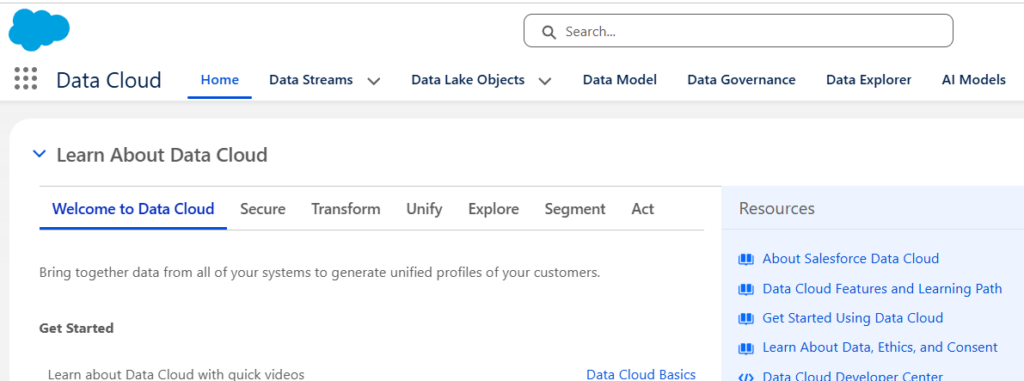
Salesforce Data Cloud is Salesforce’s customer data platform (CDP) and activation layer designed to unify customer data across systems into a single operational profile that can be used for segmentation, analytics, AI, automation, and activation. Unlike traditional data warehouses that mostly store and report data, Data Cloud focuses on turning data into actions inside Salesforce products and connected ecosystems.
What Data Cloud Actually Does
Source Systems
↓
Connect & Ingest
↓
Store / Federate
↓
Transform & Model
↓
Identity Resolution
↓
Unified Profile
↓
Insights / Segmentation / Activation / AI
Data Cloud connects multiple systems, standardizes data into a shared model, resolves duplicates, and exposes the result for business usage.
Data Cloud Core Terminology
Data Source
A Data Source is any internal or external system that produces customer, transactional, operational, or behavioral data and makes that information available to Data Cloud. It represents the original location where data exists before ingestion, transformation, or unification.
Most Data Cloud implementations connect multiple data sources because customer information is typically distributed across CRM systems, marketing platforms, websites, mobile applications, and analytical environments.
A system where data originates.
Examples:
- Salesforce CRM
- Marketing Cloud Engagement
- Snowflake
- Amazon S3
- Website events
- ERP
- POS
- Mobile apps
Data Cloud connects sources using connectors and data streams.
Connector
A Connector is the integration component responsible for establishing communication between Data Cloud and an external system. Connectors handle authentication, schema discovery, connectivity, and the movement or access of data.
A connector does not define business logic. Its role is to provide a secure and reliable pathway between systems.
Connector = technical integration mechanism.
Examples:
- Salesforce CRM Connector
- Snowflake Connector
- S3 Connector
- Google Storage Connector
- Kinesis Connector
The connector authenticates and defines access.
Think:
Connector = Pipe
Data Source = Water Source
Data Stream
A Data Stream is the ingestion mechanism that controls how data enters Data Cloud. It defines which objects are imported, how frequently synchronization occurs, and how records are identified and refreshed.
Data Streams serve as the operational layer that converts source system data into Data Cloud objects ready for modeling and activation.
One of the most important concepts.
A Data Stream is the ingestion pipeline that imports or federates data into Data Cloud.
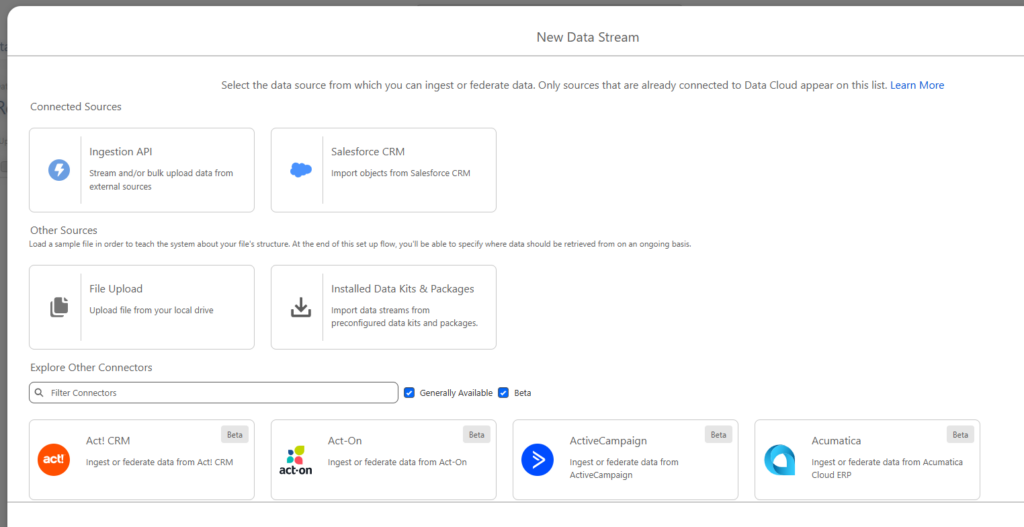
Example:
Salesforce CRM
    ↓
Account Object
    ↓
CRM Data Stream
    ↓
Data Cloud
Data streams:
- choose source objects
- define schedule
- define keys
- add formula fields
- assign data spaces
DLO – Data Lake Object
A Data Lake Object (DLO) is the raw storage layer inside Data Cloud. Records entering Data Cloud are stored in their original structure with minimal transformation to preserve source fidelity.
DLOs provide the foundation for later cleansing, enrichment, mapping, and identity resolution processes.
Raw storage layer.
Data enters Data Cloud and is preserved in original structure.
Example:
Source:
customer_email

Stored DLO:
customer_email
Characteristics:
- source-oriented
- minimally transformed
- scalable storage
- historical
Think: DLO = Landing Zone

Data ingestion stores records as DLOs.
DMO – Data Model Object
A Data Model Object (DMO) represents the standardized business view of data inside Data Cloud. DLOs are mapped into DMOs so information from different systems can follow a consistent structure.
DMOs enable cross-channel analytics, segmentation, and unified customer understanding through the Customer 360 model.
Business-friendly semantic layer.
DLO:
cust_mailDMO:
Individual.EmailDMOs normalize source systems into Customer 360.
Examples:
- Individual
- Account
- Contact Point Email
- Orders
- Engagement
Think: DMO = Standardized Business View
Customer 360 Data Model
Customer 360 Data Model is Salesforce’s semantic layer that standardizes customer information across all sources. Instead of every platform naming concepts differently, Customer 360 introduces common business entities and relationships.
Salesforce’s predefined business model.
This enables:
- Cross-channel segmentation
- Unified reporting
- Shared AI inputs
- Consistent personalization
Instead of every system inventing:
email
mail
customer_email
contact
everything maps into:
Individual
Contact Point Email
Data Space
A Data Space is a logical partition inside Data Cloud used to separate data and services across brands, departments, or regions. Data Spaces are especially important in enterprise environments where multiple teams share the same Data Cloud instance.
Common use cases:
- Multi-brand setup
- Regional separation
- Governance boundaries
Data partitioning layer.
Data Spaces isolate:
- brands
- regions
- departments
- business units
Example:
Default Space
├── Europe
├── US
└── APAC
Objects become namespaced.
Example:
EU_Individual_dlm
US_Individual_dlm
Formula Fields
Formula Fields are calculated fields created during ingestion or modeling to derive new values without changing source systems. Formula fields help enrich, cleanse, and normalize incoming records.
Typical examples:
Revenue → Revenue Tier
Country → Region
Age → Age Group
Transformation layer during ingestion.
Example:
Source:
Country = SlovakiaFormula:
Region =
CASE(
Country,
"Slovakia","EMEA"
)
Identity Resolution
Identity Resolution is the process of determining which records from multiple systems belong to the same customer or account. It combines records using configurable rules and generates a unified representation.
Identity Resolution consists of:
The feature everybody talks about.
Identity Resolution links records belonging to the same person.
Example:
CRM
john@email.com

Website
john@email.com

Mobile
device_123

↓

Unified Individual
Identity Resolution uses:
Match Rules
How records match.
Examples:
- exact email
- fuzzy name
- lead→contact
Reconciliation Rules
Determine which source wins if values differ.
Examples:
- Exact email
- Device match
- Lead → Contact conversion
Which value wins.
Example:
CRM phone wins
Web country wins
Unified Profile
A Unified Profile is the final customer entity produced after identity resolution. It combines attributes and interactions from all connected systems.
Unified Profiles become the foundation for:
- Audience segmentation
- Journey entry
- AI predictions
- Reporting
Typical contents:
- Identity
- Contact points
- Purchases
- Engagement
- Preferences
Final customer representation.
Example:
Unified Individual
────────────────
Name
Emails
Phones
Purchases
Campaigns
Web Activity
Scores
This becomes the object marketers and AI consume.
Major Data Cloud Features
Data Federation (Zero Copy)
Data Federation allows Data Cloud to access external datasets directly without physically moving the data into Salesforce. This architecture reduces duplication and enables near real-time access.
Salesforce refers to this approach as BYOL (Bring Your Own Lake).
Access external data without importing.
Example:
Snowflake
↓
Query live
↓
Data Cloud
Benefits:
- no duplication
- near real time
- lower storage
Salesforce calls this BYOL (Bring Your Own Lake).
Batch & Streaming Data Processing
Batch and Streaming Data Processing define how Data Cloud receives and updates information from connected systems. The processing mode determines whether data is collected periodically in scheduled intervals or continuously as events occur.
Selecting the correct ingestion approach affects freshness, latency, infrastructure requirements, and downstream activation scenarios.
Batch
Batch processing loads records at predefined intervals and processes them together as a group. Data is collected over a period of time and then imported into Data Cloud in one execution.
Batch ingestion is commonly used when:
- source systems export files periodically
- near real-time updates are not required
- large historical datasets must be loaded
- nightly synchronization is sufficient
Examples:
- Daily CRM synchronization
- Overnight transaction imports
- Weekly customer exports
Streaming
Streaming processing continuously ingests events as they occur and makes them available with minimal delay. Streaming ingestion supports scenarios where customer activity should influence decisions immediately after it happens.
Streaming ingestion is commonly used when:
- customer behavior must trigger immediate actions
- websites produce clickstream events
- mobile applications generate interactions
- operational systems publish event data
Examples:
- Website page views
- Product clicks
- App interactions
- Real-time purchases
Data Cloud supports both scheduled ingestion and near real-time processing depending on the connector and source capabilities.
Data Transforms
Data Transforms are the data preparation and transformation layer inside Data Cloud used to reshape, cleanse, enrich, and combine datasets before they are consumed by business processes.
Transforms allow teams to modify data after ingestion without changing the original source systems. The transformed output can then be written back into Data Cloud objects and used for segmentation, analytics, identity resolution, activation, or AI scenarios.
Data Transforms support common ETL-style operations such as:
- filtering records
- joining multiple datasets
- deriving calculated values
- aggregating data
- appending datasets
- restructuring columns
- generating output objects
Typical examples include:
- Combining CRM and ecommerce purchase data
- Calculating customer lifetime value
- Standardizing country values across systems
- Creating derived audience attributes
- Enriching profiles with behavioral metrics
Think:PowerQuery + SQL + ETL
Example transformation flow:
CRM Customers
        +
Website Events
        +
Order Data
        ↓
Data Transform
        ↓
Customer Engagement Dataset
        ↓
Segment / Insight / Activation
Data Transforms can operate on both Data Lake Objects (DLOs) and Data Model Objects (DMOs), depending on whether transformation should occur before or after semantic modeling. Output can be written into existing objects or newly created destination objects.
Segmentation
Segmentation creates audiences based on customer attributes and behavior stored inside unified profiles. Segments are reusable and can feed campaigns, journeys, and activations.
Build audiences from unified profiles.
Example:
Country = SK
AND
Opened Email > 5
AND
Spent > 1000
Output:
VIP AudienceSegments later activate into marketing channels.
Calculated Insights
Calculated Insights generate aggregated metrics over customer data and expose business KPIs directly inside Data Cloud.
Metrics generated over data.
Examples:
- Total Revenue
- Last Purchase
- Average Order Value
- Engagement Score
Unlike formulas, insights aggregate across datasets.
Activation
Activation publishes Data Cloud audiences into downstream destinations where the data becomes actionable.
Typical activation destinations:
- Marketing Cloud
- CRM
- Advertising platforms
- Data lakes
- Journey Builder
Send Data Cloud audiences somewhere.
Destinations:
- Marketing Cloud
- Advertising
- S3
- CRM
- Journeys
Example:
Segment
↓
Activate
↓
Journey Builder
AI + Agentforce + Marketing Cloud Next
Data Cloud acts as the foundational data layer powering AI features and Marketing Cloud Next experiences.
Unified data enables:
- Engagement scoring
- Personalization
- Agentforce
- Send time optimization
- Embedded analytics
Marketing Cloud Next setup relies on Data Cloud data kits, deployed streams, and identity resolution.
Typical First Implementation (CSV Example)
Imagine importing:
email,firstname,country
john@test.com,John,SK
mary@test.com,Mary,CZ
Step 1 - Create Connector
CSV / S3 / CRM
↓
Step 2 - Create Data Stream
↓
Step 3 - Generate DLO
↓
Step 4 - Map DLO → Individual DMO
↓
Step 5 - Configure Identity Resolution
↓
Step 6 - Create Segment
↓
Step 7 - Activate
↓
Step 8 - Send / AnalyzeIf you already know SFMC or Adobe Campaign, the closest mental model is:
- Data Extension ≈ DLO (not exact)
- Contact Builder ≈ DMO layer
- Contact Key resolution ≈ Identity Resolution
- Audience Builder ≈ Segmentation
- Journey Entry ≈ Activation