
Salesforce Data Cloud CRM Contact Mapping Explained

Salesforce Data Cloud introduces a completely different data model compared to traditional Salesforce CRM. Many users expect to find familiar objects such as Contact, Lead, or Email directly inside Data Cloud, but instead encounter objects like Individual, Contact Point Email, Unified Individual, and Party Identification. This can be a hard concept to grasp, especially when you are new to the technology.
This confusion usually starts during the first CRM mapping exercise.
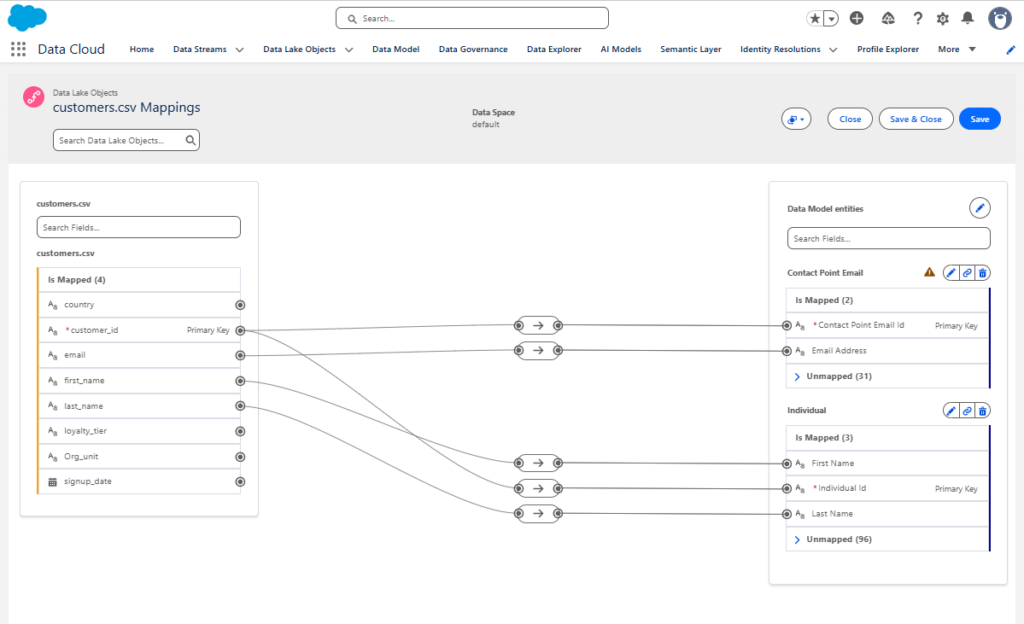
A standard Salesforce Contact does not map directly into a single customer object in Data Cloud. Instead, Salesforce separates customer identity, communication channels, consent, and external identifiers into multiple Data Model Objects (DMOs).
Understanding the Data Cloud Architecture
A simplified Data Cloud ingestion flow looks like this:
Source (CRM, e-commerce, analytics, data lake, csv ...)
↓
Data Stream
↓
Data Lake Object (DLO)
↓
Data Model Object (DMO)
↓
Identity Resolution
↓
Unified Individual
Each layer has a different purpose.
| Layer | Purpose |
|---|---|
| Source | Original system such as Salesforce CRM or even csv file |
| Data Stream | Ingestion connection |
| DLO | Raw imported source structure |
| DMO | Harmonized business object |
| Unified Individual | Final merged customer profile |
CRM Contact Mapping in Data Cloud
In Salesforce CRM, customer information is usually stored directly on the Contact object.
Contact
- First Name
- Last Name
- Email
- Phone
- Address
In Data Cloud, this information is split into multiple objects.
Individual
- First Name
- Last Name

Contact Point Email
- Email Address

Contact Point Phone
- Phone Number

Contact Point Address
- Address
This allows Salesforce to support:
- multiple email addresses
- multiple phone numbers
- multiple source systems
- channel-specific consent
- identity resolution
- unified customer profiles
Main Objects Used in CRM Contact Mapping
Individual
The Individual DMO is the main person or customer object in Data Cloud.
This is the closest equivalent to:
CRM Contact
CRM Lead
Customer Record
Typical fields mapped into Individual:
CRM Contact.FirstName
→ Individual.FirstName

CRM Contact.LastName
→ Individual.LastName
This is where you usually find:
- First Name
- Last Name
- Birth Date
- Gender
- Customer identifiers
Contact Point Email
Stores email addresses separately from the customer profile.
Typical mapping:
CRM Contact.Email → Contact Point Email.Email AddressExample:
Individual
→ John Smith

Contact Point Email
→ john@gmail.com
→ john.work@gmail.com
Contact Point Phone
Stores phone numbers independently from the customer object.
Typical mapping:
CRM Contact.Phone → Contact Point Phone.Phone NumberContact Point Consent
Stores subscription and consent information per communication channel.
Example:
john@gmail.com
→ Email Opt-In

+421900111111
→ SMS Opt-Out
This allows one customer to:
- subscribe to email
- unsubscribe from SMS
- have different consent statuses per channel
Party Identification
Stores external identifiers associated with the customer.
Examples:
- CRM Contact ID
- Loyalty ID
- SAP ID
- Magento Customer ID
Typical mapping:
CRM Contact.Id → Party Identification.External IDThese identifiers are commonly used in identity resolution rules.
CRM Account Mapping in Data Cloud
Accounts are mapped much more directly compared to Contacts.
Example:
CRM Account
- Name
- Industry
- Website
- Billing Address

↓ Mapping

Account
- Account Name
- Industry
- Website
- Billing Address
The Account DMO represents the company or organization associated with Individuals.
Typical relationships:
Individual
→ belongs to
Account
Unified Individual Explained
Unified Individual is the final merged customer profile created by Identity Resolution.
Example:
CRM Contact → john@gmail.com Website
Visitor → cookie_123
Mobile App User → device_456
Marketing Cloud Subscriber → john@gmail.com
↓
Identity Resolution Unified Individual → John Smith
This is usually the object used for:
- segmentation
- audience activation
- Marketing Cloud Next targeting
- unified customer analytics
Simplified CRM to Data Cloud Mapping
A simplified Salesforce CRM mapping can look like this:
Salesforce CRM Contact
├── FirstName
├── LastName
├── Email
├── Phone
└── Id

↓ Mapping

Individual
├── First Name
└── Last Name

Contact Point Email
└── Email Address

Contact Point Phone
└── Phone Number

Party Identification
└── CRM Contact ID

And separately:

Salesforce CRM Account
├── Name
├── Industry
└── Website

↓ Mapping

Account
├── Account Name
├── Industry
└── Website
Why Data Cloud Feels Different From CRM
Traditional Salesforce CRM stores most customer information directly on Contact and Account objects.
Data Cloud instead uses a normalized enterprise customer model designed for:
- customer unification
- identity resolution
- multi-channel communication
- consent management
- customer analytics
- activation across platforms
Because of this, even a simple CRM Contact becomes distributed across multiple objects inside Data Cloud.
Automatic CRM Bundle Mapping in Data Cloud
When Salesforce CRM connectors and data streams are deployed in Data Cloud, Salesforce automatically applies predefined mappings through the Sales Cloud or Service Cloud CRM data bundle. These bundles map CRM objects into customer-related Data Model Objects (DMOs) such as Individual, Contact Point Email, Contact Point Phone, Account, and Party Identification.
For example, Salesforce Contact records are automatically distributed across multiple DMOs rather than being stored as a single object inside Data Cloud. Email addresses map into Contact Point Email, phone numbers into Contact Point Phone, while customer identity fields such as First Name and Last Name map into Individual.
Identity Resolution then uses these mapped DMOs to connect records coming from multiple systems and generate unified customer profiles represented by the Unified Individual object.