🔥 500+ people already subscribed. Why not you? Get the monthly newsletter with handy code snippets, tips, and marketing automation insights.

background shape
background shape

Fast select field in Adobe Campaign query builder

Working with Adobe Campaign Classic often involves frequent mouse movements and clicks. However, after a while, you’ll discover certain tricks to work with this tool more efficiently and quickly. Today, I’ll show you a simple trick that will help you enter fields in the query builder faster and without having to move your mouse across the monitor.
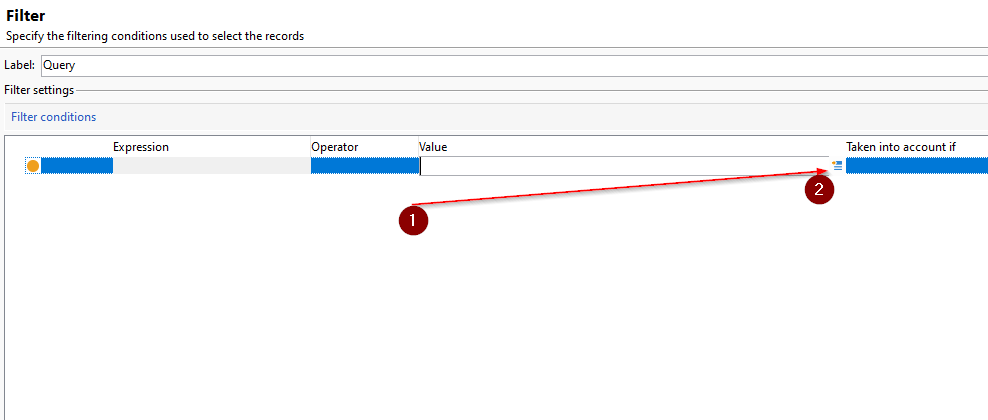
  1. Click
  2. Move mouse on the Edit expression

I know it isn’t much, but after you do it a thousand times, your hand will start to feel it.

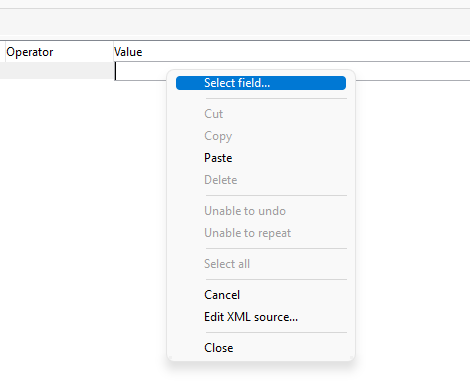
The trick I’ll show you is to make right click after the first click, this will open a context menu where we just need to click on Select field...
Oh hi there đź‘‹
I have a FREE e-book for you.

Sign up now to get an in-depth analysis of Adobe and Salesforce Marketing Clouds!

We don’t spam! Read our privacy policy for more info.

Share With Others

Leave a Comment

Your email address will not be published. Required fields are marked *

MarTech consultant

Marcel Szimonisz

Marcel Szimonisz

I specialize in solving problems, automating processes, and driving innovation through major marketing automation platforms—particularly Salesforce Marketing Cloud and Adobe Campaign.

Get exclusive technical tips—only available on my blog.

We don’t spam! Read our privacy policy for more info.

Buy me a coffee
Related posts