

Fixing GROUP BY Errors When Aggregating Data in Adobe Campaign Classic
Every now and then, you may receive a request to aggregate data within an Adobe Campaign Classic workflow. However, if you group by something other than the targeting dimension, you may encounter an error such as:
'w0.iid' must appear in the GROUP BY clause or be used as an aggregate function.PGS-220000 PostgreSQL error: ERROR:
column "t0.itrackinglogid" must appear in the GROUP BY clause
or be used in an aggregate function.What data is typically aggregated in Adobe Campaign Classic?
Most aggregation requests involve recipient-generated data, particularly:
- Delivery logs
- Broad logs
- Tracking logs
For example, you may need to group tracking-log clicks by URL to recreate the Hot Clicks report inside a workflow.
The aggregation itself is usually straightforward. You add the required fields, configure a count or another aggregate function, and select the relevant Group by checkboxes. The problem is that Adobe Campaign Classic automatically adds the primary key of the targeting dimension to the SELECT clause.
Because this primary key is neither aggregated nor included in the GROUP BY clause, the database rejects the query.
The reason Adobe Campaign adds the primary key in this situation is unclear, but the Query activity provides an option to disable this behaviour.
How to fix the aggregation error
Open the Query activity and follow these steps:
- Open the Add data configuration.
- Create the required calculated or aggregated fields.
- Select Group by for each field that should be included in the grouping.
- Save and close the Add data window.
- Open Edit additional data.
- Expand the Advanced parameters section at the bottom of the window.
- Enable:Disable automatic adding of the primary keys of targeting dimension
- Save the configuration and run the workflow again.
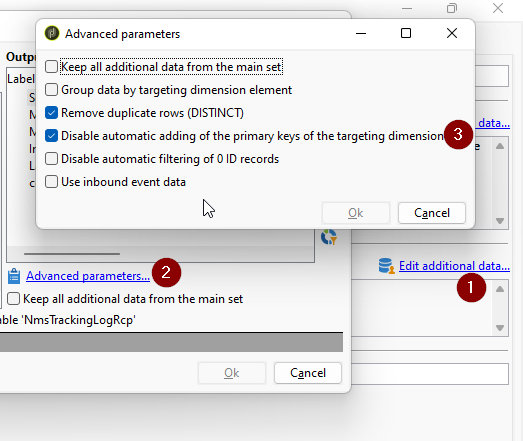
Adobe Campaign will no longer automatically add the targeting-dimension primary key to the query, allowing the aggregation to run successfully.
Important limitations when aggregating data in Adobe Campaign Classic
The Add data feature is available in several workflow activities, including:
- Query
- Enrichment
- Change dimension
However, the Disable automatic adding of the primary keys of targeting dimension option is available only in the Query activity.
Another detail that can make this setting difficult to find is that the Advanced parameters section is not displayed while initially adding a field. You must first save the Add data configuration and then reopen it through Edit additional data.
Because this workaround is limited to the Query activity, it is useful to understand the differences between using a Query activity and an Enrichment activity in an Adobe Campaign workflow.
Share With Others
 Platinum